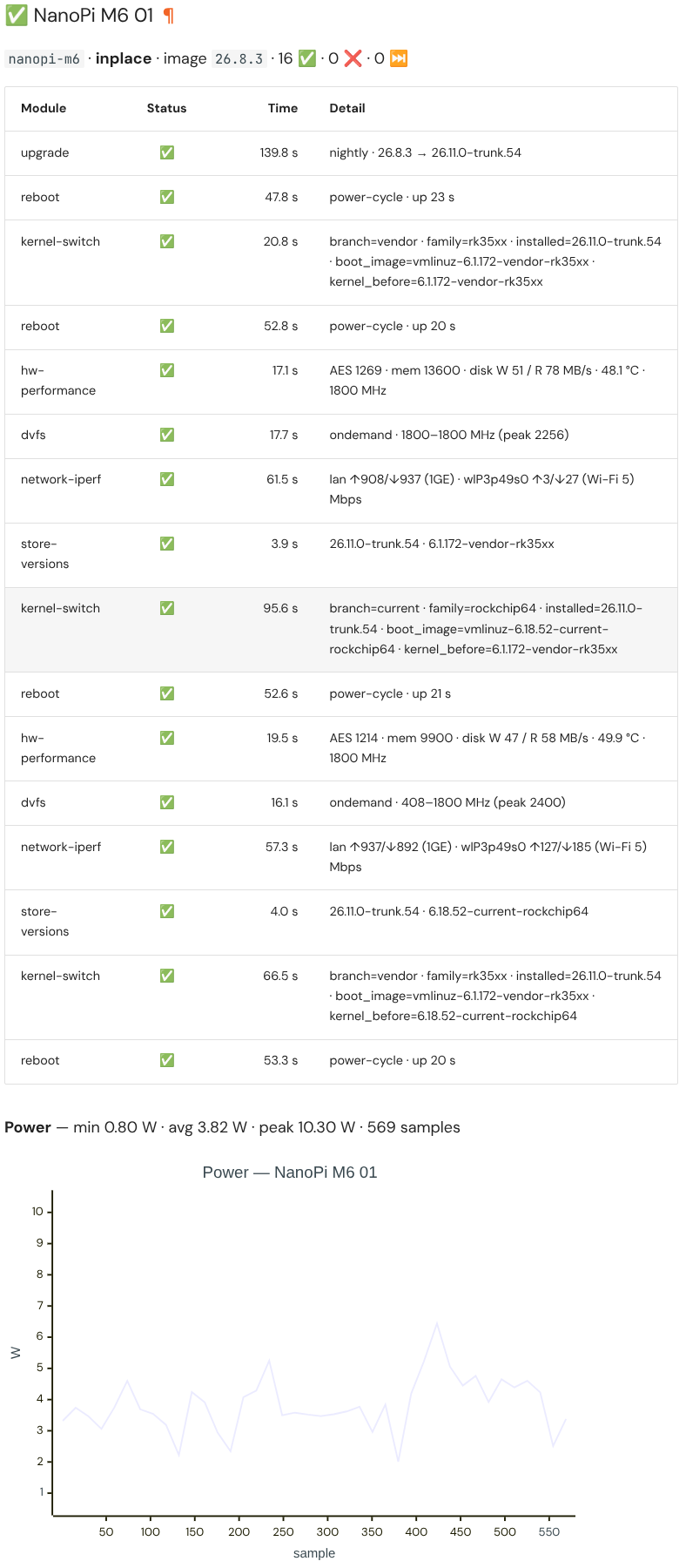
May 28, 2026

hackergotchi for Proxmox VE

Proxmox VE

Proxmox Datacenter Manager 1.1 released!

We are pleased to announce the release of Proxmox Datacenter Manager 1.1!

This point release focuses on expanding visibility and automation for large-scale, multi-site deployments. Our main focus for this iteration has been introducing integrated automation installation workflows and taking our first major steps toward comprehensive, cross-remote guest management. This helps you manage your virtualized environments safely and efficiently at scale.

Proxmox Datacenter Manager 1.1 is based on...

Read more

28 May, 2026 11:48AM by t.lamprecht (invalid@example.com)

hackergotchi for Qubes

Qubes

Qubes OS 4.3.1-rc1 is available for testing

The first release candidate (RC) for Qubes OS 4.3.1 is now available for testing. This patch release aims to consolidate all the security patches, bug fixes, and other updates that have occurred since the release of Qubes 4.3.0.

What’s new in Qubes 4.3.1?

When is the stable release?

That depends on the number of bugs discovered in this RC and their severity. As explained in our release schedule documentation, our usual process after issuing a new RC is to collect bug reports, triage the bugs, and fix them. If warranted, we then issue a new RC that includes the fixes and repeat the process. We continue this iterative procedure until we’re left with an RC that’s good enough to be declared the stable release. No one can predict with certainty, at the outset, how many iterations will be required (and hence how many RCs will be needed before a stable release), but we tend to get a clearer picture of this as testing progresses.

Since the changes between 4.3.0 and 4.3.1 are relatively minor, we currently don’t anticipate any major problems requiring a second RC. We currently expect to be able to publish the stable 4.3.1 release in one to two weeks.

How to test Qubes 4.3.1-rc1

If you’d like to help us test this RC, the best way to do so is by performing a clean installation with the new ISO. As always, we strongly recommend making a full backup beforehand and updating Qubes OS immediately afterward in order to apply all available bug fixes.

As an alternative to a clean installation, there’s also the option of performing an in-place upgrade without reinstalling. However, since Qubes 4.3.1 is a patch release, it’s essentially Qubes 4.3.0 inclusive of all updates to date, which largely amounts to just using a fully-updated 4.3.0 installation. By contrast, a clean installation covers other areas that could also benefit from testing, such as the installation procedure, which is why it’s the recommended testing method.

Regardless of your testing method, please help us improve the eventual stable release by reporting any bugs you encounter. If you’re an experienced user, we encourage you to join the testing team.

Known issues in Qubes OS 4.3.1

It is possible that templates restored in 4.3.1 from a pre-4.3 backup may continue to target their original Qubes OS release repos. This does not affect fresh templates on a clean 4.3.1 installation. For more information, see issue #8701.

View the full list of known bugs affecting Qubes 4.3 in our issue tracker.

What’s a release candidate?

A release candidate (RC) is a software build that has the potential to become a stable release, unless significant bugs are discovered in testing. RCs are intended for more advanced (or adventurous!) users who are comfortable testing early versions of software that are potentially buggier than stable releases. You can read more about Qubes OS supported releases and the version scheme in our documentation.

What’s a patch release?

The Qubes OS Project uses the semantic versioning standard. Version numbers are written as [major].[minor].[patch]. Hence, we refer to releases that increment the third number as “patch releases.” A patch release does not designate a separate, new major or minor release of Qubes OS. Rather, it designates its respective major or minor release (in this case, 4.3) inclusive of all updates up to a certain point. See our supported releases for a comprehensive list of major and minor releases and our version scheme documentation for more information about how Qubes OS releases are versioned.

28 May, 2026 12:00AM

May 27, 2026

hackergotchi for ARMBIAN

ARMBIAN

Native UFS boot lands on the NanoPi M5

Native UFS boot lands on the NanoPi M5

Armbian&aposs next release boots the FriendlyElec NanoPi M5 end-to-end from UFS on a mainline U-Boot, with no proprietary recovery image in the loop. It is the first RK3576 board in the catalogue to reach this state, and the integration pattern paves the way for the others.

UFS, the storage class that replaced eMMC in phones, is packet-based and full-duplex with command queuing. The practical gain over an SD card shows up in random I/O, in latency under concurrent load, and in write endurance that holds up over years of deployment. FriendlyElec ships UFS on the M5 because the RK3576 has a native UFS controller, a sensible choice for any board destined for kiosks, robots, or industrial gateways.

What mainline was missing

The UFS controller IP itself had a partial driver in mainline U-Boot. Everything around it was not wired: PHY init sequencing, the regulator rails the device needs before it responds, the device-tree glue that tells U-Boot "yes, this board has UFS." For the M5, none of it existed. There is also a cosmetic detail that catches every newcomer, namely that Rockchip&aposs loader tooling labels UFS as SATA in the RKDevTool storage dropdown. Flashing goes through upgrade_tool, not the more familiar rkdeveloptool, because rkdeveloptool has never had UFS support.

How it came together

Three workstreams had to converge. Jonas Karlman&aposs kwiboo/rk3576 branch carried the upstream RK3576 U-Boot enablement, pinctrl, clocks, storage controller bindings, and has been merging into mainline through 2026. The rockchip-linux/rkbin tree had to ship a UFS-capable MiniLoader, which the RK3576MINIALL.ini recipe assembles from the DDR init, the UFS-aware loader, and the OP-TEE/ATF blobs. The Armbian side was the integration: a board config on U-Boot v2026.04, a U-Boot DT overlay that brings the UFS regulators and PHY up at the right moment, and a flashing path that upgrade_tool accepts. None of these were individually hard. Making them line up is what took the time.

On the device, the stack does its job cleanly. The BootROM reads the IDB off UFS and pulls in the TPL; the TPL initialises DDR and the UFS host controller, sequences the regulators, negotiates the link, and reads the next stage; ATF jumps to U-Boot; U-Boot enumerates ufs 0 and loads the kernel; the kernel re-probes the same controller it just booted through. The work, almost all of it, lived at the TPL stage. Controller fine, PHY fine, but the device sits silent if regulator sequencing is wrong by a handful of milliseconds. Once that is right, the upper layers see a clean SCSI-shaped block device and the rest is unsurprising.

What it leaves us with

For users with a UFS-equipped M5, the next release image flashes through the FriendlyElec Rockchip workflow with upgrade_tool, BOOT switch on UFS/SD, storage dropdown labelled "SATA". The board boots without an SD card or eMMC involvement, and armbian-install writes the same image to UFS in place once the system is running from another medium. Against microSD on the same hardware the difference is felt rather than benchmarked: small reads land faster, the system stays responsive under concurrent I/O, and the write endurance is in a different ballpark.

A few rough edges remain. The vendor tooling will keep calling UFS "SATA" until either Rockchip relabels the GUI or rkdeveloptool grows a cs ufs opcode, neither on the immediate horizon. The BOOT switch is a hardware gate with no software override. And upgrade_tool ships only as a Linux x86_64 ELF, so flashing from an Apple Silicon Mac means a Linux VM with USB passthrough or a Windows host running the GUI.

The same plumbing now unlocks every other UFS-equipped RK3576 board in the catalogue. The M5 reached the line first because the hardware was available and the upstream pieces were the most complete. The others should be substantially less work, now that the integration pattern exists and the loader path has been proven on real silicon.

27 May, 2026 03:14PM by Daniele Briguglio

May 26, 2026

Github Highlights

Github Highlights

This week&aposs work centers on board support expansion, kernel and U-Boot maintenance, and desktop and CI tooling refinements.

On the platform side, the Radxa Cubie A5E received Wi-Fi enablement and a kernel refresh as part of a broader update, while the youyeetoo YY3588 was promoted from CSC to standard support and the YY3568 gained PCIe NVMe functionality. The NanoPi R76S and Rock 5 ITX were both migrated to mainline U-Boot v2026.04, dropping vendor-branch gates, and the Vanxoak HD-RK3506-EVB was added with vendor and board imagery.

Kernel hygiene dominated the maintenance work: duplicate OPP labels on the Xiaoxin Pad Pro (sm8250) were corrected, broken UHS-I, xo-clock, SD, and DSI patches were removed from sm8550 trees for both 6.18 and 7.0, and a now-upstream r-spi backport was dropped from sunxi-6.18. The odroidxu4-current branch advanced to 6.6.141 across two successive bumps.

Desktop and infrastructure tooling saw layered improvements through configng: alsa-ucm-conf and libcamera/v4l userspace were added to the minimal tier, PackageKit and AppStream landed at the mid tier, and DE postinst scripts now execute in the build chroot to resolve missing wallpaper. UEFI x86 and arm64 desktop spins were switched to GNOME on the edge kernel, and build infrastructure gained inline ShellCheck PR feedback, scoped token permissions, fork-aware artifact gating, and event-driven runner cleanup via systemd hooks.

#Armbian #EmbeddedLinux #Rockchip #UBoot #KernelDevelopment

Changes

26 May, 2026 09:51PM by Michael Robinson

May 25, 2026

hackergotchi for ZEVENET

ZEVENET

SKUDONET EE 10.2.0: Operational Improvements, Smarter HTTPS Handling and Better Application Compatibility

In application delivery environments, not every meaningful improvement needs to be disruptive.

A large part of maintaining stable and efficient infrastructures comes from continuously refining how systems behave in production: reducing operational friction, improving compatibility, and making administration more predictable for technical teams managing critical services.

That is the direction behind SKUDONET Enterprise Edition 10.2.0,  a release focused on operational consistency, HTTPS flexibility, and incremental improvements across the ADC and WAF stack.

Enhanced HTTPS listener flexibility

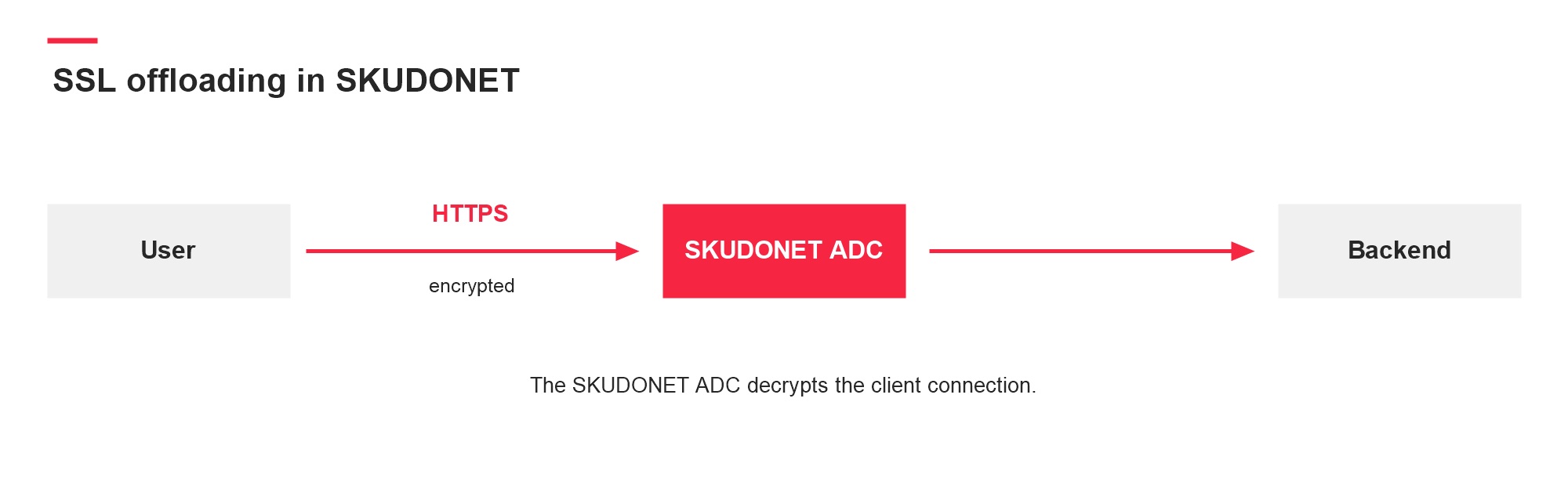
SKUDONET EE 10.2.0 introduces additional flexibility in HTTPS farm listener management, allowing HTTP/2 behaviour to be configured directly from the farm settings.

This enhancement simplifies the activation and management of modern HTTP delivery capabilities within HTTPS services, streamlining configuration across different application environments.

Designed for modern web applications and APIs, HTTP/2 improves connection efficiency through features such as request multiplexing and optimised resource delivery, helping reduce latency and improve responsiveness under concurrent traffic loads.

The new configuration approach allows administrators to manage listener behaviour more dynamically while maintaining the operational simplicity of HTTPS farms.

Improved WebGUI usability for day-to-day administration

This release also includes several refinements in WebGUI sections that rely on picklist-based components.

While these changes may appear subtle, they have a direct impact on daily administration tasks, especially in environments with larger configurations or multiple managed objects.

The improvements focus on:

  • Smoother interactions
  • Better responsiveness
  • Improved handling of large lists
  • Greater consistency across configuration views

The goal is simple: to make administration more fluid without adding unnecessary complexity.

For technical teams working across multiple farms, services, or security policies, these kinds of usability refinements can significantly improve operational efficiency over time.

Smarter cookie domain handling in HTTP/S farms

Session persistence management has also been improved in HTTP and HTTPS farms.

When a cookie domain is not explicitly configured, and a dynamic feature is enabled, SKUDONET can now automatically use the incoming request virtual host as the cookie domain.

This behaviour helps simplify deployments involving multiple domains or virtual hosts while reducing the need for additional manual configuration.

In practice, this makes multi-site and multi-tenant environments easier to manage and helps maintain more predictable persistence behaviour across distributed applications.

More consistent WAF rule management

SKUDONET EE 10.2.0 also refines the behaviour associated with WAF rule movement actions.

The rule move process now correctly respects the selected administrative action, improving consistency when reorganising or managing security rules within the configuration.

For teams working with customised security policies, predictable rule management becomes especially important in order to maintain visibility and operational control across complex environments.

As part of its application security architecture, SKUDONET integrates WAF and IPDS capabilities directly into the ADC layer to help protect applications and APIs from modern web threats .

Better compatibility with backend applications

Another important refinement in this release affects URL handling within HTTP farms.

Previously, incoming request URLs could be automatically decoded before being forwarded to backend services. With 10.2.0, SKUDONET now preserves and forwards the original encoded URL exactly as received from the client.

Although technically small, this adjustment improves compatibility with applications and APIs that depend on encoded paths, special URL characters, or framework-specific routing behaviours.

In modern microservice architectures and API-driven environments, preserving request integrity can help avoid unexpected behaviours and simplify backend integrations.

A release focused on real operational environments

SKUDONET EE 10.2.0 does not aim to reinvent the platform, but rather to continue refining how it behaves in real production environments.

From enhanced HTTPS flexibility to improvements in administration workflows, persistence handling, and backend compatibility, this release follows the same practical and progressive approach that defines the platform: reducing operational complexity without sacrificing control, performance, or security capabilities.

These are the kinds of improvements designed for teams that need predictable, stable, and easy-to-manage infrastructures in their day-to-day operations.

As part of its unified Application Delivery and Security approach, SKUDONET continues evolving as an ADC solution built for physical, virtual, cloud, and hybrid environments.

If you’re looking to improve the stability and security of your infrastructure without adding complexity, discover how SKUDONET adapts to physical, virtual, and cloud environments with a unified approach to Application Delivery—try it free for 30 days.

If you work with SKUDONET Enterprise Edition or want to stay up to date with the latest technical updates, visit our Timeline.

25 May, 2026 10:19AM by Isabel Perez

May 22, 2026

hackergotchi for Deepin

Deepin

May 21, 2026

hackergotchi for Purism PureOS

Purism PureOS

Google’s Lock Down Policy

For years, Android marketed itself as the antidote to Apple’s walled garden. Open. Flexible and developer friendly. That promise is now eroding—fast.

The post Google’s Lock Down Policy appeared first on Purism.

21 May, 2026 10:46PM by Purism

Smartphone Study

The recent National Bureau of Economic Research (NBER) study on effectiveness of school phone bans has reignited debate over whether restricting smartphones in schools actually helps students. Its headline result—that strict bans show “close to zero” immediate impact on test scores—has been interpreted by some as evidence that regulation doesn’t work.

The post Smartphone Study appeared first on Purism.

21 May, 2026 10:40PM by Purism

DHS Inspector General Study

The Inspector General’s audits uncovered a systemic collapse in mobile‑device security across DHS’s Intelligence & Analysis (I&A) office and CIO organization.

The post DHS Inspector General Study appeared first on Purism.

21 May, 2026 08:36PM by Purism

Privacy Under Siege: Why Purism’s User Sovereignty Model is the Way Forward

California’s data broker crackdown, AI creeping into browsers, and global surveillance trends signal one truth—individual privacy are under attack. Here’s how Purism is building a future where your data stays yours.

The post Privacy Under Siege: Why Purism’s User Sovereignty Model is the Way Forward appeared first on Purism.

21 May, 2026 08:25PM by Purism

hackergotchi for Proxmox VE

Proxmox VE

Proxmox Virtual Environment 9.2 available!

We are excited to announce the release of Proxmox Virtual Environment 9.2. This release focuses heavily on platform refinement, stability, and core optimization.

Proxmox VE 9.2 is built on the robust Debian 13.5 "Trixie" and ships with Linux kernel 7.0 as the new stable default. In addition to core system enhancements, this update integrates the latest versions of our key underlying technologies, including QEMU 11.0, LXC 7.0, and ZFS 2.4. Storage capabilities have also been advanced with...

Read more

21 May, 2026 01:04PM by t.lamprecht (invalid@example.com)

hackergotchi for GreenboneOS

GreenboneOS

Attackers are increasingly shifting from stolen credentials to exploited vulnerabilities

For nearly two decades, stolen credentials have been the focus of many analyses of security breaches. This picture is now changing. According to the Verizon 2026 Data Breach Investigations Report (DBIR), vulnerability exploitation has overtaken credential abuse as the top breach vector for the first time — accounting for 31% of breaches, compared to just […]

21 May, 2026 12:17PM by Elmar Geese

hackergotchi for ZEVENET

ZEVENET

Multi-Tenant Architecture Risks: Spain’s IP Blocking Controversy Explained

In early 2025, internet users across Spain began experiencing something unexpected: legitimate websites going dark, developer tools becoming unreachable, and businesses losing access to their own online services. GitHub, GitLab, Docker registries, corporate websites, and e-commerce platforms all affected not by a cyberattack, not by a provider outage, but by a court-ordered IP block targeting illegal football streaming.

The mechanism was straightforward. A ruling from the Commercial Court No. 6 of Barcelona, issued in December 2024, authorised Spanish ISPs to block IP addresses identified as sources of illegal IPTV broadcasts during football matches. 

The problem was that many of those addresses were Cloudflare IPs shared simultaneously by thousands of unrelated websites and services. When ISPs blocked the flagged addresses, they didn’t take down one streaming site. They took down everything behind the same shared IP.

The football piracy angle captured headlines. The infrastructure lesson is what matters for organisations operating critical services anywhere in the world.

What happened technically and Why Shared IP Blocking Scales So Broadly 

To understand why IP-level blocking caused collateral damage at this scale, it helps to understand how large CDN and edge-delivery infrastructures work.

Cloudflare, like most major content delivery networks, operates a shared global edge infrastructure. When a company routes its traffic through Cloudflare, it passes through Cloudflare’s distributed network of nodes rather than reaching the origin server directly. From the outside, that service’s visible IP address is a Cloudflare IP pooled across many other customers simultaneously. A single IP address in a shared CDN infrastructure can front hundreds or even thousands of completely unrelated domains.

This is the multi-tenant model applied at the network edge: multiple organisations share the same underlying infrastructure resources, including IP address ranges, reverse proxy layers, TLS termination systems, and WAF infrastructure. Clients are logically separated; the network layer beneath them is not.

The consequence follows directly. Any action operating at the IP level (a court-ordered block, a blacklist entry, an ISP-level firewall rule) doesn’t target a single service. It targets every service resolving through that address. Developers found they couldn’t pull packages. Companies found their websites unreachable. None of them had any connection to the reason for the block.

It is important to note that this operational model is not unique to Cloudflare. Most large CDN, WAF, and edge delivery providers rely on shared, multi-tenant infrastructure to deliver scalability and cost efficiency globally. This architectural model is deeply embedded across much of the modern internet delivery stack.

The Spain case became a highly visible example of shared infrastructure risk in modern cloud delivery architectures.

The court order didn’t create this vulnerability. It revealed one that was already there.

The tradeoffs of multi-tenant architecture that rarely get discussed

Multi-tenant architecture is not inherently flawed. It became the dominant model in cloud computing for legitimate, well-understood reasons.

For providers, it enables resource pooling, centralised maintenance, elastic scalability, and cost efficiency at scale. For customers, it translates into lower entry costs, faster deployment, and freedom from managing infrastructure directly. Most organisations don’t need (or want) to operate their own edge networks, WAF layers, or global traffic distribution systems. Consuming those capabilities as a shared service makes practical and economic sense.

The issue isn’t that multi-tenancy is inefficient. The issue is that shared infrastructure creates shared operational exposure and that exposure is rarely top of mind when organisations choose SaaS platforms or CDN services.

In a multi-tenant environment, organisations can inherit operational risk from events that have nothing to do with their own services:

  • An IP address is blacklisted because another tenant was abusing it
  • DDoS traffic targeting a neighbouring tenant is degrading shared network performance
  • A legal or regulatory action that catches shared IPs in its scope
  • A provider-level policy change applied uniformly across the customer base

Under normal conditions, these risks remain invisible. Most of the time, shared infrastructure works exactly as advertised. But under stress (a security incident, a large-scale abuse event, a court order), the shared layer is precisely where failures propagate.

This is what infrastructure engineers refer to as a shared blast radius: the operational scope of an incident isn’t defined by the intended target, but by the boundaries of the shared environment.

Why infrastructure isolation is becoming a resilience decision

Single-tenant architecture reverses the model. Each client operates a dedicated environment: isolated IP addresses, independent compute resources, and exclusive security policies that are not shared with other organisations.

The tradeoff has traditionally been cost and operational overhead. Dedicated infrastructure is more resource-intensive than shared SaaS deployments. That gap is why multi-tenancy became the default.

But the relevant question is not which model is architecturally superior. It is the operational risks that the organisation is prepared to carry.

For many workloads, multi-tenant SaaS remains the correct and efficient decision. For critical applications (platforms where availability directly affects revenue, SLA compliance, customer trust, or operational continuity) the calculation looks different.

Consider the practical implications. An e-commerce platform that becomes unreachable during peak sales hours due to a shared IP block loses revenue that it cannot recover. A SaaS provider whose service goes dark due to an incident involving a neighbouring tenant faces SLA breach conversations with its own customers. A financial service or healthcare platform that loses availability (even briefly, even for reasons entirely outside its control) faces reputational and regulatory consequences that extend well beyond the technical incident itself.

These aren’t theoretical edge cases. They represent the downstream business impact of shared operational exposure.

This is why infrastructure isolation is increasingly appearing in resilience discussions rather than just security or compliance contexts. The growing interest in dedicated environments, private edge infrastructure, and hybrid deployment models reflects a broader recognition: that shared platforms also mean shared operational exposure, and that for critical services, reducing that exposure is a legitimate architectural strategy, not just a premium option.

Managed single-tenant deployments (where the provider handles infrastructure operations on dedicated resources) narrow the practical gap between SaaS convenience and isolated control, without requiring organisations to operate everything themselves.

Questions worth asking before relying on shared infrastructure

The Spain controversy highlighted something important: many organisations don’t fully understand how shared their infrastructure actually is. Before deploying critical services on SaaS or CDN platforms, the following questions are worth examining carefully.

Are IP addresses shared with other tenants? If multiple customers share the same edge IPs, reputation issues, legal restrictions, or blocking measures targeting one tenant can affect others.

What is the actual isolation boundary? Logical separation and operational isolation are not equivalent. Understanding how traffic, policies, rate limits, and security rules are enforced or shared across tenants matters for availability planning.

What is the provider’s blast radius during incidents? Every platform experiences incidents. The relevant question is how broadly those incidents propagate across the customer base.

Can another tenant’s actions affect your availability? This includes abuse-triggered IP restrictions, DDoS spillover, shared WAF rate limiting, and legal or compliance measures applied at the infrastructure level without tenant-specific granularity.

Is an isolated or hybrid deployment available? For critical services, the ability to deploy on dedicated infrastructure (on-premise, private cloud, or dedicated cloud instances) reduces dependency on shared operational models and gives organisations direct control over their exposure.

How transparent is the provider about its architecture? Providers that clearly document whether they operate as multi-tenant SaaS, isolated instances, or dedicated environments enable informed infrastructure decisions. Opacity here is itself a risk signal.

The debate in Spain will evolve through legal appeals, technical adjustments, and regulatory review. But the infrastructure question that surfaced isn’t tied to football season.

Organisations have spent years consolidating digital operations onto shared, efficient, globally distributed platforms. That consolidation brought genuine benefits: lower costs, faster deployment, and reduced operational complexity. It also created dependencies on shared infrastructure that those organisations do not control — and cannot protect themselves from when something goes wrong on the shared layer.

The Spain controversy is not fundamentally a story about piracy enforcement or internet freedom. It is a visibility event for a problem that already exists across large parts of modern cloud infrastructure: organisations are increasingly dependent on shared operational layers they neither fully control nor fully understand.

For critical services, resilience is no longer only about redundancy or scalability. It is also about understanding where infrastructure boundaries actually exist and whether an event targeting someone else can reach you through a layer you assumed was yours.

SKUDONET has extensively explored the architectural and operational differences between multi-tenant and isolated application delivery environments, particularly for organisations running critical services, APIs, or high-availability infrastructure.

21 May, 2026 09:35AM by Isabel Perez

hackergotchi for Tails

Tails

Tails 7.8

Changes and updates

  • Update Tor Browser to 15.0.14.

  • Remove Thunderbird.

    You can still install Thunderbird as additional software.

    If you have both the Thunderbird Email Client and Additional Software features of the Persistent Storage turned on, Tails automatically adds Thunderbird to your list of additional software.

    A new version of Thunderbird is released in Debian shortly after each Tails release, because both Tails and Thunderbird follow the release calendar of Firefox. As a consequence, until Tails 7.5 (February 2026), the version of Thunderbird in Tails was almost always outdated, with known security vulnerabilities.

    By installing Thunderbird as additional software, the latest version of Thunderbird is installed automatically from your Persistent Storage each time you start Tails.

Fixed problems

  • Fix multiple security vulnerabilities in the Linux kernel and haveged, that could allow an application in Tails to gain administration privileges.

    For example, if an attacker was able to exploit other unknown security vulnerabilities in an application included in Tails, they might then use one of these vulnerabilities to take full control of your Tails and deanonymize you.

For more details, read our changelog.

Get Tails 7.8

To upgrade your Tails USB stick and keep your Persistent Storage

  • Automatic upgrades are available from Tails 7.0 or later to 7.8.

  • If you cannot do an automatic upgrade or if Tails fails to start after an automatic upgrade, please try to do a manual upgrade.

To install Tails 7.8 on a new USB stick

Follow our installation instructions:

The Persistent Storage on the USB stick will be lost if you install instead of upgrading.

To download only

If you don't need installation or upgrade instructions, you can download Tails 7.8 directly:

21 May, 2026 12:00AM

May 20, 2026

hackergotchi for Purism PureOS

Purism PureOS

PureOS Crimson Development Report: April 2026 – PureOS Crimson Released

The finish line! The moment we have anticipated is finally here – PureOS Crimson is released! All devices running PureOS Byzantium will receive the PureOS Upgrade application with their regular software updates.  If you’d like to install Crimson fresh, refer to our installation instructions for PCs, servers, and the Librem 5. This has been an […]

The post PureOS Crimson Development Report: April 2026 – PureOS Crimson Released appeared first on Purism.

20 May, 2026 06:48PM by Purism

hackergotchi for Grml developers

Grml developers

Michael Prokop: The mysterious XF86AudioPlay issue

I was getting “<XF86AudioPlay> is undefined” in the status bar of Emacs displayed every 2-3 seconds. Nowhere else I noticed any misbehavior or problems, and also couldn’t find any related log entries. It didn’t stop, though didn’t want to reboot my system to see whether that would fix the problem, but it was driving me nuts.

Now, as a starting point I adjusted my sway configuration, to react to the XF86AudioPlay key press event:

bindsym XF86AudioPlay exec playerctl play-pause

After reloading sway, my music player started to play for 2-3 seconds, stopped playing, started again, etc. It wasn’t a Emacs bug, but something indeed seemed to send the XF86AudioPlay key event every 2-3 seconds. It wasn’t my USB keyboard or any stuck key on it, as verified also by unplugging it. So which device was causing this?

libinput from libinput-tools to the rescue:

% sudo libinput debug-events
[...]
-event12  KEYBOARD_KEY                 +0.000s  KEY_PLAYPAUSE (164) pressed
 event12  KEYBOARD_KEY                 +0.000s  KEY_PLAYPAUSE (164) released
 event12  KEYBOARD_KEY                 +2.887s  KEY_PLAYPAUSE (164) pressed
 event12  KEYBOARD_KEY                 +2.887s  KEY_PLAYPAUSE (164) released
 event12  KEYBOARD_KEY                 +5.773s  KEY_PLAYPAUSE (164) pressed
 event12  KEYBOARD_KEY                 +5.774s  KEY_PLAYPAUSE (164) released
[...]

The `event12` device was sending this event, what’s behind this?

% sudo udevadm info /dev/input/event12
P: /devices/pci0000:00/0000:00:1f.3/skl_hda_dsp_generic/sound/card0/input17/event12
M: event12
R: 12
J: c13:76
U: input
D: c 13:76
N: input/event12
L: 0
S: input/by-path/pci-0000:00:1f.3-platform-skl_hda_dsp_generic-event
E: DEVPATH=/devices/pci0000:00/0000:00:1f.3/skl_hda_dsp_generic/sound/card0/input17/event12
E: DEVNAME=/dev/input/event12
E: MAJOR=13
E: MINOR=76
E: SUBSYSTEM=input
E: USEC_INITIALIZED=12468722
E: ID_INPUT=1
E: ID_INPUT_KEY=1
E: ID_INPUT_SWITCH=1
E: ID_PATH=pci-0000:00:1f.3-platform-skl_hda_dsp_generic
E: ID_PATH_TAG=pci-0000_00_1f_3-platform-skl_hda_dsp_generic
E: XKBMODEL=pc105
E: XKBLAYOUT=us
E: XKBOPTIONS=lv3:ralt_switch,compose:rctrl
E: BACKSPACE=guess
E: LIBINPUT_DEVICE_GROUP=0/0/0:ALSA
E: DEVLINKS=/dev/input/by-path/pci-0000:00:1f.3-platform-skl_hda_dsp_generic-event
E: TAGS=:power-switch:
E: CURRENT_TAGS=:power-switch:

% sudo udevadm info -a /dev/input/event12 | grep -iE 'kernels|drivers|name'
    KERNELS=="input17"
    DRIVERS==""
    ATTRS{name}=="sof-hda-dsp Headphone"
    KERNELS=="card0"
    DRIVERS==""
    KERNELS=="skl_hda_dsp_generic"
    DRIVERS=="skl_hda_dsp_generic"
    KERNELS=="0000:00:1f.3"
    DRIVERS=="sof-audio-pci-intel-tgl"
    KERNELS=="pci0000:00"
    DRIVERS==""

Behind this event12 is sof-hda-dsp Headphone, and evtest confirms that:

% sudo evtest
No device specified, trying to scan all of /dev/input/event*
Available devices:
/dev/input/event0:      AT Translated Set 2 keyboard
/dev/input/event1:      Sleep Button
/dev/input/event10:     ThinkPad Extra Buttons
/dev/input/event11:     sof-hda-dsp Mic
/dev/input/event12:     sof-hda-dsp Headphone
/dev/input/event13:     sof-hda-dsp HDMI/DP,pcm=3
/dev/input/event14:     sof-hda-dsp HDMI/DP,pcm=4
/dev/input/event15:     sof-hda-dsp HDMI/DP,pcm=5
/dev/input/event16:     Yubico YubiKey OTP+FIDO+CCID
/dev/input/event17:     Apple Inc. Magic Keyboard with Numeric Keypad
/dev/input/event18:     Apple Inc. Magic Keyboard with Numeric Keypad
[...]
Select the device event number [0-24]: ^C

We can even get further information:

% sudo evtest /dev/input/event12
Input driver version is 1.0.1
Input device ID: bus 0x0 vendor 0x0 product 0x0 version 0x0
Input device name: "sof-hda-dsp Headphone"
Supported events:
  Event type 0 (EV_SYN)
  Event type 1 (EV_KEY)
    Event code 114 (KEY_VOLUMEDOWN)
    Event code 115 (KEY_VOLUMEUP)
    Event code 164 (KEY_PLAYPAUSE)
    Event code 582 (KEY_VOICECOMMAND)
  Event type 5 (EV_SW)
    Event code 2 (SW_HEADPHONE_INSERT) state 0
Properties:
Testing ... (interrupt to exit)
Event: time 1779295060.175766, type 5 (EV_SW), code 2 (SW_HEADPHONE_INSERT), value 1
Event: time 1779295060.175766, -------------- SYN_REPORT ------------
Event: time 1779295061.951168, type 1 (EV_KEY), code 164 (KEY_PLAYPAUSE), value 1
Event: time 1779295061.951168, -------------- SYN_REPORT ------------
Event: time 1779295061.951194, type 1 (EV_KEY), code 164 (KEY_PLAYPAUSE), value 0
Event: time 1779295061.951194, -------------- SYN_REPORT ------------
Event: time 1779295064.548671, type 1 (EV_KEY), code 164 (KEY_PLAYPAUSE), value 1
Event: time 1779295064.548671, -------------- SYN_REPORT ------------
Event: time 1779295064.548689, type 1 (EV_KEY), code 164 (KEY_PLAYPAUSE), value 0
Event: time 1779295064.548689, -------------- SYN_REPORT ------------
Event: time 1779295067.437172, type 1 (EV_KEY), code 164 (KEY_PLAYPAUSE), value 1
Event: time 1779295067.437172, -------------- SYN_REPORT ------------
Event: time 1779295067.437187, type 1 (EV_KEY), code 164 (KEY_PLAYPAUSE), value 0
Event: time 1779295067.437187, -------------- SYN_REPORT ------------
Event: time 1779295070.323775, type 1 (EV_KEY), code 164 (KEY_PLAYPAUSE), value 1
Event: time 1779295070.323775, -------------- SYN_REPORT ------------
Event: time 1779295070.323790, type 1 (EV_KEY), code 164 (KEY_PLAYPAUSE), value 0
Event: time 1779295070.323790, -------------- SYN_REPORT ------------
Event: time 1779295073.200350, type 1 (EV_KEY), code 164 (KEY_PLAYPAUSE), value 1
Event: time 1779295073.200350, -------------- SYN_REPORT ------------
Event: time 1779295073.200373, type 1 (EV_KEY), code 164 (KEY_PLAYPAUSE), value 0
Event: time 1779295073.200373, -------------- SYN_REPORT ------------
Event: time 1779295076.076228, type 1 (EV_KEY), code 164 (KEY_PLAYPAUSE), value 1
Event: time 1779295076.076228, -------------- SYN_REPORT ------------
Event: time 1779295076.076250, type 1 (EV_KEY), code 164 (KEY_PLAYPAUSE), value 0
Event: time 1779295076.076250, -------------- SYN_REPORT ------------
Event: time 1779295078.961740, type 1 (EV_KEY), code 164 (KEY_PLAYPAUSE), value 1
Event: time 1779295078.961740, -------------- SYN_REPORT ------------
Event: time 1779295078.961754, type 1 (EV_KEY), code 164 (KEY_PLAYPAUSE), value 0
Event: time 1779295078.961754, -------------- SYN_REPORT ------------
Event: time 1779295081.850156, type 1 (EV_KEY), code 164 (KEY_PLAYPAUSE), value 1
Event: time 1779295081.850156, -------------- SYN_REPORT ------------
Event: time 1779295081.850175, type 1 (EV_KEY), code 164 (KEY_PLAYPAUSE), value 0
Event: time 1779295081.850175, -------------- SYN_REPORT ------------
Event: time 1779295083.306612, type 5 (EV_SW), code 2 (SW_HEADPHONE_INSERT), value 0
Event: time 1779295083.306612, -------------- SYN_REPORT ------------

So when I plug in my headphone (see the `SW_HEADPHONE_INSERT` event), the unexpected behavior starts, unplugging stops the problem.
Good! But what was totally unexpected for me: my headphone, being a Beyerdynamic DT-990 Pro, does not have any keys. 8-)

As it turned out, the headphone jack seemed to have been not entirely clean. The analog side of the jack triggers a behavior within the audio codec, where it seems to interpret the fluctuating impedance as a play button of the headset, being pressed, again and again.

I cleaned the jack of my headphone and my XF86AudioPlay problem is gone, case closed.

20 May, 2026 05:19PM

hackergotchi for Deepin

Deepin

(中文) 社区大佬联手打造 deepin 25 增强软件源

Sorry, this entry is only available in 中文.

20 May, 2026 02:28AM by xiaofei

May 19, 2026

hackergotchi for ARMBIAN

ARMBIAN

Github Highlights

Github Highlights

This week&aposs work advances on three fronts: kernel and bleedingedge alignment across Rockchip and Sunxi trees, board and platform enablement spanning RV1106 to SpacemiT, and CI hardening with self-hosted runner maintenance.

On the kernel side, bleedingedge was bumped to 7.1-rc3, accompanied by cfg80211 API fixes and re-enablement of the rtl8189fs and rtl8852bs drivers for the new release. Both the rockchip64 and sunxi patch stacks for current and edge were rewritten, an upstream ptrace fix for CVE-2026-46333 was backported to linux-rockchip, and the odroidxu4-current kernel moved to 6.6.139.

Platform enablement was broad. The Ayn Odin2 gained 7.0 kernel support, the Mekotronics R58X-Pro switched its vendor build to mainline U-Boot with a corrected LCD driver, and the H96 TV box advanced to U-Boot v2026.04. RV1106 transitioned from extlinux to a bootscript and gained DS1307, PCF85063, and RV8803 RTC drivers, while SpacemiT received OpenSBI, U-Boot, and BPI-F3 DTS fixups. Smaller but user-visible improvements include NanoPi M5 second USB3 port exposure via DRD0 host-mode pinning, NORCO EMB-3531 LPDDR4X variants, RK3528 USB2 PHY corrections for high-speed NCM, and UEFI x86 images enabling iwlwifi MLD and Intel SOF audio for MTL, LNL, and PTL.

Infrastructure work centered on self-hosted runner reliability and supply-chain hygiene. A new runner-cleanup module provides hourly disk and memory maintenance, skips busy runners, and ships via .deb, while a maintenance watchdog was added to the SDK repository. Multiple StepSecurity hardening passes landed across build and SDK workflows, though an overly strict egress-policy was subsequently reverted after breaking builds.

#Armbian #EmbeddedLinux #Rockchip #RISCV #KernelDevelopment

Changes

19 May, 2026 12:09PM by Michael Robinson

hackergotchi for Deepin

Deepin

May 18, 2026

hackergotchi for Purism PureOS

Purism PureOS

Geofence Warrants, Location Data, and the Fourth Amendment in the Digital Age

The Supreme Court’s consideration of geofence warrants represents one of the most technically and constitutionally significant privacy cases of the modern era. The core issue is whether bulk collection of location metadata—generated by consumer devices and cloud-based services—can coexist with the Fourth Amendment’s prohibition against unreasonable searches.

The post Geofence Warrants, Location Data, and the Fourth Amendment in the Digital Age appeared first on Purism.

18 May, 2026 03:04PM by Purism

hackergotchi for GreenboneOS

GreenboneOS

Greenbone’s OPENVAS SCAN Now Covers Ubuntu 26.04 LTS Security Notices!

Defenders deploying Ubuntu will be pleased to know that Greenbone’s OPENVAS SCAN now includes detection for Ubuntu 26.04 LTS security notices via the OPENVAS ENTERPRISE FEED and COMMUNITY FEED. Ubuntu 26.04 LTS, aka “Resolute Raccoon”, is a long-term support (LTS) version of Ubuntu that was released on April 23rd, 2026. LTS releases receive standard security […]

18 May, 2026 10:34AM by Greenbone AG

Greenbone’s OPENVAS SCAN Now Covers Fedora 44 Security Advisories!

Defenders deploying Fedora will be pleased to know that Greenbone’s OPENVAS SCAN now includes detection for Fedora 44 security advisories via the OPENVAS ENTERPRISE FEED and COMMUNITY FEED. Fedora Linux 44 was released on April 28th, 2026, and releases are typically maintained for 13 months. Fedora 44 has been assigned an expected end-of-life (EOL) date […]

18 May, 2026 09:03AM by Greenbone AG

May 15, 2026

hackergotchi for ZEVENET

ZEVENET

What Happens When Modern Applications Fail Under Pressure

Together with Bluella, we’ve hosted a live technical webinar around a problem that many infrastructure and cybersecurity teams eventually face:

What actually happens when applications start failing under pressure?

Not in theory.
Not in a slide deck.
But in real environments, with real traffic, real attacks, and real operational stress.

From the beginning, the idea behind the session was simple: instead of talking about infrastructure problems abstractly, we wanted to show them happening live.

Throughout the webinar, we recreated several scenarios using the SKUDONET Application Delivery & Security Platform, demonstrating how modern infrastructures behave when traffic spikes, backend services become unstable, or malicious requests begin targeting exposed applications.

The session brought together professionals working across cloud, infrastructure, DevOps, and cybersecurity environments, and one of the most rewarding parts for us was the level of interaction during the event itself.

Many attendees stayed connected after the webinar officially ended to continue discussing deployment models, traffic visibility, failover strategies, and application security challenges they are currently facing in production environments.

We also want to thank the Bluella team for the collaboration throughout the entire process. From planning the session to coordinating the live demonstrations, it was genuinely a pleasure working together as partners.

Further below, you’ll also find a technical assessment designed to help teams evaluate how prepared their infrastructure really is under pressure.

Assess Your Infrastructure Readiness

Moving Beyond “Slide-Driven” Webinars

One of the recurring ideas during the session was that modern infrastructure problems rarely look dramatic at the beginning.

Most incidents don’t start with systems suddenly collapsing.

Instead, they usually begin with small signs:

  • latency increases slightly
  • requests start behaving differently
  • backend nodes become inconsistent
  • traffic patterns stop looking normal

And in many cases, by the time teams fully understand what is happening, they are already reacting under pressure.

That’s why we wanted the webinar to focus less on theory and more on operational behaviour.

Rather than presenting isolated product features, the demonstrations focused on how load balancing, high availability, Web Application Firewall (WAF) protections, and traffic inspection work together during real infrastructure stress scenarios.

Load Balancing Under Real Traffic Conditions

The first part of the webinar focused on Layer 4 and Layer 7 load balancing.

During the live demonstration, attendees could see how traffic was distributed dynamically across backend nodes while monitoring concurrency, health checks, and response behaviour in real time.

One interesting discussion that emerged during this section was how operational complexity continues to be a challenge in many environments.

Even today, adjusting traffic distribution policies or deploying failover mechanisms often involves fragmented tooling, manual processes, or long intervention times.

The goal of the demonstration was not simply to show traffic balancing itself, but to illustrate how quickly infrastructure teams need to react when services begin degrading under pressure.

High Availability Is No Longer Optional

Another important moment during the webinar came during the high availability and failover demonstrations.

Instead of explaining failover conceptually, we simulated node failure conditions live while maintaining service continuity through an active-passive cluster configuration.

What became very clear during this part of the session is that availability is no longer just an infrastructure metric.

For many organizations, even small periods of service degradation directly affect:

  • operational continuity
  • customer trust
  • internal productivity
  • and revenue generation

Modern applications are now deeply connected to business operations, which means infrastructure resilience is no longer a secondary concern.

DDoS Traffic and Visibility Under Stress

One of the most dynamic parts of the webinar focused on DDoS mitigation and traffic behaviour under stress.

Using live traffic simulations, attendees could observe the difference between legitimate user traffic and malicious flooding attempts designed to exhaust backend resources.

What made the demonstration especially interesting was not simply the attack mitigation itself, but the visibility aspect behind it.

Because one of the biggest challenges during modern attacks is not only stopping malicious traffic.

It’s understanding what is actually happening before systems become unstable.

Many attacks today are designed to degrade infrastructure progressively rather than immediately taking services offline. Performance deteriorates slowly, observability becomes harder, and teams lose operational clarity while trying to identify the root cause.

The session showed how traffic filtering and inspection at the application delivery layer can help isolate malicious behaviour before backend services are affected.

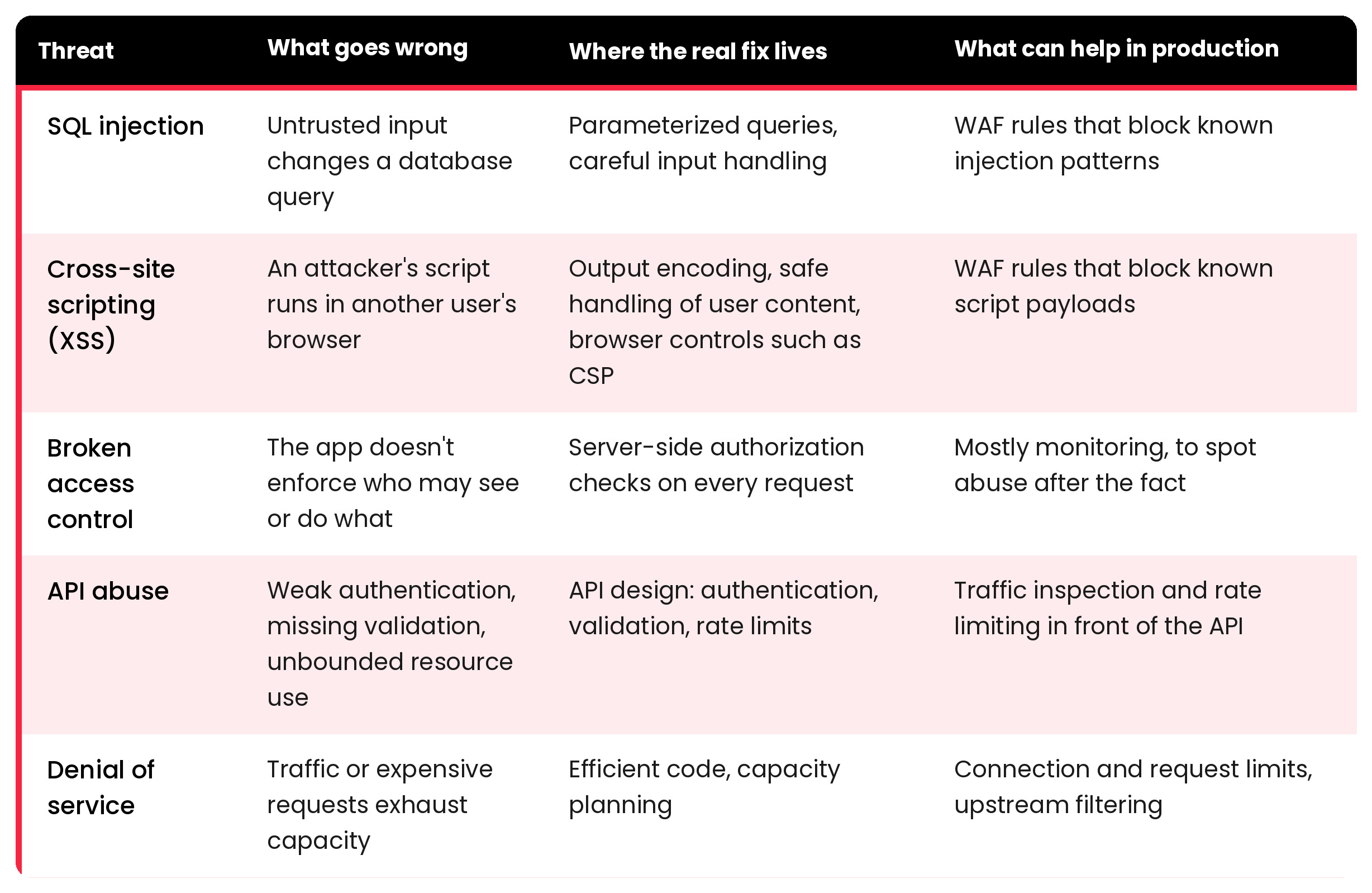
Looking Beyond the Surface: XSS and SQL Injection

The webinar also explored application-layer attacks such as Cross-Site Scripting (XSS) and SQL Injection.

Rather than discussing these threats abstractly, attendees could see how malicious payloads interact with exposed applications in real time and how WAF protections identify and block suspicious requests before they reach backend services.

One of the most interesting conversations during this section focused on how difficult modern attacks can be to distinguish from normal traffic patterns.

From the outside, many malicious requests initially appear legitimate.

But underneath, they may be attempting to:

  • manipulate application behaviour
  • extract information
  • bypass validation mechanisms
  • or exploit backend vulnerabilities

This is where application visibility becomes critical.

Because modern application delivery is no longer only about distributing traffic efficiently.

It’s about understanding whether that traffic should be trusted in the first place.

More Than Security: Operational Control

Although the webinar covered load balancing, failover, DDoS mitigation, and WAF protections separately, one common theme appeared throughout the entire session: operational control.

Modern infrastructures generate enormous volumes of traffic, requests, logs, alerts, and behavioural changes.

Without visibility, teams often end up reacting blindly during incidents.

This is one of the reasons why modern Application Delivery Controllers (ADCs) like SKUDONET increasingly combine:

  • load balancing
  • high availability
  • traffic inspection
  • observability
  • automation
  • and application security

into a single operational layer.

The objective is not simply performance.

It’s maintaining control when infrastructure conditions become unpredictable.

A Very Technical and Very Real Conversation

For us, one of the most valuable parts of the webinar was what happened after the official presentation ended.

Several attendees stayed connected to continue discussing infrastructure architectures, deployment flexibility, hybrid environments, operational bottlenecks, and the practical challenges of maintaining application availability under increasing traffic and security pressure.

Those conversations reinforced something we see constantly across the industry:

Teams are no longer looking only for “more features”.

They are looking for:

  • operational simplicity
  • better visibility
  • faster incident response
  • integrated security
  • and infrastructure that remains manageable as complexity grows
Emilio Campos durante el WebinarEmilio Campos, CEO of SKUDONET, showcasing a live demo during the webinar

Assess Your Own Infrastructure Readiness

The scenarios explored during the webinar reflect operational challenges that many organizations already face today from traffic spikes and Layer 7 attacks to limited visibility during incidents and increasing pressure on critical applications.

To help teams evaluate their own environments, we’ve prepared a short technical assessment inspired by the same types of real-world scenarios covered during the session:


15 May, 2026 10:25AM by Isabel Perez

hackergotchi for Deepin

Deepin

(中文) 应用商店 | 你的应用,值得被千万用户看见!

Sorry, this entry is only available in 中文.

15 May, 2026 03:27AM by xiaofei

May 14, 2026

hackergotchi for GreenboneOS

GreenboneOS

New High-Severity Linux Flaws: Copy Fail, Copy Fail 2, and Dirty Frag Offer Local Privilege Escalation to Root

Three new high-severity local privilege escalation (LPE) vulnerabilities affecting Linux were recently disclosed, creating significant global risk. Although user-level access is a prerequisite for their exploitation, the new CVEs allow command execution as the root user and full system takeover. The CVEs are considered reliably exploitable on all major Linux distributions. The name “Copy Fail” […]

14 May, 2026 05:03AM by Joseph Lee

hackergotchi for VyOS

VyOS

How we Rebuilt docs.vyos.io for the AI Era (MyST, Opus Reviewers, and Context7)

The VyOS documentation site has carried us a long way. Sphinx + reStructuredText served the project well for years — but the world around our documentation has changed faster than our toolchain. Contributors write in Markdown. LLM coding assistants pull docs into their context windows. Reviewers expect machine-assisted feedback. AI agents need a stable, machine-readable surface to reason about VyOS configuration.

14 May, 2026 12:30AM by Yuriy Andamasov (yuriy@sentrium.io)

hackergotchi for Qubes

Qubes

QSB-114: Intel CPU data exposure vulnerability

We have published Qubes Security Bulletin (QSB) 114: Intel CPU data exposure vulnerability. The text of this QSB and its accompanying cryptographic signatures are reproduced below, followed by a general explanation of this announcement and authentication instructions.

Qubes Security Bulletin 114


             ---===[ Qubes Security Bulletin 114 ]===---

                              2026-05-13

                Intel CPU data exposure vulnerability

User action
------------

Continue to update normally [1] in order to receive the security updates
described in the "Patching" section below. No other user action is
required in response to this QSB.

Summary
--------

On 2026-05-12, Intel published "2026.2 IPU-Intel Processor Firmware
Advisory" (INTEL-SA-01420, CVE-2025-35979). [3] Unfortunately, this
advisory does not provide sufficient information for us to make a
definitive assessment about the extent to which this vulnerability
affects the security of Qubes OS. Based on the limited information
available, we surmise that it is likely that it might affect cross-qube
data exposure.

Impact
-------

On affected systems, an attacker who has managed to compromise one qube
can attempt to exploit this vulnerability in order to infer data
belonging to other qubes.

Affected systems
-----------------

Intel Core Ultra Series 2 and 3 processors are affected. For a more
detailed list of affected products, see Intel's "2026.2 IPU-Intel
Processor Firmware Advisory." [3]

Patching
---------

The following packages contain security updates that address the
vulnerabilities described in this bulletin:

  For Qubes 4.2 and 4.3, in dom0:
  - microcode_ctl version 2.1.20260512

These packages will migrate from the security-testing repository to the
current (stable) repository over the next two weeks after being tested
by the community. [2] Once available, the packages should be installed
via the Qubes Update tool or its command-line equivalents. [1]

Dom0 must be restarted afterward in order for the updates to take
effect.

If you use Anti Evil Maid, you will need to reseal your secret
passphrase to new PCR values, as PCR18+19 will change due to the new
microcode updates.

Credits
--------

See Intel's "2026.2 IPU-Intel Processor Firmware Advisory." [3]

References
-----------

[1] https://doc.qubes-os.org/en/latest/user/how-to-guides/how-to-update.html
[2] https://doc.qubes-os.org/en/latest/user/downloading-installing-upgrading/testing.html
[3] https://www.intel.com/content/www/us/en/security-center/advisory/intel-sa-01420.html

--
The Qubes Security Team
https://www.qubes-os.org/security/

Source: qsb-114-2026.txt

Marek Marczykowski-Górecki’s PGP signature

-----BEGIN PGP SIGNATURE-----

iQIzBAABCAAdFiEELRdx/k12ftx2sIn61lWk8hgw4GoFAmoFN9QACgkQ1lWk8hgw
4GqUbBAAiXjMrnNlWAfCno5WRQ+O//A+gvWNja8oVYqqGYIXOlT6nyIloGUueY4S
q+Cg5QWsgFJ+gVFn0z3ZgIUi5ryIIvucesFP/ZG1ipmmu29dVaiQKcHRadAUInTI
TMywxnz7LArebbu3saS3BpLGdYX3PdXVg5WFdUC3XHg+g0/AFR+RXZEjuvJ8vbM0
QPIRaGbBVnqSXQ7Y2fKia5uycQsZmn8ua4GB17LZYkbPgih6cwOe3R5fKuICCtZ2
OkjJFMfZEZEKzean66oPMPz5tBlMrmDlixrYsWYmaQO2P86fOt9QyoskJ3FEPtQZ
ZNV+c8fD8aRp1xsDxTx6DKgSevldYrRbovW/+bBHcdbbnCxPYffRKbS71Nuk48RF
1Vj5D2mZRM7Vq4P5LSQHfRfoDk1eCRDSIvxw0jhpf4Jq2SO6FXZD/rFUcoCPerRJ
ghUls8zWPbkgDPu8UMwkosZIOuHPoxmexm3U+wFb7n63R9iXRrS6wIjDlsoC8aZw
WAlc8Ra+hASnGE1SWiBHE2uVLzNx7DKfa38mXph0eJ44FhLGBur4F8V/Jhqe9bCM
oCAjP+1al8yDs/KQP2kI++mHqBsy2YKfEW3Jks/e3t/3e10tJ1W2a5I9cPPrIoAe
/gZu6FtBmZAEFAmNuWWj+2wM4k2DLFq8ojE4lFjNqrfCxD+E6cY=
=0kpC
-----END PGP SIGNATURE-----

Source: qsb-114-2026.txt.sig.marmarek

Simon Gaiser (aka HW42)’s PGP signature

-----BEGIN PGP SIGNATURE-----

iQIzBAABCgAdFiEE6hjn8EDEHdrv6aoPSsGN4REuFJAFAmoFossACgkQSsGN4REu
FJCUfw/+OlXTGq66HQGv6O8Bp060fXmopjpJGSP/XJ6GC4OfDSNPQwwwuPHBFDyV
ZH8BabEbwF8vVG0AEYgWtGOicGsOkrQgySGfnJ0SMMdmgfbrU3ADyA7tGrlgaSRX
xqgX3gHtdvYT+WTplom66XPmRq+ANYL2De0ju23WXxwZ+H+twDB1hzmttzOpg95R
EDkcblB0LPvmIlnLDwNv38lCwYJr4B0cANvdEafnwbvOGQV0VqYxWMfC2gvHHIQ9
Wbd4gPSczuwvMlac6paEZL1paA53IDDVaGu9mJJEvYS8Mv7PGc4Q4cSCbrCPJ5to
Y3iAlWjAOFshcQvn5kq7RM5MDFrelQ+qb891PHBaH1TFZQnU5GXVM50l8k5wt6Eb
bn8hWphr5U2c0smpr9/xO3WhDIMDu2ACddBFt1caqYtuyjhy/Z0D848aW0iRxyNq
RM4DLqqR1vtk/Og9mbJg05hdExWy4tAuZscSIQasuv+KaUAwG2gaJTdric7aPH2R
n/wGliEy+5U1ICm3kRVRpA8hYumYgIBd1Ez5zHrsp9sEPXrTbtsYrUzesyg74GN1
9GajWdJqSxpvQQSjnIFhZY3K1GqMzNpTr3ggnOKa4czDIqVCzALYHXB49N46l5yI
JkO/MDVB4Iw4JCHS+9jR4Z0tcHWyC+FtA+rOgOpNPw7nL2RM4zA=
=0Hee
-----END PGP SIGNATURE-----

Source: qsb-114-2026.txt.sig.simon

What is the purpose of this announcement?

The purpose of this announcement is to inform the Qubes community that a new Qubes security bulletin (QSB) has been published.

What is a Qubes security bulletin (QSB)?

A Qubes security bulletin (QSB) is a security announcement issued by the Qubes security team. A QSB typically provides a summary and impact analysis of one or more recently-discovered software vulnerabilities, including details about patching to address them.

Why should I care about QSBs?

QSBs tell you what actions you must take in order to protect yourself from recently-discovered security vulnerabilities. In most cases, security vulnerabilities are addressed by updating normally. However, in some cases, special user action is required. In all cases, the required actions are detailed in QSBs.

What are the PGP signatures that accompany QSBs?

A PGP signature is a cryptographic digital signature made in accordance with the OpenPGP standard. PGP signatures can be cryptographically verified with programs like GNU Privacy Guard (GPG). The Qubes security team cryptographically signs all QSBs so that Qubes users have a reliable way to check whether QSBs are genuine. The only way to be certain that a QSB is authentic is by verifying its PGP signatures.

Why should I care whether a QSB is authentic?

A forged QSB could deceive you into taking actions that adversely affect the security of your Qubes OS system, such as installing malware or making configuration changes that render your system vulnerable to attack. Falsified QSBs could sow fear, uncertainty, and doubt about the security of Qubes OS or the status of the Qubes OS Project.

How do I verify the PGP signatures on a QSB?

The following command-line instructions assume a Linux system with git and gpg installed. (For Windows and Mac options, see OpenPGP software.)

  1. Obtain the Qubes Master Signing Key (QMSK), e.g.:

    $ gpg --fetch-keys https://keys.qubes-os.org/keys/qubes-master-signing-key.asc
    gpg: directory '/home/user/.gnupg' created
    gpg: keybox '/home/user/.gnupg/pubring.kbx' created
    gpg: requesting key from 'https://keys.qubes-os.org/keys/qubes-master-signing-key.asc'
    gpg: /home/user/.gnupg/trustdb.gpg: trustdb created
    gpg: key DDFA1A3E36879494: public key "Qubes Master Signing Key" imported
    gpg: Total number processed: 1
    gpg:               imported: 1
    

    (For more ways to obtain the QMSK, see How to import and authenticate the Qubes Master Signing Key.)

  2. View the fingerprint of the PGP key you just imported. (Note: gpg> indicates a prompt inside of the GnuPG program. Type what appears after it when prompted.)

    $ gpg --edit-key 0x427F11FD0FAA4B080123F01CDDFA1A3E36879494
    gpg (GnuPG) 2.2.27; Copyright (C) 2021 Free Software Foundation, Inc.
    This is free software: you are free to change and redistribute it.
    There is NO WARRANTY, to the extent permitted by law.
       
       
    pub  rsa4096/DDFA1A3E36879494
         created: 2010-04-01  expires: never       usage: SC
         trust: unknown       validity: unknown
    [ unknown] (1). Qubes Master Signing Key
       
    gpg> fpr
    pub   rsa4096/DDFA1A3E36879494 2010-04-01 Qubes Master Signing Key
     Primary key fingerprint: 427F 11FD 0FAA 4B08 0123  F01C DDFA 1A3E 3687 9494
    
  3. Important: At this point, you still don’t know whether the key you just imported is the genuine QMSK or a forgery. In order for this entire procedure to provide meaningful security benefits, you must authenticate the QMSK out-of-band. Do not skip this step! The standard method is to obtain the QMSK fingerprint from multiple independent sources in several different ways and check to see whether they match the key you just imported. For more information, see How to import and authenticate the Qubes Master Signing Key.

    Tip: After you have authenticated the QMSK out-of-band to your satisfaction, record the QMSK fingerprint in a safe place (or several) so that you don’t have to repeat this step in the future.

  4. Once you are satisfied that you have the genuine QMSK, set its trust level to 5 (“ultimate”), then quit GnuPG with q.

    gpg> trust
    pub  rsa4096/DDFA1A3E36879494
         created: 2010-04-01  expires: never       usage: SC
         trust: unknown       validity: unknown
    [ unknown] (1). Qubes Master Signing Key
       
    Please decide how far you trust this user to correctly verify other users' keys
    (by looking at passports, checking fingerprints from different sources, etc.)
       
      1 = I don't know or won't say
      2 = I do NOT trust
      3 = I trust marginally
      4 = I trust fully
      5 = I trust ultimately
      m = back to the main menu
       
    Your decision? 5
    Do you really want to set this key to ultimate trust? (y/N) y
       
    pub  rsa4096/DDFA1A3E36879494
         created: 2010-04-01  expires: never       usage: SC
         trust: ultimate      validity: unknown
    [ unknown] (1). Qubes Master Signing Key
    Please note that the shown key validity is not necessarily correct
    unless you restart the program.
       
    gpg> q
    
  5. Use Git to clone the qubes-secpack repo.

    $ git clone https://github.com/QubesOS/qubes-secpack.git
    Cloning into 'qubes-secpack'...
    remote: Enumerating objects: 4065, done.
    remote: Counting objects: 100% (1474/1474), done.
    remote: Compressing objects: 100% (742/742), done.
    remote: Total 4065 (delta 743), reused 1413 (delta 731), pack-reused 2591
    Receiving objects: 100% (4065/4065), 1.64 MiB | 2.53 MiB/s, done.
    Resolving deltas: 100% (1910/1910), done.
    
  6. Import the included PGP keys. (See our PGP key policies for important information about these keys.)

    $ gpg --import qubes-secpack/keys/*/*
    gpg: key 063938BA42CFA724: public key "Marek Marczykowski-Górecki (Qubes OS signing key)" imported
    gpg: qubes-secpack/keys/core-devs/retired: read error: Is a directory
    gpg: no valid OpenPGP data found.
    gpg: key 8C05216CE09C093C: 1 signature not checked due to a missing key
    gpg: key 8C05216CE09C093C: public key "HW42 (Qubes Signing Key)" imported
    gpg: key DA0434BC706E1FCF: public key "Simon Gaiser (Qubes OS signing key)" imported
    gpg: key 8CE137352A019A17: 2 signatures not checked due to missing keys
    gpg: key 8CE137352A019A17: public key "Andrew David Wong (Qubes Documentation Signing Key)" imported
    gpg: key AAA743B42FBC07A9: public key "Brennan Novak (Qubes Website & Documentation Signing)" imported
    gpg: key B6A0BB95CA74A5C3: public key "Joanna Rutkowska (Qubes Documentation Signing Key)" imported
    gpg: key F32894BE9684938A: public key "Marek Marczykowski-Górecki (Qubes Documentation Signing Key)" imported
    gpg: key 6E7A27B909DAFB92: public key "Hakisho Nukama (Qubes Documentation Signing Key)" imported
    gpg: key 485C7504F27D0A72: 1 signature not checked due to a missing key
    gpg: key 485C7504F27D0A72: public key "Sven Semmler (Qubes Documentation Signing Key)" imported
    gpg: key BB52274595B71262: public key "unman (Qubes Documentation Signing Key)" imported
    gpg: key DC2F3678D272F2A8: 1 signature not checked due to a missing key
    gpg: key DC2F3678D272F2A8: public key "Wojtek Porczyk (Qubes OS documentation signing key)" imported
    gpg: key FD64F4F9E9720C4D: 1 signature not checked due to a missing key
    gpg: key FD64F4F9E9720C4D: public key "Zrubi (Qubes Documentation Signing Key)" imported
    gpg: key DDFA1A3E36879494: "Qubes Master Signing Key" not changed
    gpg: key 1848792F9E2795E9: public key "Qubes OS Release 4 Signing Key" imported
    gpg: qubes-secpack/keys/release-keys/retired: read error: Is a directory
    gpg: no valid OpenPGP data found.
    gpg: key D655A4F21830E06A: public key "Marek Marczykowski-Górecki (Qubes security pack)" imported
    gpg: key ACC2602F3F48CB21: public key "Qubes OS Security Team" imported
    gpg: qubes-secpack/keys/security-team/retired: read error: Is a directory
    gpg: no valid OpenPGP data found.
    gpg: key 4AC18DE1112E1490: public key "Simon Gaiser (Qubes Security Pack signing key)" imported
    gpg: Total number processed: 17
    gpg:               imported: 16
    gpg:              unchanged: 1
    gpg: marginals needed: 3  completes needed: 1  trust model: pgp
    gpg: depth: 0  valid:   1  signed:   6  trust: 0-, 0q, 0n, 0m, 0f, 1u
    gpg: depth: 1  valid:   6  signed:   0  trust: 6-, 0q, 0n, 0m, 0f, 0u
    
  7. Verify signed Git tags.

    $ cd qubes-secpack/
    $ git tag -v `git describe`
    object 266e14a6fae57c9a91362c9ac784d3a891f4d351
    type commit
    tag marmarek_sec_266e14a6
    tagger Marek Marczykowski-Górecki 1677757924 +0100
       
    Tag for commit 266e14a6fae57c9a91362c9ac784d3a891f4d351
    gpg: Signature made Thu 02 Mar 2023 03:52:04 AM PST
    gpg:                using RSA key 2D1771FE4D767EDC76B089FAD655A4F21830E06A
    gpg: Good signature from "Marek Marczykowski-Górecki (Qubes security pack)" [full]
    

    The exact output will differ, but the final line should always start with gpg: Good signature from... followed by an appropriate key. The [full] indicates full trust, which this key inherits in virtue of being validly signed by the QMSK.

  8. Verify PGP signatures, e.g.:

    $ cd QSBs/
    $ gpg --verify qsb-087-2022.txt.sig.marmarek qsb-087-2022.txt
    gpg: Signature made Wed 23 Nov 2022 04:05:51 AM PST
    gpg:                using RSA key 2D1771FE4D767EDC76B089FAD655A4F21830E06A
    gpg: Good signature from "Marek Marczykowski-Górecki (Qubes security pack)" [full]
    $ gpg --verify qsb-087-2022.txt.sig.simon qsb-087-2022.txt
    gpg: Signature made Wed 23 Nov 2022 03:50:42 AM PST
    gpg:                using RSA key EA18E7F040C41DDAEFE9AA0F4AC18DE1112E1490
    gpg: Good signature from "Simon Gaiser (Qubes Security Pack signing key)" [full]
    $ cd ../canaries/
    $ gpg --verify canary-034-2023.txt.sig.marmarek canary-034-2023.txt
    gpg: Signature made Thu 02 Mar 2023 03:51:48 AM PST
    gpg:                using RSA key 2D1771FE4D767EDC76B089FAD655A4F21830E06A
    gpg: Good signature from "Marek Marczykowski-Górecki (Qubes security pack)" [full]
    $ gpg --verify canary-034-2023.txt.sig.simon canary-034-2023.txt
    gpg: Signature made Thu 02 Mar 2023 01:47:52 AM PST
    gpg:                using RSA key EA18E7F040C41DDAEFE9AA0F4AC18DE1112E1490
    gpg: Good signature from "Simon Gaiser (Qubes Security Pack signing key)" [full]
    

    Again, the exact output will differ, but the final line of output from each gpg --verify command should always start with gpg: Good signature from... followed by an appropriate key.

For this announcement (QSB-114), the commands are:

$ gpg --verify qsb-114-2026.txt.sig.marmarek qsb-114-2026.txt
$ gpg --verify qsb-114-2026.txt.sig.simon qsb-114-2026.txt

You can also verify the signatures directly from this announcement in addition to or instead of verifying the files from the qubes-secpack. Simply copy and paste the QSB-114 text into a plain text file and do the same for both signature files. Then, perform the same authentication steps as listed above, substituting the filenames above with the names of the files you just created.

14 May, 2026 12:00AM

May 13, 2026

hackergotchi for Deepin

Deepin

hackergotchi for Qubes

Qubes

XSAs released on 2026-05-12

The Xen Project has released one or more Xen security advisories (XSAs). The security of Qubes OS is affected.

XSAs that DO affect the security of Qubes OS

The following XSAs do affect the security of Qubes OS:

XSAs that DO NOT affect the security of Qubes OS

The following XSAs do not affect the security of Qubes OS, and no user action is necessary:

  • (none)

About this announcement

Qubes OS uses the Xen hypervisor as part of its architecture. When the Xen Project publicly discloses a vulnerability in the Xen hypervisor, they issue a notice called a Xen security advisory (XSA). Vulnerabilities in the Xen hypervisor sometimes have security implications for Qubes OS. When they do, we issue a notice called a Qubes security bulletin (QSB). (QSBs are also issued for non-Xen vulnerabilities.) However, QSBs can provide only positive confirmation that certain XSAs do affect the security of Qubes OS. QSBs cannot provide negative confirmation that other XSAs do not affect the security of Qubes OS. Therefore, we also maintain an XSA tracker, which is a comprehensive list of all XSAs publicly disclosed to date, including whether each one affects the security of Qubes OS. When new XSAs are published, we add them to the XSA tracker and publish a notice like this one in order to inform Qubes users that a new batch of XSAs has been released and whether each one affects the security of Qubes OS.

13 May, 2026 12:00AM

QSB-113: AMD CPU Opcode Cache corruption (XSA-490)

We have published Qubes Security Bulletin (QSB) 113: AMD CPU Opcode Cache corruption (XSA-490). The text of this QSB and its accompanying cryptographic signatures are reproduced below, followed by a general explanation of this announcement and authentication instructions.

Qubes Security Bulletin 113


             ---===[ Qubes Security Bulletin 113 ]===---

                              2026-05-12

              AMD CPU Opcode Cache corruption (XSA-490)

User action
------------

Continue to update normally [1] in order to receive the security updates
described in the "Patching" section below. No other user action is
required in response to this QSB.

Summary
--------

On 2026-05-12, the Xen Project published XSA-490, "x86: CPU Opcode Cache
corruption" (CVE-2025-54518) [3]:
| AMD have disclosed a potential vulnerability in certain CPUs which can
| cause instructions to execute at a higher privilege.

For more information, see AMD's "CPU OP Cache Corruption" advisory. [4]

Impact
-------

On affected systems, an attacker can attempt to exploit this
vulnerability in order to:
- escalate privileges from userspace to the kernel inside of a given
  qube in order to escape sandboxes inside that qube
- compromise Qubes OS itself

Affected systems
-----------------

Only AMD Zen 2 systems are affected. Systems with other AMD
microarchitectures and systems with Intel processors are not affected.

Patching
---------

The following packages contain security updates that address the
vulnerabilities described in this bulletin:

  For Qubes 4.2, in dom0:
  - Xen packages, version 4.17.6-5
  For Qubes 4.3, in dom0:
  - Xen packages, version 4.19.4-8

These packages will migrate from the security-testing repository to the
current (stable) repository over the next two weeks after being tested
by the community. [2] Once available, the packages should be installed
via the Qubes Update tool or its command-line equivalents. [1]

Dom0 must be restarted afterward in order for the updates to take
effect.

If you use Anti Evil Maid, you will need to reseal your secret
passphrase to new PCR values, as PCR18+19 will change due to the new Xen
binaries.

Credits
--------

See AMD's "CPU OP Cache Corruption" advisory. [4]

References
-----------

[1] https://doc.qubes-os.org/en/latest/user/how-to-guides/how-to-update.html
[2] https://doc.qubes-os.org/en/latest/user/downloading-installing-upgrading/testing.html
[3] https://xenbits.xen.org/xsa/advisory-490.html
[4] https://www.amd.com/en/resources/product-security/bulletin/amd-sb-7052.html

--
The Qubes Security Team
https://www.qubes-os.org/security/

Source: qsb-113-2026.txt

Marek Marczykowski-Górecki’s PGP signature

-----BEGIN PGP SIGNATURE-----

iQIzBAABCAAdFiEELRdx/k12ftx2sIn61lWk8hgw4GoFAmoEZPMACgkQ1lWk8hgw
4Gog8Q/+MhlqZQ4EfpXn0jy4qP2SOD2mk0e5gzokxhMrvENxKzBKa5h2UB/zFruU
uud72pSlvH7bP1+izHrxK5Ld+lPaK4ZVXbbyaC6Cqx09HihGLljhMl/zKELT6hi8
LzZqT3+eSPiagi58cqkRdiKOhCM+ew4TUAtoAPHSd/Wun8Ao8Cl3HZiAHlsIc1uJ
T8mHfAD7WetO24aa72g8D5s/huOLccUKIiXdDygtGJO1uTPT1uGfav5YtFYeB0nZ
y6HqFSNKC83JFHUZpP6FJqNsYn/M96Faw8G4utiV9N1Vhd8APnPU/DGSY1hE46/x
5ANuH2mIeGiuIG8pF1ucRRjLejpatN829MVxz8D8e6eI9SqprysMBi5LJw9rlihk
F31p028hlx+towv3cVHqtr/qHWAzHe7RzQce6CnKd/R0Aoj3fAhLMdgwHiKYkF4L
Fq9XpJJeQyJ9cRxs2zyLGX7XQWfb7cobP8CImL+fOaY0RxEovkKcsiyVRwcOu+OX
afAMNAGyn+EJxKwp4nF4vzvFbqAJILtuMCPfqvCMKHbUe2rnOudGsOzDps8P5+eD
5l6oDKly2NfMiIiyyjbDYuKYzE3JQlTMSbiAlYRIxaP3/yhQxM/H/hxTvtx4o6GG
9mCcc3SpWhAsp7kOJM0bkK2zZezgovQ2L6dHBlem+HpizfHvrEU=
=EDLg
-----END PGP SIGNATURE-----

Source: qsb-113-2026.txt.sig.marmarek

Simon Gaiser (aka HW42)’s PGP signature

-----BEGIN PGP SIGNATURE-----

iQIzBAABCgAdFiEE6hjn8EDEHdrv6aoPSsGN4REuFJAFAmoEXn8ACgkQSsGN4REu
FJCQRw/9FEFMx/P4GvKO5Kf4xTwuvdDasQ67hJD7D04xXNqOyiot/k4CgWQ421CI
efsecioFz0MAKqGa1cHYL44wOxAw1ot7QP5AmPvkiRVO8se0hsBepZggzB5vf50X
F+amqs3TAIcEiVlIf9PO9pgHz1oZuj0lqQBQkvD2zSwpb9oXPTIFicAndDYHkX8f
GT5iRc4tI4aVAYwnThIQWaEFxgUU8+EpspnA7hkZbz0rxx6rmNqyEY16oTt5Pu2U
6E93rcIo9+M+zmuQjkkQiN3jjJn3gukCQ7uBTHRcTrc+vUVEDii83CxDPMUlxXfj
t3MlC2Zk93Ikw7PEDaY0QqP3d0a7IjwY547rzPKzkPIyLsMMTrRktOwkKSz3BUgr
WSvjkhnSiDKaxZXf9u0/vMRzXfLsXC4+bZI78d9IewLB1bfBKeVTUTcgaLgoteLn
mjP3rueNCXXRXhhcZOEyZxfIhv+ePsFaVGSjdDFJ+B1tFz1j6rkuymOWimuqw52Z
wiCFcQJqzDoalMHvySEdrfs3FPQc7lJ2lYjs+90XXDwfNnpei1Lwtm3Zt9zTvetp
PZmZSgmvIV5WOJRSmgRMEGj46lPjJMO5h8RJAM6IVsre2ssjO/+pgcb8rYGq81LT
8cV8vbN7mk4QI6MWn5kvD+jO7fABqOLVTOZBEsWaRl1xSmfcCsg=
=zem1
-----END PGP SIGNATURE-----

Source: qsb-113-2026.txt.sig.simon

What is the purpose of this announcement?

The purpose of this announcement is to inform the Qubes community that a new Qubes security bulletin (QSB) has been published.

What is a Qubes security bulletin (QSB)?

A Qubes security bulletin (QSB) is a security announcement issued by the Qubes security team. A QSB typically provides a summary and impact analysis of one or more recently-discovered software vulnerabilities, including details about patching to address them.

Why should I care about QSBs?

QSBs tell you what actions you must take in order to protect yourself from recently-discovered security vulnerabilities. In most cases, security vulnerabilities are addressed by updating normally. However, in some cases, special user action is required. In all cases, the required actions are detailed in QSBs.

What are the PGP signatures that accompany QSBs?

A PGP signature is a cryptographic digital signature made in accordance with the OpenPGP standard. PGP signatures can be cryptographically verified with programs like GNU Privacy Guard (GPG). The Qubes security team cryptographically signs all QSBs so that Qubes users have a reliable way to check whether QSBs are genuine. The only way to be certain that a QSB is authentic is by verifying its PGP signatures.

Why should I care whether a QSB is authentic?

A forged QSB could deceive you into taking actions that adversely affect the security of your Qubes OS system, such as installing malware or making configuration changes that render your system vulnerable to attack. Falsified QSBs could sow fear, uncertainty, and doubt about the security of Qubes OS or the status of the Qubes OS Project.

How do I verify the PGP signatures on a QSB?

The following command-line instructions assume a Linux system with git and gpg installed. (For Windows and Mac options, see OpenPGP software.)

  1. Obtain the Qubes Master Signing Key (QMSK), e.g.:

    $ gpg --fetch-keys https://keys.qubes-os.org/keys/qubes-master-signing-key.asc
    gpg: directory '/home/user/.gnupg' created
    gpg: keybox '/home/user/.gnupg/pubring.kbx' created
    gpg: requesting key from 'https://keys.qubes-os.org/keys/qubes-master-signing-key.asc'
    gpg: /home/user/.gnupg/trustdb.gpg: trustdb created
    gpg: key DDFA1A3E36879494: public key "Qubes Master Signing Key" imported
    gpg: Total number processed: 1
    gpg:               imported: 1
    

    (For more ways to obtain the QMSK, see How to import and authenticate the Qubes Master Signing Key.)

  2. View the fingerprint of the PGP key you just imported. (Note: gpg> indicates a prompt inside of the GnuPG program. Type what appears after it when prompted.)

    $ gpg --edit-key 0x427F11FD0FAA4B080123F01CDDFA1A3E36879494
    gpg (GnuPG) 2.2.27; Copyright (C) 2021 Free Software Foundation, Inc.
    This is free software: you are free to change and redistribute it.
    There is NO WARRANTY, to the extent permitted by law.
       
       
    pub  rsa4096/DDFA1A3E36879494
         created: 2010-04-01  expires: never       usage: SC
         trust: unknown       validity: unknown
    [ unknown] (1). Qubes Master Signing Key
       
    gpg> fpr
    pub   rsa4096/DDFA1A3E36879494 2010-04-01 Qubes Master Signing Key
     Primary key fingerprint: 427F 11FD 0FAA 4B08 0123  F01C DDFA 1A3E 3687 9494
    
  3. Important: At this point, you still don’t know whether the key you just imported is the genuine QMSK or a forgery. In order for this entire procedure to provide meaningful security benefits, you must authenticate the QMSK out-of-band. Do not skip this step! The standard method is to obtain the QMSK fingerprint from multiple independent sources in several different ways and check to see whether they match the key you just imported. For more information, see How to import and authenticate the Qubes Master Signing Key.

    Tip: After you have authenticated the QMSK out-of-band to your satisfaction, record the QMSK fingerprint in a safe place (or several) so that you don’t have to repeat this step in the future.

  4. Once you are satisfied that you have the genuine QMSK, set its trust level to 5 (“ultimate”), then quit GnuPG with q.

    gpg> trust
    pub  rsa4096/DDFA1A3E36879494
         created: 2010-04-01  expires: never       usage: SC
         trust: unknown       validity: unknown
    [ unknown] (1). Qubes Master Signing Key
       
    Please decide how far you trust this user to correctly verify other users' keys
    (by looking at passports, checking fingerprints from different sources, etc.)
       
      1 = I don't know or won't say
      2 = I do NOT trust
      3 = I trust marginally
      4 = I trust fully
      5 = I trust ultimately
      m = back to the main menu
       
    Your decision? 5
    Do you really want to set this key to ultimate trust? (y/N) y
       
    pub  rsa4096/DDFA1A3E36879494
         created: 2010-04-01  expires: never       usage: SC
         trust: ultimate      validity: unknown
    [ unknown] (1). Qubes Master Signing Key
    Please note that the shown key validity is not necessarily correct
    unless you restart the program.
       
    gpg> q
    
  5. Use Git to clone the qubes-secpack repo.

    $ git clone https://github.com/QubesOS/qubes-secpack.git
    Cloning into 'qubes-secpack'...
    remote: Enumerating objects: 4065, done.
    remote: Counting objects: 100% (1474/1474), done.
    remote: Compressing objects: 100% (742/742), done.
    remote: Total 4065 (delta 743), reused 1413 (delta 731), pack-reused 2591
    Receiving objects: 100% (4065/4065), 1.64 MiB | 2.53 MiB/s, done.
    Resolving deltas: 100% (1910/1910), done.
    
  6. Import the included PGP keys. (See our PGP key policies for important information about these keys.)

    $ gpg --import qubes-secpack/keys/*/*
    gpg: key 063938BA42CFA724: public key "Marek Marczykowski-Górecki (Qubes OS signing key)" imported
    gpg: qubes-secpack/keys/core-devs/retired: read error: Is a directory
    gpg: no valid OpenPGP data found.
    gpg: key 8C05216CE09C093C: 1 signature not checked due to a missing key
    gpg: key 8C05216CE09C093C: public key "HW42 (Qubes Signing Key)" imported
    gpg: key DA0434BC706E1FCF: public key "Simon Gaiser (Qubes OS signing key)" imported
    gpg: key 8CE137352A019A17: 2 signatures not checked due to missing keys
    gpg: key 8CE137352A019A17: public key "Andrew David Wong (Qubes Documentation Signing Key)" imported
    gpg: key AAA743B42FBC07A9: public key "Brennan Novak (Qubes Website & Documentation Signing)" imported
    gpg: key B6A0BB95CA74A5C3: public key "Joanna Rutkowska (Qubes Documentation Signing Key)" imported
    gpg: key F32894BE9684938A: public key "Marek Marczykowski-Górecki (Qubes Documentation Signing Key)" imported
    gpg: key 6E7A27B909DAFB92: public key "Hakisho Nukama (Qubes Documentation Signing Key)" imported
    gpg: key 485C7504F27D0A72: 1 signature not checked due to a missing key
    gpg: key 485C7504F27D0A72: public key "Sven Semmler (Qubes Documentation Signing Key)" imported
    gpg: key BB52274595B71262: public key "unman (Qubes Documentation Signing Key)" imported
    gpg: key DC2F3678D272F2A8: 1 signature not checked due to a missing key
    gpg: key DC2F3678D272F2A8: public key "Wojtek Porczyk (Qubes OS documentation signing key)" imported
    gpg: key FD64F4F9E9720C4D: 1 signature not checked due to a missing key
    gpg: key FD64F4F9E9720C4D: public key "Zrubi (Qubes Documentation Signing Key)" imported
    gpg: key DDFA1A3E36879494: "Qubes Master Signing Key" not changed
    gpg: key 1848792F9E2795E9: public key "Qubes OS Release 4 Signing Key" imported
    gpg: qubes-secpack/keys/release-keys/retired: read error: Is a directory
    gpg: no valid OpenPGP data found.
    gpg: key D655A4F21830E06A: public key "Marek Marczykowski-Górecki (Qubes security pack)" imported
    gpg: key ACC2602F3F48CB21: public key "Qubes OS Security Team" imported
    gpg: qubes-secpack/keys/security-team/retired: read error: Is a directory
    gpg: no valid OpenPGP data found.
    gpg: key 4AC18DE1112E1490: public key "Simon Gaiser (Qubes Security Pack signing key)" imported
    gpg: Total number processed: 17
    gpg:               imported: 16
    gpg:              unchanged: 1
    gpg: marginals needed: 3  completes needed: 1  trust model: pgp
    gpg: depth: 0  valid:   1  signed:   6  trust: 0-, 0q, 0n, 0m, 0f, 1u
    gpg: depth: 1  valid:   6  signed:   0  trust: 6-, 0q, 0n, 0m, 0f, 0u
    
  7. Verify signed Git tags.

    $ cd qubes-secpack/
    $ git tag -v `git describe`
    object 266e14a6fae57c9a91362c9ac784d3a891f4d351
    type commit
    tag marmarek_sec_266e14a6
    tagger Marek Marczykowski-Górecki 1677757924 +0100
       
    Tag for commit 266e14a6fae57c9a91362c9ac784d3a891f4d351
    gpg: Signature made Thu 02 Mar 2023 03:52:04 AM PST
    gpg:                using RSA key 2D1771FE4D767EDC76B089FAD655A4F21830E06A
    gpg: Good signature from "Marek Marczykowski-Górecki (Qubes security pack)" [full]
    

    The exact output will differ, but the final line should always start with gpg: Good signature from... followed by an appropriate key. The [full] indicates full trust, which this key inherits in virtue of being validly signed by the QMSK.

  8. Verify PGP signatures, e.g.:

    $ cd QSBs/
    $ gpg --verify qsb-087-2022.txt.sig.marmarek qsb-087-2022.txt
    gpg: Signature made Wed 23 Nov 2022 04:05:51 AM PST
    gpg:                using RSA key 2D1771FE4D767EDC76B089FAD655A4F21830E06A
    gpg: Good signature from "Marek Marczykowski-Górecki (Qubes security pack)" [full]
    $ gpg --verify qsb-087-2022.txt.sig.simon qsb-087-2022.txt
    gpg: Signature made Wed 23 Nov 2022 03:50:42 AM PST
    gpg:                using RSA key EA18E7F040C41DDAEFE9AA0F4AC18DE1112E1490
    gpg: Good signature from "Simon Gaiser (Qubes Security Pack signing key)" [full]
    $ cd ../canaries/
    $ gpg --verify canary-034-2023.txt.sig.marmarek canary-034-2023.txt
    gpg: Signature made Thu 02 Mar 2023 03:51:48 AM PST
    gpg:                using RSA key 2D1771FE4D767EDC76B089FAD655A4F21830E06A
    gpg: Good signature from "Marek Marczykowski-Górecki (Qubes security pack)" [full]
    $ gpg --verify canary-034-2023.txt.sig.simon canary-034-2023.txt
    gpg: Signature made Thu 02 Mar 2023 01:47:52 AM PST
    gpg:                using RSA key EA18E7F040C41DDAEFE9AA0F4AC18DE1112E1490
    gpg: Good signature from "Simon Gaiser (Qubes Security Pack signing key)" [full]
    

    Again, the exact output will differ, but the final line of output from each gpg --verify command should always start with gpg: Good signature from... followed by an appropriate key.

For this announcement (QSB-113), the commands are:

$ gpg --verify qsb-113-2026.txt.sig.marmarek qsb-113-2026.txt
$ gpg --verify qsb-113-2026.txt.sig.simon qsb-113-2026.txt

You can also verify the signatures directly from this announcement in addition to or instead of verifying the files from the qubes-secpack. Simply copy and paste the QSB-113 text into a plain text file and do the same for both signature files. Then, perform the same authentication steps as listed above, substituting the filenames above with the names of the files you just created.

13 May, 2026 12:00AM

May 12, 2026

hackergotchi for Xanadu developers

Xanadu developers

hackergotchi for Deepin

Deepin

deepin Community April 2026 User Issue and Feature Request Feedback Progress Synchronization

deepin, an open‑source operating system that performs remarkably in the DistroWatch global ranking and is widely recognised by users worldwide, values the voice of every user. With the launch of deepin 25.1 in April, community feedback has been enthusiastic. This summary integrates user issues and feature requests collected from multiple channels, including the deepin Forum. Adhering to the principle of transparent co‑construction, we are normalising the regular synchronisation of progress. We now release the monthly community feedback summary for April 2026. Everyone is welcome to actively share suggestions on the deepin Forum and participate in product iteration together. Official Forum: https://bbs.deepin.org/ ...Read more

12 May, 2026 05:19AM by xiaofei

hackergotchi for Tails

Tails

Tails 7.7.3

This release is an emergency release to fix a critical security vulnerability in the Linux kernel, as well as security vulnerabilities in Tor Browser and in the Tor client.

Changes and updates

  • Update the Linux kernel to 6.12.86, which fixes Dirty Frag, a vulnerability that could allow an application in Tails to gain administration privileges.

    For example, if an attacker was able to exploit other unknown security vulnerabilities in an application included in Tails, they might then use Copy Fail to take full control of your Tails and deanonymize you.

    We are not aware of this vulnerability being used in practice until now.

  • Update Tor Browser to 15.0.12.

  • Update the Tor client to 0.4.9.8.

  • Update Thunderbird to 140.10.1.

Fixed problems

For more details, read our changelog.

Get Tails 7.7.3

To upgrade your Tails USB stick and keep your Persistent Storage

  • Automatic upgrades are available from Tails 7.0 or later to 7.7.3.

  • If you cannot do an automatic upgrade or if Tails fails to start after an automatic upgrade, please try to do a manual upgrade.

To install Tails 7.7.3 on a new USB stick

Follow our installation instructions.

The Persistent Storage on the USB stick will be lost if you install instead of upgrading.

To download only

If you don't need installation or upgrade instructions, you can download Tails 7.7.3 directly:

12 May, 2026 12:00AM

May 11, 2026

hackergotchi for Purism PureOS

Purism PureOS

Purism’s Product Philosophy in an Age of Government–Big Tech Convergence

Purism exists because individual rights are no longer reliably protected by policy alone. In practice, they are determined by the design of the technology people are required to use.

The post Purism’s Product Philosophy in an Age of Government–Big Tech Convergence appeared first on Purism.

11 May, 2026 04:27PM by Purism

hackergotchi for ARMBIAN

ARMBIAN

Github Highlights

Github Highlights

This week&aposs work centers on release and CI infrastructure, board and U-Boot updates, and build framework hardening.

On the release pipeline, asset manifest JSON is now emitted alongside uploads, third-party armbian-images.json sources are merged into the main download index, and dispatch chains were rewired so that build completion fans out cleanly to download-index regeneration and website sync. Ubuntu resolute (26.04) entered the daily build matrix, with corresponding prepare-host adjustments for its qemu-user packaging and a targeted blacklist for boards failing resolute plus GNOME. The new Armbian SDK images are now surfaced on the website and ship preloaded with the build framework, code-server, and developer tooling.

On the platform side, U-Boot v2026.04 lands for Helios4, Rock-5B-Plus, Rock-5T, and NanoPi-M5 (with mainline UFS via a vendor-SPL hybrid), while new bleedingedge branches were introduced for rockchip64 and meson64. Initial support arrived for the Photonicat2 board, new RK3576 SPL and RK3588 DDR blobs were added, Panthor firmware expanded to cover additional Mali GPUs, and a PCIe LTSSM timeout fix improves cold-boot NVMe detection on Rockchip. NanoPC-T6 LTS Plus was renamed, panther-x2 moved from CSC to EOS, and odroidxu4-current advanced to 6.6.138.

In the build framework, an unsafe eval was replaced with declare -g and namerefs, destructive commands were properly quoted, and Docker --privileged is now gated behind an explicit DOCKER_PRIVILEGED toggle. The desktop configuration tree migrated to the armbian-config module_desktops system, kernel build failures now propagate exit codes correctly, missing BOOT_FDT_FILE surfaces as an error alert, and SysRq-via-BREAK was restored on dw-apb-uart for mvebu-6.18 and rockchip64-7.0 kernels.

#Armbian #EmbeddedLinux #UBoot #Rockchip #SBC #LinuxKernel

Changes

11 May, 2026 02:23PM by Michael Robinson

hackergotchi for SparkyLinux

SparkyLinux

Sparky 8.3

There is the third update available for Sparky 8 – 8.3. This is a quarterly update of the Sparky 8 “Seven Sisters” stable release. Sparky 8 is based on and fully compatible with Debian 13 “Trixie”. Main changes: – All packages updated from the stable Debian and Sparky repositories as of May 9, 2026. – Linux kernel 6.12.86-LTS (7.0.6, 6.18.29-LTS, 6.12.87-LTS in sparky repositories) …

Source

11 May, 2026 01:13PM by pavroo

hackergotchi for ArcheOS

ArcheOS

DCMTK, a collection of libraries for DICOM standard

 Hi everyone,

As mentioned in my previous post, I’ve been working on a paper regarding our 3D documentation of the Similaun Mummy (Ötzi) and his equipment. During this project (conducted between 2022 and 2024), we processed DICOM data from the CT scan performed by the South Tyrol Health Care Service (Azienda Sanitaria dell'Alto Adige / Südtiroler Sanitätsbetrieb) in 2021.


To extract the CT scan metadata, Alessandro Bezzi identified an excellent FLOSS tool that worked perfectly for our needs: DCMTK.


DCMTK is a comprehensive collection of libraries and applications implementing large parts of the DICOM standard. Below, you can see a screenshot of the shell output showing the metadata of the .dcm image we analyzed.


I believe this is an incredibly useful application for anyone working in mummy studies and beyond. For this reason, I have officially added DCMTK to the ArcheOS software list, which you can find here: https://github.com/lucaarcteam/ArcheOS-software-list/blob/main/software/dicom.md.

I hope you find this useful. Have a nice day!

11 May, 2026 08:23AM by Luca Bezzi (noreply@blogger.com)

May 09, 2026

hackergotchi for Deepin

Deepin

Urgent Security Update: Fix for Dirty Frag Kernel CVES – Upgrade ASAP

Dear deepin users and community partners, Recently, a local privilege escalation vulnerability in the Linux kernel was disclosed, referred to in the industry as Dirty Frag or Copy Fail 2. This vulnerability is a variant of the same class as the Copy Fail vulnerability. An attacker who has already obtained local low-privilege code execution may exploit this vulnerability to tamper with the page cache of read-only files, further escalate privileges, and gain root access. According to publicly available information, exploit code for this vulnerability has already been circulated. Given its severity and widespread impact, we strongly recommend that all users ...Read more

09 May, 2026 06:28AM by xiaofei

May 08, 2026

deepin Community Monthly Report for April 2026

I. April Community Data Overview II. Community Products deepin 25.1 Image Officially Released: AI-Powered, Silky Smooth Experience In April, deepin welcomed a major version update – the official release of the deepin 25.1 image. This version accumulates results from multiple internal testing rounds, delivering comprehensive upgrades in AI capabilities, kernel performance, and desktop experience: Major Evolution of UOS AI The writing agent has been completely restructured, supporting "outline-first" mode and multi‑format export. The system‑level Claw mode is now available, allowing the AI to automatically control the computer and execute cross‑application tasks via natural language commands. Native integration with Feishu, DingTalk, ...Read more

08 May, 2026 02:13AM by xiaofei

May 07, 2026

May 06, 2026

hackergotchi for GreenboneOS

GreenboneOS

April 2026 Threat Report: Mythos or Reality? Time to Find Out

In April 2026, the cyber security landscape was flooded with news about Anthropic’s new Mythos bug-hunting AI and Project Glasswing. The rose-colored takeaway is that one year from now, software will be free from vulnerabilities because AI will find all of the flaws and vendors will patch. Major software companies will scan all their products […]

06 May, 2026 01:34PM by Joseph Lee

hackergotchi for Qubes

Qubes

Debian 12 (Bookworm) approaching end of life

Debian 12 (Bookworm) is currently scheduled to reach end-of-life (EOL) on 2026-06-10 (approximately one month from the date of this announcement). Please upgrade all of your Debian templates and standalones by that date. For more information, see Upgrading to avoid EOL.

There are two ways to upgrade a template to a new Debian release:

Note on Debian LTS

Debian releases have two EOL dates: regular and long-term support (LTS). Qubes OS support for Debian templates ends at the regular EOL date, not the LTS EOL date.

06 May, 2026 12:00AM

May 05, 2026

hackergotchi for ARMBIAN

ARMBIAN

Github Highlights

Github Highlights

This week&aposs work centers on release pipeline modernization, desktop and userland refinements, and board and kernel platform maintenance.

On the release and CI side, the build matrix gained codename parameterisation with Ubuntu 26.04 "resolute" set as default, a dedicated Bianbu target, and exposed map overrides, while standard-support targets now include UEFI desktops and a plain cloud variant. The KDE fast-HDMI matrix was switched from kde-neon to kde-plasma, mesa-vpu was dropped from auto-attached extensions, and external CI now skips slots with a warning when upstream sources break. Supporting fixes route forky/loong64 base-files lookups to the main archive and add AI cover image generation to the blog workflow.

Desktop and userland changes focus on the Bianbu environment, where PVR DRI was enabled, detection corrected, menu entries added, systemd suspend re-enabled on K1, and gnome-initial-setup purged post-install. Broader fixes pass --allow-downgrades on pinned package installs, align LAN/WAN labels across IPv4 and IPv6 rows in the MOTD, harden console-width handling against invalid COLUMNS values, and correct output to /etc/armbian-image-release.

Platform support sees explicit ARCH=arm64 declarations on five inheriting boards, validate-board-config now following inheritance from ${SRC}/config/boards, and targeted fixes for imx8m binman hooks and rockchip family tweaks under forky (addgroupgroupadd). Kernel and DTS work restores 6.18.y on sm8550, syncs CAINIAO CNIoT-CORE DTS from 6.18 to 6.12, disables broken drm/xe patches under uefi-loong64-7.0, and improves the SMART AM40 and Retroid Pocket board definitions. AX210 firmware lands for mainline, and Seeed Studio reComputer images join the catalogue.

#Armbian #EmbeddedLinux #ARM64 #Rockchip #Ubuntu #KDE #Mainline

Changes


05 May, 2026 03:36AM by Michael Robinson

May 04, 2026

hackergotchi for OSMC

OSMC

OSMC's May update is here with Dolby Vision FEL support

Today we're happy to release OSMC's May 2026 update for all supported devices. This update continues to bring Kodi v21.3 as Kodi v22 becomes nearer to release.

Dolby Vision FEL support

Recently, we announced test builds that added Dolby Vision FEL support. Today, we're happy to make Dolby Vision FEL support for all Vero V users out of the box without any need to install any special test builds.

Shortly, we'll be updating the Wiki and product pages to reflect these changes.

On the OSMC side, we've made a number of changes to keep things running smoothly:

Bug fixes

  • Fix audio issues at 44.1Khz when playing 4K video on Vero V
  • Fix some connectivity issues with WiFi using ConnMan

Improving the user experience

  • Vero V: Allow YUV for VESA displays that support it
  • Vero V: Added Dolby Vision FEL support
  • Add /boot/cmdline.txt support for Vero V to allow customising boot parameters
  • Allow user to disable splash screen when booting Vero V for more verbose boot

Wrap up

To get the latest and greatest version of OSMC, simply head to My OSMC -> Updater and check for updates manually on your exising OSMC set up. Of course — if you have updates scheduled automatically you should receive an update notification shortly.

If you enjoy OSMC, please follow us on X, like us on Facebook and consider making a donation if you would like to support further development.

You may also wish to check out our Store, which offers a wide variety of high quality products which will help you get the most out of OSMC.

Vero V is our latest and greatest flagship and the best way to enjoy OSMC and with Dolby Vision now supported, it's better than ever.

04 May, 2026 06:51PM by Sam Nazarko

hackergotchi for GreenboneOS

GreenboneOS

Emergency Patch! CVE-2026-41940 in cPanel & WHM Enables Full Server Takeover

! Update May 18, 2026 Three additional CVEs have been discovered in cPanel & WHM that could allow attackers to read files, execute arbitrary code, or escalate privileges on unpatched systems. The issues have been patched in cPanel & WHM versions 11.136.0.9, 11.134.0.25, 11.132.0.31, and WP Squared. Greenbone’s OPENVAS ENTERPRISE FEED provides users with alerts […]

04 May, 2026 09:29AM by Joseph Lee

hackergotchi for Tails

Tails

Tails 7.7.2

This release is an emergency release to fix a critical security vulnerability in the Linux kernel.

Changes and updates

  • Update the Linux kernel to 6.12.85, which fixes Copy Fail, a vulnerability that could allow an application in Tails to gain administration privileges.

    For example, if an attacker was able to exploit other unknown security vulnerabilities in an application included in Tails, they might then use Copy Fail to take full control of your Tails and deanonymize you.

    We are not aware of this vulnerability being used in practice until now.

Fixed problems

For more details, read our changelog.

Get Tails 7.7.2

To upgrade your Tails USB stick and keep your Persistent Storage

  • Automatic upgrades are available from Tails 7.0 or later to 7.7.2.

  • If you cannot do an automatic upgrade or if Tails fails to start after an automatic upgrade, please try to do a manual upgrade.

To install Tails 7.7.2 on a new USB stick

Follow our installation instructions.

The Persistent Storage on the USB stick will be lost if you install instead of upgrading.

To download only

If you don't need installation or upgrade instructions, you can download Tails 7.7.2 directly:

04 May, 2026 12:00AM

May 03, 2026

hackergotchi for ArcheOS

ArcheOS

3DHOP X-Ray Tool


Hi everyone,

Lately, I’ve been working on a scientific paper regarding one of our past projects from 2023: the 3D documentation of the Similaun Mummy (Ötzi) via SfM (Structure from Motion). The project was carried out on behalf of the South Tyrol Museum of Archaeology and was presented on August 14, 2025, in Peru at the XI World Congress on Mummy Studies in Cuzco, as you can see in the official post of the Museum. For those interested, I’m including links to some news coverage regarding our presentation below (RAI-TGR, Archaeologie on line, Der Standard).

As part of this project, once we obtained the 3D model of Ötzi, we decided to integrate it with DICOM data from the latest CT scans. To achieve this, I used the open-source software InVesalius to automatically extract the 3D model of the skeleton, and 3DHOP to visualize both 3D models (mummy and skeleton) together.

To allow the skeleton model to be viewed within the mummy model in 3DHOP, I utilized the excellent existing "Plane Sections" tool, but I also developed a new tool called "x-ray". This tool manipulates the transparency of the upper layer (the mummy) to reveal the internal layer (the skeleton).


The 3DHOP x-ray extension I developed for the project.

I realized that, due to time constraints, I had never shared the code for this tool. I’ve now corrected that by creating a small GitHub repository, which you can find here: https://github.com/lucaarcteam/3dhop_x-ray_extension.

I hope this post proves useful to the community.

Have a nice day!

03 May, 2026 11:15AM by Luca Bezzi (noreply@blogger.com)

May 01, 2026

hackergotchi for SparkyLinux

SparkyLinux

Sparky news 2026/04

The 4rd monthly Sparky project and donate report of the 2026: – Linux kernel updated up to 7.0.3, 6.18.26-LTS, 6.12.85-LTS – Linux kernel 6.19 is EOL, so removed from Sparky repos – preparations for a next Sparky stable release 8.3 is on the way, stay tuned. Many thanks to all of you for supporting our open-source projects. Your donations help keeping them and us alive. Don’t forget to…

Source

01 May, 2026 05:50PM by pavroo

April 30, 2026

hackergotchi for Grml developers

Grml developers

grml development blog: Grml - new stable release 2026.04 available

We are proud to announce our new stable release 🚢 version 2026.04, code-named ‘CashFloh’!

Grml is a bootable live system (Live CD) based on Debian. Grml 2026.04 brings you fresh software packages from Debian testing/forky, switches from ISOLINUX to GRUB2 for BIOS boot, enhanced hardware support and addresses known bugs from previous releases.

Like in the previous release 2025.12, Live ISOs 📀 are available for 64-bit x86 (amd64) and 64-bit ARM CPUs (arm64).

For a detailed overview of the changes from Grml 2025.12 to 2026.04, please check out the official release announcement.

❤️ Thanks ❤️

Once again netcup contributed financially, this time specifically to this release. Thank you, netcup ❤️

We also want to thank our individual sponsors donating through GitHub. If you like what we are doing, please join in!

Thanks to everyone who contributed to Grml and this release, stay healthy and happy Grml-ing! ❤️🧡💛💚💙💜

grml-live changes

If you remaster Grml ISOs or build your own, please take a look at the grml-live changelog.

In the next release, we will stop shipping grml-live in the GRML_FULL ISO flavour. Let us know if you have usecases for running grml-live from Grml!

Get your copy

Now head over to our download page and grab your own copy.

30 April, 2026 01:55PM

hackergotchi for Deepin

Deepin

Urgent Security Update | Fix for Linux Kernel Copy Fail Local Privilege Escalation Vulnerability – Upgrade Immediately!

Dear deepin users and community partners, Recently, the deepin community detected a high-risk local privilege escalation vulnerability in the Linux kernel. This vulnerability, dubbed "Copy Fail" (CVE-2026-31431), exists in the Linux kernel cryptographic subsystem (the algif_aead module). It originates from a code optimization introduced in 2017, which causes the AF_ALG cryptographic interface to potentially share the same kernel page cache page between the source and destination buffers when processing AEAD cryptographic operations. Given its severity and widespread impact, we strongly recommend that all users upgrade as soon as possible to ensure the security of your systems.   I. Vulnerability Information CVE ...Read more

30 April, 2026 09:36AM by xiaofei

hackergotchi for Tails

Tails

Tails 7.7.1

This release is an emergency release to fix important security vulnerabilities in Tor Browser.

Changes and updates

  • Update Tor Browser to 15.0.11, which fixes several vulnerabilities in Firefox 140.10.1.

    We are not aware of these vulnerabilities being exploited in practice until now.

  • Update Thunderbird to 140.10.0.

  • Stop making it possible to start our ISO images from a USB stick.

    Since 2019, we recommend USB images to start Tails from a USB stick, which is by far the most common way of running Tails.

    We still distribute ISO images to start Tails from a DVD or in a virtual machine. Until now, these ISO images worked on USB sticks as well, but provided a degraded experience without automatic upgrades or Persistent Storage.

    Our ISO images no longer work on USB sticks to save a few megabytes and prevent confusion for people who use USB sticks.

For more details, read our changelog.

Get Tails 7.7.1

To upgrade your Tails USB stick and keep your Persistent Storage

  • Automatic upgrades are available from Tails 7.0 or later to 7.7.1.

  • If you cannot do an automatic upgrade or if Tails fails to start after an automatic upgrade, please try to do a manual upgrade.

To install Tails 7.7.1 on a new USB stick

Follow our installation instructions.

The Persistent Storage on the USB stick will be lost if you install instead of upgrading.

To download only

If you don't need installation or upgrade instructions, you can download Tails 7.7.1 directly:

30 April, 2026 12:00AM

April 29, 2026

hackergotchi for ARMBIAN

ARMBIAN

Armbian Newsletter April 2026

Armbian Newsletter April 2026

Welcome to the latest Armbian Newsletter: your source for the latest developments, community highlights, and behind-the-scenes updates from the world of open-source ARM and RISC-V computing.

Armbian has released images based on Ubuntu 26.04 LTS, codenamed Resolute Raccoon the latest long-term support base. As always, Armbian applies its own platform-optimized kernel, board-specific patches, and tested drivers on top so what you get is a clean, stable foundation across SBCs, PCs, and cloud environments, with no Snap packages, fully compatible with the Ubuntu ecosystem, and no surprises.


SPONSORED
Armbian Newsletter April 2026

Join us in making open source better! Every donation helps Armbian improve security, performance, and reliability — so everyone can enjoy a solid foundation for their devices.

We rewrote how Armbian installs desktops. Here’s what changed
A friendlier, faster, snap-free desktop install in armbian-config If you’ve installed a desktop environment with armbian-config over the last few months, you may have noticed things feel different: there’s a tier you can pick, the browser actually works on every arch, uninstall doesn’t take half your system with it, and
Armbian Newsletter April 2026
Armbian Q1 2026: Technical Milestones and the Road to Embedded World
The first quarter of 2026 has been a period of significant technical consolidation for the Armbian project. Driven by the v26.02 (Goa) release cycle, the project has focused on three core pillars: aggressive framework refactoring, the stable rollout of the Linux 6.18 LTS kernel, and the maturation of
Armbian Newsletter April 2026
Github Highlights
This week in Armbian development saw a broad range of updates spanning kernel enhancements, desktop improvements, and infrastructure refinements. Notable changes include new developer documentation for the desktop submodule, expanded GPU and multimedia support for vendor-kernel desktops, and several kernel version bumps for various platforms. The build system received fixes
Armbian Newsletter April 2026

29 April, 2026 03:36PM by Michael Robinson

hackergotchi for GreenboneOS

GreenboneOS

What Is the EU Cyber Resilience Act? Scope, Products, and Who It Affects

Until recently, a digital product could be placed on the European market with essentially no binding cyber security standard attached to it. Manufacturers decided how much security to build in, and buyers had no assurances and no way to compare. When vulnerabilities emerged, there was no legal obligation to report or fix them. Products could […]

29 April, 2026 01:29PM by Greenbone AG

hackergotchi for Proxmox VE

Proxmox VE

Proxmox Backup Server 4.2 released!

We're pleased to announce the release of Proxmox Backup Server 4.2.

This version is based on Debian 13.4 ("Trixie"), uses Linux kernel 7.0 as the new stable default for improved hardware support, and comes with ZFS 2.4 for reliable, enterprise-grade storage.

Here are the highlights
  • Move groups and namespaces within a datastore for easier backup reorganization
  • Server-side encryption/decryption for sync jobs
  • Improved sync performance with concurrent group processing...

Read more

29 April, 2026 12:26PM by t.lamprecht (invalid@example.com)

hackergotchi for VyOS

VyOS

VyOS Project April 2026 Update

Hello, Community!

Now that VyOS 1.5.0 is out of the door, it's time to share the news about new developments in VyOS rolling release that happened in March and April that either weren't included in VyOS 1.5.0 and VyOS Stream 2026.03 or didn't get a prominent mention. They include support for BGP link-state address family, post-quantum pre-shared keys in IPsec, and more.

29 April, 2026 11:17AM by Daniil Baturin (daniil@sentrium.io)

April 28, 2026

hackergotchi for Deepin

Deepin

[Tutorial] Seamless Experience on Windows Offline Installation Guide for deepin 25 WSL

For daily development and testing, many users want a convenient way to use Linux toolchains within a Windows environment. This is where WSL (Windows Subsystem for Linux) becomes the best choice. What is WSL? WSL is a feature provided by Microsoft that enables developers to run a GNU/Linux environment—including most command-line tools, utilities, and applications—directly on Windows without the overhead of a traditional virtual machine or dual-boot setup. With WSL, you get a near-native Linux experience. A New Installation Experience Microsoft recently updated its WSL ecosystem rules: distributing Linux distributions is no longer strictly tied to the Microsoft Store. This ...Read more

28 April, 2026 09:58AM by xiaofei

hackergotchi for ARMBIAN

ARMBIAN

Github Highlights

Github Highlights

This week in Armbian development saw a broad range of updates spanning kernel enhancements, desktop improvements, and infrastructure refinements. Notable changes include new developer documentation for the desktop submodule, expanded GPU and multimedia support for vendor-kernel desktops, and several kernel version bumps for various platforms. The build system received fixes for filesystem resizing and improved dependency handling, while CI workflows were optimized with increased timeouts and better error handling. New hardware targets were added, including Radxa Dragon Q6A and Nio 12L, alongside updates to u-boot and kernel drivers for multiple devices. Additional improvements focused on patch maintenance, logo updates, and enhanced automation for VM provisioning. These collective efforts continue to strengthen Armbian’s reliability, performance, and hardware compatibility.

Changes


28 April, 2026 01:46AM by Michael Robinson

hackergotchi for Qubes

Qubes

XSAs released on 2026-04-28

The Xen Project has released one or more Xen security advisories (XSAs). The security of Qubes OS is not affected.

XSAs that DO affect the security of Qubes OS

The following XSAs do affect the security of Qubes OS:

  • (none)

XSAs that DO NOT affect the security of Qubes OS

The following XSAs do not affect the security of Qubes OS, and no user action is necessary:

  • XSA-483
    • Qubes OS does not use oxenstored.
  • XSA-484
    • Denial of service only
  • XSA-485
    • In-VM attack only
  • XSA-486
    • Grant table v2 is disabled in Qubes OS.
  • XSA-487
    • In-VM attack only
  • XSA-489
    • Qubes OS does not use XAPI.

About this announcement

Qubes OS uses the Xen hypervisor as part of its architecture. When the Xen Project publicly discloses a vulnerability in the Xen hypervisor, they issue a notice called a Xen security advisory (XSA). Vulnerabilities in the Xen hypervisor sometimes have security implications for Qubes OS. When they do, we issue a notice called a Qubes security bulletin (QSB). (QSBs are also issued for non-Xen vulnerabilities.) However, QSBs can provide only positive confirmation that certain XSAs do affect the security of Qubes OS. QSBs cannot provide negative confirmation that other XSAs do not affect the security of Qubes OS. Therefore, we also maintain an XSA tracker, which is a comprehensive list of all XSAs publicly disclosed to date, including whether each one affects the security of Qubes OS. When new XSAs are published, we add them to the XSA tracker and publish a notice like this one in order to inform Qubes users that a new batch of XSAs has been released and whether each one affects the security of Qubes OS.

28 April, 2026 12:00AM

April 27, 2026

hackergotchi for Xanadu developers

Xanadu developers