October 22, 2026

hackergotchi for ZEVENET

ZEVENET

Critical PHP Vulnerabilities: How SKUDONET WAF Helps Mitigate PHP2Shell Attacks

On October 21, 2026, the PHP project released fixes for two critical vulnerabilities, CVE-2026-109618 and CVE-2026-109619, that can allow unauthenticated remote code execution. BBC News reported that security agencies urged organizations unable to patch in time to consider taking their sites offline, and that several public bodies did so, among them the Finnish government and the Dutch cyber-security agency.

Patching a whole PHP estate takes time: finding every instance, testing, scheduling maintenance. To cover that gap, SKUDONET’s engineering team has prepared a WAF ruleset, PHP2Shell.conf. SKUDONET WAF can help reduce exposure to the known PHP2Shell exploitation vector while you patch, but it does not replace the official PHP patches.

What happened

PHP 8.5.12, 8.4.27, 8.3.36 and 8.2.35 fix both flaws. PHP’s advisory describes them as follows:

  • CVE-2026-109618: out-of-memory handling can interrupt PHP while internal request data is only partially initialized, and request cleanup may then treat that invalid data as valid.
  • CVE-2026-109619: request-owned internal state can survive after its memory has been freed, and a later request handled by the same worker may use it.

PHP says all installations serving web requests are at risk (PHP-FPM, mod_php, php-cgi, FrankenPHP and LiteSpeed), with mod_php the highest. According to the BBC, details of the flaws leaked on social media before the planned release, and Cloudflare reported seeing early attacks.

SKUDONET itself does not use PHP to process user requests, so Enterprise Edition and Community Edition are not directly exposed to this vector. The PHP applications running behind SKUDONET can still be vulnerable, and those are what the ruleset is for.

What PHP2Shell.conf does

The ruleset focuses on CVE-2026-109619, whose publicly documented exploitation path uses the PHP_SESSION_UPLOAD_PROGRESS field of PHP’s session.upload_progress feature. According to SKUDONET’s engineers, it cuts that known vector and reduces the risk from both vulnerabilities, but it is not a solution for either one. PHP’s advisory also warns that other exploitation variants exist, which a WAF cannot see.

The rules detect:

  • requests that include the PHP_SESSION_UPLOAD_PROGRESS field, the main vector;
  • known public exploitation tools, by their User-Agent and their characteristic multipart boundaries;
  • session file poisoning, where PHP code is embedded in the name of an uploaded file;
  • evasion attempts using malformed multipart requests;
  • session identifiers sent in the POST body, which bypass session.use_only_cookies;
  • HTTP 5xx responses after a multipart POST, as an alert signal that a PHP worker has crashed.

The WAF inspects each request in several phases: first the headers (User-Agent, Content-Type, session cookie), then the POST body, both parsed and raw so that manipulation does not get past it, and finally the response code. When it matches the field, the tool or the attack pattern, it cuts the request with an HTTP 403 before it reaches the application. The rules most prone to false positives are first left in log-only mode.

What has been tested

The team validated the rules’ syntax and logic and confirmed that they fire on known attack indicators. We have not run exploitation tests against a vulnerable PHP server, because that means running the exploit, so we make no claim of demonstrated protection against real attacks.

This is the ModSecurity log from a test request with the User-Agent php2shell-test:

Oct 22 10:59:14 ID13905 pound: test, [WAF,service be, backend 172.16.100.254:80,] (7efe5c4b36c0) [client 172.16.100.60] ModSecurity: Access denied with code 403 (phase 1). Matched "Operator `Rx' with parameter `(?i)php2shell' against variable `REQUEST_HEADERS:User-Agent' (Value: `php2shell-test' ) [file "/usr/local/skudonet/config/ipds/waf/sets/PHP2Shell.conf"] [line "17"] [id "99200100"] [rev ""] [msg "PHP2Shell Exploit: Malicious User-Agent detected"] [data "client:172.16.100.60"] [severity "0"] [ver ""] [maturity "0"] [accuracy "0"] [hostname "172.16.100.60"] [uri "/"] [unique_id "179265955471.271463"] [ref "o0,9v47,14"]

It shows the request denied with a 403 in phase 1 (header inspection). The Rx operator matched the pattern php2shell against the User-Agent header, whose value was php2shell-test. The rule that fired is ID 99200100 at line 17 of PHP2Shell.conf, with the message “PHP2Shell Exploit: Malicious User-Agent detected”. The request was for / and came from the client 172.16.100.60. This test covers the User-Agent rule only.

You can run the same safe check on your own farm by sending an inert request, such as a test User-Agent or an invalid session cookie, and confirming that the WAF answers 403.

Applying it

SKUDONET customers can request PHP2Shell.conf by opening a ticket with our support team. The ruleset is designed for SKUDONET’s WAF module: it is imported and associated with the farm that serves the PHP application. Before enabling blocking, SKUDONET recommends:

  1. Start in detection mode and review the logs for a day or two. Applications that upload files (WordPress, admin panels, file managers) are the likeliest to produce false positives. The deserialization and obfuscated-function rules can also trigger on CMS platforms or forums where users paste code.
  2. Confirm each application’s field and cookie names. The upload progress field name is configurable (session.upload_progress.name), and so is the session cookie if it is not PHPSESSID. If either was changed, the rules need adjusting.
  3. Make sure the WAF can see plain HTTP. It can only inspect encrypted traffic where it terminates TLS.

Perimeter filtering does not correct the memory flaw inside PHP.

What to do now

The WAF helps reduce exposure to the known vector while you patch. No mitigation can guarantee that it covers a given attack, which is why PHP’s advisory states that updating is the only safe choice. In order of priority:

  1. Update PHP to 8.5.12, 8.4.27, 8.3.36 or 8.2.35 (or later). PHP 8.1 and older no longer receive updates from the PHP project, so check your distribution or LTS vendor for backports, or upgrade. The BBC also notes that PHP can be bundled inside appliances and third-party products, so include those in your inventory.
  2. Until then, set session.upload_progress.enabled = 0 in the server-level PHP configuration and restart the workers (PHP-FPM or Apache). Using ini_set() or .user.ini does not work, because the setting has to apply before the request is processed. PHP notes that this closes the confirmed session paths but not other variants.
  3. Keep the default IPDS protection rules active on every service exposed to the Internet. Many attack types, this one included, share well-known patterns that those rules already cover.

Need assistance securing your applications?

If you have questions about these PHP vulnerabilities or how SKUDONET WAF can help, contact our team.

22 October, 2026 12:09PM by Isabel Perez

hackergotchi for Deepin

Deepin

October 21, 2026

hackergotchi for GreenboneOS

GreenboneOS

Emergency Patch! PHP2Shell Opens PHP Servers to Remote Code Execution

Developing Story ● Status: In progress. This post was last updated on October 22nd 2026 at 12:15 UTC. We will update it as new information becomes available. PHP has released fixes for two critical vulnerabilities, CVE-2026-109618 and CVE-2026-109619, dubbed PHP2Shell by researchers. Every supported PHP installation should be updated immediately. According to PHP, both flaws […]

21 October, 2026 03:47PM by Greenbone AG

hackergotchi for siduction

siduction

Release Notes for siduction 2026.1.0 »Big Crime«

The siduction team is pleased to present another release finally. More time has passed since the last release than originally planned.

Traditionally, Big Crime was supposed to be released between Christmas and New Year. However, a lack of time among the team members delayed the release until now. The latest images are available for Download now.

What can you expect from siduction 2026.1.0?

First, a few words about the new artwork for siduction 2026.1.0, titled “Big Crime”. It was inspired by Neil Young’s song of the same name, in which he sharply criticizes the policies of the current US administration. The wallpaper was generated using ChatGPT AI.

siduction Editions

The editions we offer with siduction 2026.1.0 are KDE Plasma 6.7.4, Xfce 4.20, Xorg, and NOX. Unfortunately, GNOME, MATE, and Cinnamon did not make it into the selection because there are no maintainers for them within siduction. If you are interested or know someone who might be, please get in touch. Perhaps they will return one day. Of course, they can still be installed from the repository.

LXQt is currently not in a release-ready state. We will provide it later once it is ready for release.

The released siduction 2026.1.0 images are snapshots of Debian Unstable, also known as Sid, from October 18, 2026. They include several useful packages and scripts, a Calamares-based installer, a substantially revised CLI installer, and a customized version of Linux kernel 7.2.11, while systemd is at version 262-1.

KDE Plasma 6.7.4

We ultimately waited for Plasma 6.7 before releasing siduction 2026.1.0 “Big Crime”. This new major version marks a turning point, as it is the last major release of KDE Plasma to include an X11 session. Starting with Plasma 6.8, scheduled for release on October 14, Wayland will be the only supported display protocol.

Users who still encounter problems with individual applications under Wayland can switch to Xfce, which does not yet use Wayland by default.

A fork called SonicDE is currently being developed on GitHub. It can already be installed in Testing and Unstable, although we have not yet tested it extensively. If you have any experience with it, feel free to share your findings in our forum.

Xfce 4.20

Xfce remains true to its slow release cycle and, as with our previous release, is still at Xfce 4.20. It currently offers an experimental Wayland implementation, which has been further developed since its release. In addition, the Thunar file manager, among other components, has received significant improvements.

Xorg

As before, Xorg provides a way to build your own system based on a preinstalled X server. This currently still works with all the desktop environments we provide, but starting with Plasma 6.8, it will no longer work with KDE and LXQt.

Fluxbox serves as the window manager, offering an extremely fast and resource-efficient environment for the X Window System. This also makes Xorg a suitable starting point for users who cannot or do not yet want to use Wayland.

NOX

NOX differs from Xorg in that it does not include an X server. With the revised cli-installer (see below), installation on a modern UEFI/GPT system is now also possible.

cli-installer

For siduction 2026.1.0, the cli-installer has been completely modernized. It is included in all editions.

The main highlight is the integration of the systemd-boot boot manager, which is now available as an installation option in all editions. For users with straightforward hardware configurations, systemd-boot is a good choice.

The revised cli-installer guides users through the configuration process, suggests appropriate actions, checks dependencies and prerequisites, and provides information about the selected settings. The program can be canceled at any time.

With the introduction of Calamares as the graphical installer, the underlying fll-installer gradually lost importance. As a result, both the cli-installer and fll-installer had remained largely unchanged since 2018. Since siduction intends to continue providing a NOX edition, both installers required a fundamental overhaul to integrate modern features.

To clarify: While the cli-installer provides the user interface, the fll-installer is the actual tool working in the background that writes the data to the disk.

The most important changes:

  • Updated outdated commands, checks, and dialogs.
  • Non-free sources are now opt-in.
  • Full UEFI/GPT support.
  • Support for the Btrfs filesystem, including the creation of siduction’s standard Subvolumes.
  • Choice between the systemd-boot and GRUB boot managers.
  • Consistent user interface across all dialogs.
  • Removal of graphical interface components.

Btrfs Filesystem

When using the Btrfs filesystem with siduction, we make it possible to manage your snapshots with Snapper, a tool developed by SUSE. A dedicated chapter in the siduction manual under System Administration → Btrfs and Snapper, covers this functionality.

The Btrfs Assistant application has now been added. It is available to users of graphical desktop environments and replaces snapper-gui.

Excerpt from the siduction-btrfs documentation:

siduction-btrfs can be used on systems with either MBR or GPT partition tables, with or without a separate /boot partition.

Since version 0.3.0, siduction-btrfs uses the Snapper plugin directory.

When using the GRUB boot manager

After a rollback, the /boot/grub/grub.cfg file is regenerated in the rollback target using chroot, and GRUB is then reinstalled from within that target. This allows users to boot directly into the rollback target with a simple reboot.

All other Subvolumes, including the previously used one, remain accessible through the siduction snapshots submenu.

When the /boot/grub/grub.cfg file is updated during software installation or an upgrade, the grub-menu-title script adds the edition and Subvolume information to the default boot entry’s menu title.

When using the systemd-boot boot manager

After a rollback, the rollback-sd-boot script creates the boot entries, considering all kernels contained in the rollback target. The default boot entry is set to the rollback target, which is now the default Subvolume.

If a Subvolume with existing boot entries is deleted, those entries are also removed.

Snapper Snapshot Descriptions

After an APT operation, the snapshot-description script replaces the generic description (apt) displayed by Snapper with a more informative text.

Changelog:

siduction-btrfs (0.2.0) unstable; urgency=medium

  • Added support for systemd-boot.
  • Removed installation dependencies on grub-common and grub-btrfs.
    • Together, these changes enable a complete migration from GRUB to systemd-boot.
  • Improved snapshot descriptions in Snapper.

siduction-btrfs (0.3.0-1) unstable; urgency=medium

  • Rewritten to use the Snapper plugin directory.
  • Added support for a separate boot partition when using GRUB.

onoff

This small script replaces the removed init command. It restores the functionality of init 0 through init 6, which was removed by systemd 258~rc1-1, allowing users to change system states on a running system.

To switch to another system state, simply enter onoff, followed by the number of the desired state, in a terminal with root privileges. This eliminates the need to remember the longer systemd commands.

Non-free and Contrib

The following non-free and contrib packages are installed by default:

Non-free:

  • amd64-microcode – Processor microcode firmware for AMD CPUs
  • firmware-amd-graphics – Binary firmware for AMD/ATI graphics chips
  • firmware-atheros – Binary firmware for Atheros wireless cards
  • firmware-bnx2 – Binary firmware for Broadcom NetXtremeII
  • firmware-bnx2x – Binary firmware for Broadcom NetXtreme II 10Gb
  • firmware-brcm80211 – Binary firmware for Broadcom 802.11 wireless cards
  • firmware-crystalhd – Crystal HD Video Decoder firmware
  • firmware-intelwimax – Binary firmware for Intel WiMAX Connection
  • firmware-iwlwifi – Binary firmware for Intel wireless cards
  • firmware-libertas – Binary firmware for Marvell Libertas 8xxx wireless cards
  • firmware-linux-nonfree – Binary firmware for various drivers in the Linux kernel
  • firmware-misc-nonfree – Binary firmware for various drivers in the Linux kernel
  • firmware-myricom – Firmware for Myri-10G Ethernet adapters
  • firmware-netxen – Firmware for QLogic Intelligent Ethernet (3000)
  • firmware-qlogic – Binary firmware for QLogic HBAs
  • firmware-realtek – Binary firmware for Realtek wired/Wi-Fi/Bluetooth adapters
  • firmware-ti-connectivity – Binary firmware for TI Connectivity wireless networking
  • firmware-zd1211 – Binary firmware for the zd1211rw wireless driver
  • firmware-sof-signed – Intel audio firmware
  • intel-microcode – Processor microcode firmware for Intel CPUs

Contrib:

  • b43-fwcutter – Utility for extracting Broadcom 43xx firmware
  • firmware-b43-installer – Firmware installer for the b43 driver
  • firmware-b43legacy-installer – Firmware installer for the b43legacy driver
  • iucode-tool – Intel processor microcode utility

Removing Non-free Software

If you opted to install non-free software in Calamares but later change your mind, you can use the vrms (Virtual Richard Stallman) command to identify non-free packages installed on your system.

You can remove unwanted packages manually or use the command apt purge $(vrms -s) to remove them all at once, including their configuration files. Our remove-nonfree script achieves the same result.

Installation Notes and Known Issues

If you want to reuse an existing home partition (or another data partition), you should configure this after installation rather than in the Calamares installer.

On some devices with Intel GPUs, the live system may freeze shortly after booting. To resolve this issue, set the kernel parameter intel_iommu=igfx_off before booting again.

Credits for siduction 2026.1.0

Core Team:

Torsten Wohlfarth (towo)

Hendrik Lehmbruch (hendrikL)

Axel Konrad (akli)

Vinzenz Vietzke (vinzv)

Ferdinand Thommes (devil)

Server & Hosting:

Stefan (sla)

Former Contributors:

Alf Gaida (agaida) (eaten by the cat)

Axel Beu 2021†

Markus Meyer (coruja)

Our Thanks Go to Everyone Involved and Our Loyal Users!

We would like to thank all of you, all our testers, and everyone who has supported us over the years. This release is also your achievement.

With this release, we would also like to thank the KDE community for providing an excellent desktop environment.

And now, enjoy!

On behalf of the siduction team:

Ferdinand Thommes

21 October, 2026 07:49AM by Ferdinand Thommes

hackergotchi for Deepin

Deepin

hackergotchi for Qubes

Qubes

The Star Labs StarFighter is Qubes certified!

It is our pleasure to announce that the Star Labs StarFighter is officially certified for Qubes OS Release 4!

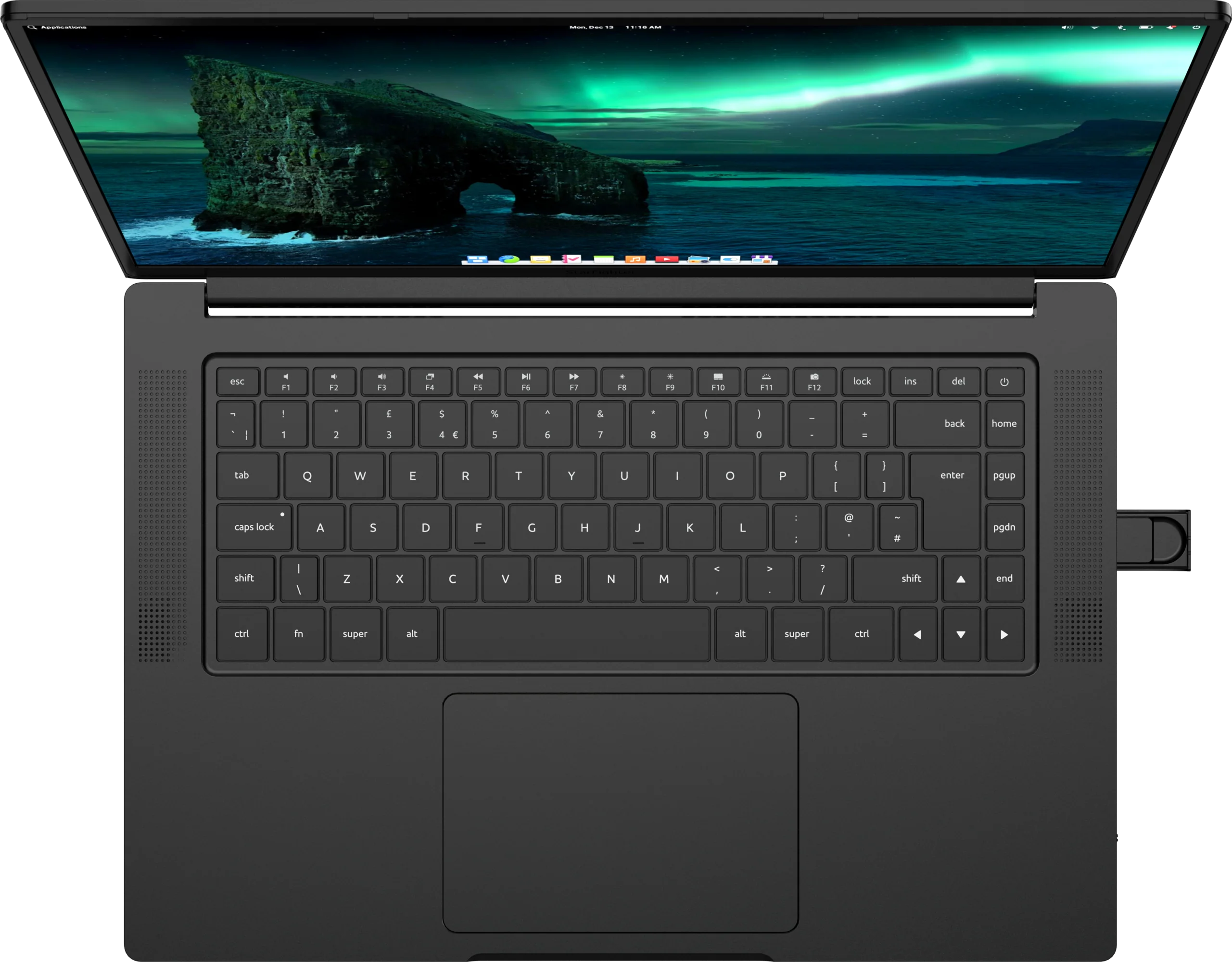
The Star Labs StarFighter

The Star Labs StarFighter is a 16-inch laptop featuring open-source coreboot firmware, disabled Intel ME, up to 64 GB of memory, wireless kill switch, removable webcam, as well as extensive firmware controls for fan, power, security, boot behavior, and more.

Photo of Star Labs StarFighter

Qubes-certified options

The configuration options required for Qubes certification are detailed below.

Base Configuration

  • Certified: Standard (Intel Core Ultra 5 125H + 32GB LPDDR5X + QHD display)

  • Certified: Ultra (Intel Core Ultra 9 285H + 64GB LPDDR5X + 4K display)

  • The AMD configuration is not certified.

  • Warning: While both the QHD and 4K display variants will work, the 4K display will run at a lower resolution (Full HD) due to the absence of proper support for HiDPI in Qubes OS. While users can manually change the resolution to 4K, we cannot guarantee everything will work properly. For example, there are known issues with both UI scaling and full-screen video playback performance in 4K. This limitation may be lifted in a future Qubes OS release.

Operating System

  • Certified: Qubes OS 4.3.2 or newer (within Release 4).

  • Releases older than 4.3.2 are not certified.

  • You may choose either to have Star Labs preinstall Qubes OS for you, or you may choose to install Qubes OS yourself. This choice does not affect certification.

Storage & Additional Storage

  • Certified: All of the available options in these sections

Disclaimers

  • As mentioned above, while both the QHD and 4K display variants will work, the 4K display will run at a lower resolution (Full HD) due to the absence of proper support for HiDPI in Qubes OS. While users can manually change the resolution to 4K, we cannot guarantee everything will work properly. For example, there are known issues with both UI scaling and full-screen video playback performance in 4K. This limitation may be lifted in a future Qubes OS release.

What is Qubes-certified hardware?

Qubes-certified hardware is hardware that has been certified by the Qubes developers as compatible with a specific major release of Qubes OS. All Qubes-certified devices are available for purchase with Qubes OS preinstalled. Beginning with Qubes 4.0, in order to achieve certification, the hardware must satisfy a rigorous set of requirements, and the vendor must commit to offering customers the very same configuration (same motherboard, same screen, same BIOS version, same Wi-Fi module, etc.) for at least one year.

Qubes-certified computers are specific models that are regularly tested by the Qubes developers to ensure compatibility with all of Qubes’ features. The developers test all new major versions and updates to ensure that no regressions are introduced.

It is important to note, however, that Qubes hardware certification certifies only that a particular hardware configuration is supported by Qubes. The Qubes OS Project takes no responsibility for any vendor’s manufacturing, shipping, payment, or other practices, nor can we control whether physical hardware is modified (whether maliciously or otherwise) en route to the user.

21 October, 2026 12:00AM

The Star Labs StarBook Horizon is Qubes certified!

It is our pleasure to announce that the Star Labs StarBook Horizon is officially certified for Qubes OS Release 4!

The Star Labs StarBook Horizon

The Star Labs StarBook Horizon is a 13.4-inch laptop featuring open-source coreboot firmware, up to 32 GB of memory, Wi-Fi kill switch, integrated webcam cover, as well as extensive firmware controls for fan, power, security, boot behavior, and more.

Photo of Star Labs StarBook Horizon

Qubes-certified options

The configuration options required for Qubes certification are detailed below.

Base Configuration

  • Certified: Standard (Intel Core i3-N305)

  • The Plus configuration (Intel Core i5-1334U) has not yet been certified. As of this writing, we have not yet received the unit for testing, but we currently do not anticipate any significant barriers to eventual certification.

Storage

  • Certified: All of the available options in these sections

Operating System

  • Certified: Qubes OS 4.3.1 or newer (within Release 4).

  • Releases older than 4.3.1 are not certified.

  • You may choose either to have Star Labs preinstall Qubes OS for you, or you may choose to install Qubes OS yourself. This choice does not affect certification.

Disclaimers

  • As mentioned above, the “Plus” base configuration (Intel Core i5-1334U) has not yet been certified. As of this writing, we have not yet received the unit for testing, but we currently do not anticipate any significant barriers to eventual certification.

What is Qubes-certified hardware?

Qubes-certified hardware is hardware that has been certified by the Qubes developers as compatible with a specific major release of Qubes OS. All Qubes-certified devices are available for purchase with Qubes OS preinstalled. Beginning with Qubes 4.0, in order to achieve certification, the hardware must satisfy a rigorous set of requirements, and the vendor must commit to offering customers the very same configuration (same motherboard, same screen, same BIOS version, same Wi-Fi module, etc.) for at least one year.

Qubes-certified computers are specific models that are regularly tested by the Qubes developers to ensure compatibility with all of Qubes’ features. The developers test all new major versions and updates to ensure that no regressions are introduced.

It is important to note, however, that Qubes hardware certification certifies only that a particular hardware configuration is supported by Qubes. The Qubes OS Project takes no responsibility for any vendor’s manufacturing, shipping, payment, or other practices, nor can we control whether physical hardware is modified (whether maliciously or otherwise) en route to the user.

21 October, 2026 12:00AM

Qubes OS Summit 2026: Nitrokey sponsorship; last call for tickets!

We’re proud to announce that Nitrokey has joined as a Qubes OS Summit 2026 Silver-tier sponsor!

Nitrokey logo

Nitrokey is a world leader in open-source security hardware. They develop hardware for data encryption, key management, user authentication, network devices, desktops, laptops, and smartphones. Several NitroPads and NitroPCs are officially certified for Qubes OS.

In addition, with the conference nearly a week away and on-site tickets over halfway gone, this serves as our last call for tickets! If you’d like to join us in person, please see below for details.

When and where

Friday, October 30 @ 9:30 AM — Sunday, November 1 @ 3:00 PM (GMT+1)

Refugio Berlin
Lenaustraße 3-4
12047 Berlin
View on OpenStreetMap

Attend in person or online

There are three ways to attend the Summit:

  1. In person at Refugio Berlin
    • Requires a paid on-site ticket
    • Grants access to the hackathon (including interactive workshops) and any design sessions (depending on conference schedule)
    • Provides the opportunity to socialize, network, and mingle with like-minded individuals who are passionate about secure computing
    • Grants exclusive access to any non-livestreamed, non-recorded presentations (see below)
    • Grants access to attend presentations and participate as a live audience member
  2. Actively participate online
    • Requires a free virtual ticket
    • For those who are presenting remotely
    • For those who are attending presentations remotely and wish to ask questions or engage in active discussion in a live chat during the presentations
    • Does not grant access to the hackathon or any design sessions
    • Does not provide the opportunity to socialize, network, or mingle with like-minded individuals who are passionate about secure computing
    • Does not grant access to any non-livestreamed, non-recorded presentations (see below)
    • Does not grant access to attend presentations as a live audience member
  3. Passively view online
    • No ticket or registration required
    • For those who simply wish to watch the presentations via the public livestream and recorded videos
    • Does not provide the ability to ask questions or engage in active discussion during the presentations
    • Does not grant access to the hackathon or any design sessions
    • Does not provide the opportunity to socialize, network, or mingle with like-minded individuals who are passionate about secure computing
    • Does not grant access to any non-livestreamed, non-recorded presentations (see below)
    • Does not grant access to attend presentations as a live audience member

Note: As mentioned above, presenters have the option to request that their presentations not be recorded. If a presenter opts out of recording, there will be a “no recording” icon next to that presentation in the conference schedule. Only on-site attendees will be able to view that presentation. It will not be livestreamed or recorded for later viewing.

Conference schedule

The official conference schedule, including a list of sessions and speakers, is available here:

https://pretalx.com/qubes-os-summit-2026/schedule/

Become a sponsor

If you or your organization are interested in sponsoring Qubes OS Summit 2026 or becoming a Qubes Partner, please contact us at funding@qubes-os.org.

Code of conduct

This event is covered by the Qubes OS Project’s code of conduct.

21 October, 2026 12:00AM

October 20, 2026

hackergotchi for Purism PureOS

Purism PureOS

The First Step Toward Digital Independence: Why AweSIM Matters

The privacy movement often asks people to make significant changes. Switch phones. Change operating systems. Learn new tools. Adopt new habits. We do that too.

The post The First Step Toward Digital Independence: Why AweSIM Matters appeared first on Purism.

20 October, 2026 06:34PM by Purism

hackergotchi for SparkyLinux

SparkyLinux

SparkyOS on USB 2026.10

SparkyOS is a modern, portable, rolling Linux-based operating system, derived from various Linux distributions, designed for modern 64-bit UEFI computers and laptops. Thanks to a pre-configured IMG image, it requires no disk partitioning or traditional installation; simply copy the IMG image content to a USB flash drive and boot your computer from that medium. Read more about SparkyOS onUSB.

Source

20 October, 2026 01:02PM by pavroo

hackergotchi for Univention Corporate Server

Univention Corporate Server

Nubus Release Overview October: Higher Release Cadence, New Flexibility

With this post, a new format begins. Instead of publishing a separate blog article for every Nubus release, a release overview that bundles the most important new features of several releases will now appear at regular intervals. The reason is a change in release frequency: Nubus has been updated more often since September, both for UCS and for Kubernetes. Operators receive updates and security fixes faster and gain more flexibility in choosing which release to run in production.

Higher Release Frequency for UCS and Kubernetes

The release frequency of Nubus is being noticeably increased. For Nubus on UCS, improvements are available weekly via erratum updates and app updates. For Nubus for Kubernetes, a new release appears at least every two weeks. This significantly shortens the time it takes for security updates and other improvements to reach users.

At the same time, Nubus for Kubernetes now makes larger release jumps possible. Not every deployment has to follow every single release as previously intended. Customers can instead decide for themselves which release to run in production and skip several versions, provided the respective upgrade path allows it. Details on the supported upgrade path can always be found in the section “Upgrade path” of the respective release notes.

New Format: Regular Overview Instead of an Article for Each Release

With the higher release cadence, the reporting in this blog also changes. Until now, nearly every release had its own article. With a cadence of at least two weeks for Kubernetes and weekly updates for UCS, that would be neither practical nor helpful for readers. From now on, a release overview like this one will therefore appear at regular intervals, bundling the relevant new features of several releases. If you do not want to wait for a summary, you will find the complete details as usual directly in the release notes.

Highlights since Nubus for Kubernetes 1.22

Since the last release article on Nubus for Kubernetes 1.22, three further releases for Kubernetes, 1.23.0 to 1.23.2, as well as the corresponding erratum and app updates for UCS have been published. The most important new features at a glance:

Guardian is back, now based on Cerbos

The authorization component Guardian is part of Nubus again, this time with Cerbos as Policy Decision Point. The new implementation does not offer any functionality yet and is disabled by default (nubusGuardian.enabled: false), but it lays the foundation for fine-grained authorization in upcoming Nubus releases. It is part of Nubus for Kubernetes and available under UCS as an app in the App Center.

Keycloak container hardened and updated

The main Keycloak container now mounts its volumes predominantly read-only. This reduces the attack surface, as significantly fewer paths in the container are writable at runtime. With Nubus for Kubernetes 1.23.1 and via the update of the app for UCS, Keycloak is also upgraded to version 26.7.4, thereby closing a larger number of CVEs.

Keycloak: preparation for stricter audience mappers (1.23.2)

Future Keycloak releases (from 26.7.5 onward) will change their behavior by ignoring OIDC audience mappers that refer to a non-existent or disabled client ID. Nubus for Kubernetes 1.23.2 and the UCS erratum updates of “univention-keycloak” prepare deployments for this change and correct the audience mapper of the OIDC client for UMC. Operators are advised to check all existing OIDC clients after the update using a supplied script and to repair them if necessary, so that the next Keycloak update proceeds without surprises. The instructions can be found in the release notes.

2FA Helpdesk: faster management UI (1.23.2)

The performance of the management UI of the 2FA Helpdesk has been improved. This is especially noticeable in environments with many user accounts.

Portal shows display names instead of usernames

Under Kubernetes, the right sidebar of the portal now displays the display name for logged-in users and only falls back to the username if no display name is set. This change will become available for UCS in an upcoming update.

Significantly smaller container images: less storage, smaller attack surface

The container images of the LDAP server and the provisioning service have been consistently slimmed down. Unused software packages were removed from the LDAP server image, and the four provisioning components now run from a shared, minimal (“distroless”) image, the first image of this kind in Nubus. This image is around 90% smaller than the previous four images, and the number of included software components drops by 85% (50% for unique components). This saves storage space and bandwidth during deployment, reduces the attack surface, and cuts the number of findings in vulnerability scans, in particular false positives caused by unused packages. Operators who use their own image overrides for provisioning components will find the required migration note in the release notes.


As always, the release notes for Nubus for Kubernetes 1.23 contain all details, including the complete list of closed CVEs. The installation is described in the Nubus Operations Manual.

Der Beitrag Nubus Release Overview October: Higher Release Cadence, New Flexibility erschien zuerst auf Univention.

20 October, 2026 09:27AM by Ingo Steuwer

hackergotchi for ARMBIAN

ARMBIAN

Github Highlights

Github Highlights

This week&aposs work centers on expanded board support, Rockchip and Realtek platform maturation, and continued refinement of installation and BSP tooling.

New hardware enablement spans several SoC families. Initial build support arrives for the Altera Agilex 5 SoCDK, Banana Pi R3 Mini, Firefly AIBOX-K3, and the Allwinner H5 PBS TV Stick, while a new realtek-rtd129x family brings mainline kernel and U-Boot to the Banana Pi W2. The MangoPi MQ Pro gains Debian GRUB EFI boot and a proper maintainer, and the Radxa CM5-IO transitions to mainline kernel and U-Boot. Supporting firmware updates include Tegra210 USB, GPU and VIC blobs, Amlogic VDEC firmware, Realtek rtl8261c, and Qualcomm EDK2 firmware for Radxa boards.

Rockchip receives sustained attention across kernel branches, with RK3576 Panfrost GPU overlays, vendor-next OPP and GPU-name corrections for RK356x Panfrost, RK356x suspend fixes for USB and NVMe, and patch repairs for the 6.18 and 7.3 trees. The new Realtek RTD129x family lands multiple stabilization patches covering hwnat RX overflow, watchdog timeout handling, and the r8169soc driver. Sunxi edge advances to 7.3, A523 gains HDMI audio DTS, and Meson moves VIM4 to 7.3 with GPU and audio support.

On the user-facing side, armbian-install gains a standalone mode for U-Boot boot disks and board-defined firmware naming, while the BSP layer improves conffile handling, preserves user edits to periodic configuration, and defers armbianEnv.txt rewrites. The imager stops mislabeling every target as an SD card, mainline U-Boot advances to v2026.10, and the documentation site adds DUT inventory, board pinouts, schematics, and installation instructions.

#Armbian #EmbeddedLinux #Rockchip #Realtek #UBoot

Changes

20 October, 2026 03:05AM by Michael Robinson

October 19, 2026

hackergotchi for GreenboneOS

GreenboneOS

CVE-2026-102764: BeyondTrust RS Actively Exploited

CVE-2026-102764 (CVSS 9.3, EPSS ≥ 67th pct) is a critical authentication-bypass flaw affecting BeyondTrust Remote Support (RS). The vulnerability stems from improper origin validation in an internal messaging component, and exploitation allows an unauthenticated remote attacker to perform file operations on an affected appliance. The CVE was published on October 15th, 2026, and added to […]

19 October, 2026 09:01AM by Joseph Lee

hackergotchi for Deepin

Deepin

Deepin patches LoongArch kernel probe bug: two redundant assembly lines caused Loongson random freezes

Imagine this scenario...the system installation is halfway through, and the machine freezes without warning. Checking the serial logs, there are only a few scattered exceptions. That's the trouble with kernel issues—the moment of failure is fleeting, the clues left behind are contradictory, and the true root cause is hidden in a tiny, unremarkable execution path. Tracking it down is like finding a needle in a haystack. The deepin file manager provides a file indexing feature. The kernel module used for indexing instruments filesystem functions through the VFS kretprobe hook method, collecting the information needed for indexing during file access. Recently, when a large number of file operations were combined with kernel probes, a low-level defect on the LoongArch platform was triggered, causing the system to freeze during installation or when extracting large images. deepin developers spent nine consecutive days investigating this issue, ultimately pinpointing the root cause to the LoongArch kernel's rethook trampoline function incorrectly restoring the percpu base address, and verified the fix direction through targeted experiments. What follows is the practical process from discovering to fixing this kernel issue. The article is long but packed with useful information—please read patiently~ First, let's understand a few concepts LoongArch: The processor instruction set architecture adopted by  The kernel must follow the register and runtime conventions defined by this architecture. percpuvariables: Data that each CPU core holds its own copy  The kernel accesses the current core's data through operations like this_cpu_(), such as scheduler and RCU state, as well as timers and FPU state. The LoongArch kernel convention uses $r21 (also called $su0) to hold the current CPU's percpu base address. During kernel-mode execution, this register should always point to the current core's percpu area. kretprobe: A Linux kernel function return tracing mechanism that can execute handling logic when a traced function  rethook: The kernel mechanism used to implement this type of return tracing, responsible for arranging callbacks and continuing the original function's return flow. To temporarily take over the function return, the kernel passes through a small ...Read more

19 October, 2026 02:24AM by xiaofei

October 15, 2026

hackergotchi for ZEVENET

ZEVENET

SKUDONET Enterprise Edition 10.3.0 adds TLS Termination for TCP Services

SKUDONET Enterprise Edition 10.3.0 is now available and brings a new farm type: TCP SSL. It extends SSL/TLS termination to TCP-based services, not just web applications. Clients open an encrypted connection to SKUDONET, which handles the TLS session and passes the traffic on to the backend servers without parsing the Layer 7 protocol.

What TCP SSL Adds

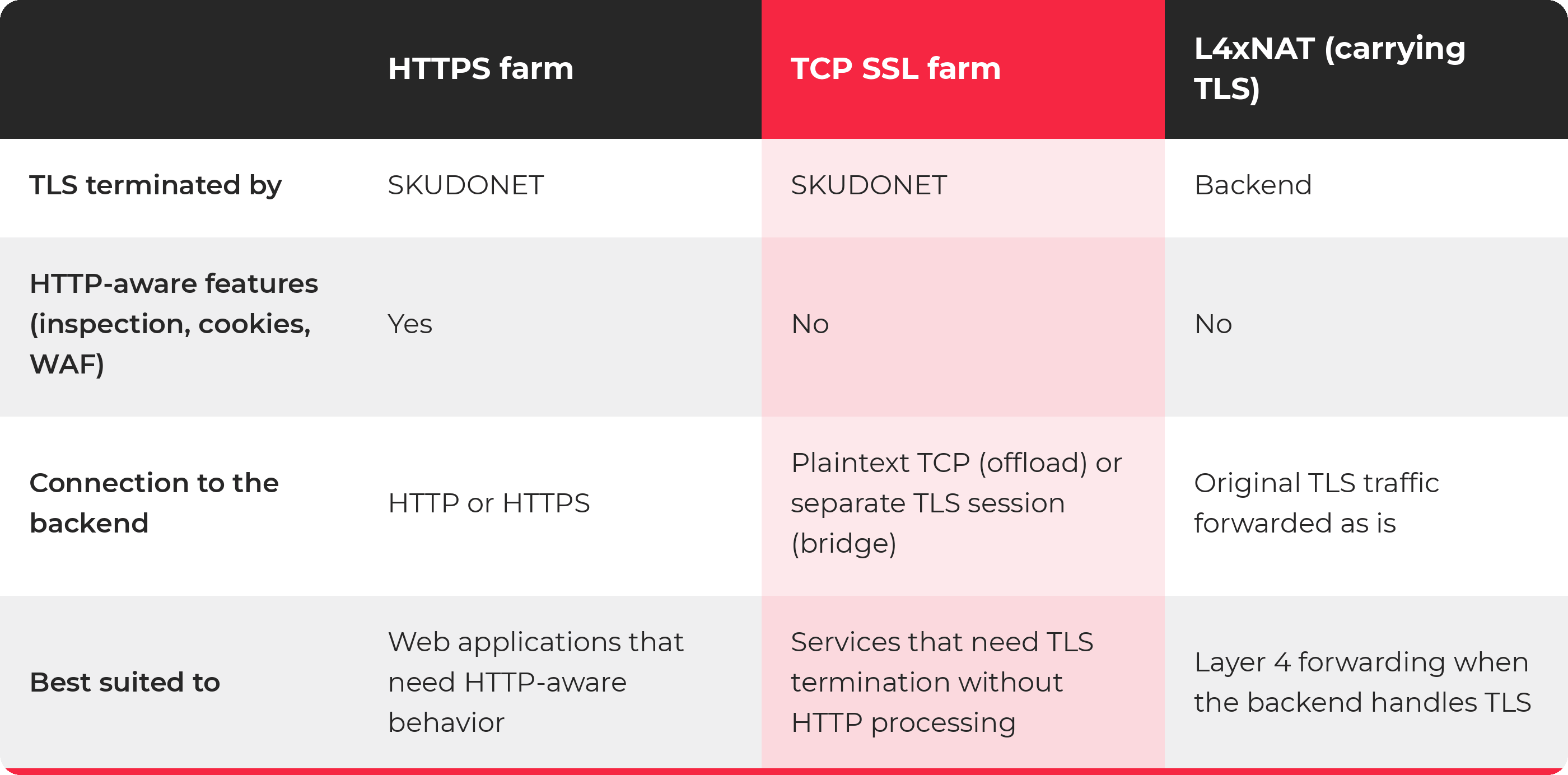
SKUDONET already offered HTTP/HTTPS farms and L4xNAT. The HTTPS farm terminates TLS and also understands HTTP, which is what makes HTTP inspection, cookie management and WAF rules possible. L4xNAT is the lightweight Layer 4 option. TCP SSL adds a new one: TLS termination for non-HTTP services, without any application-layer processing.

Why Terminate TLS at the Load Balancer?

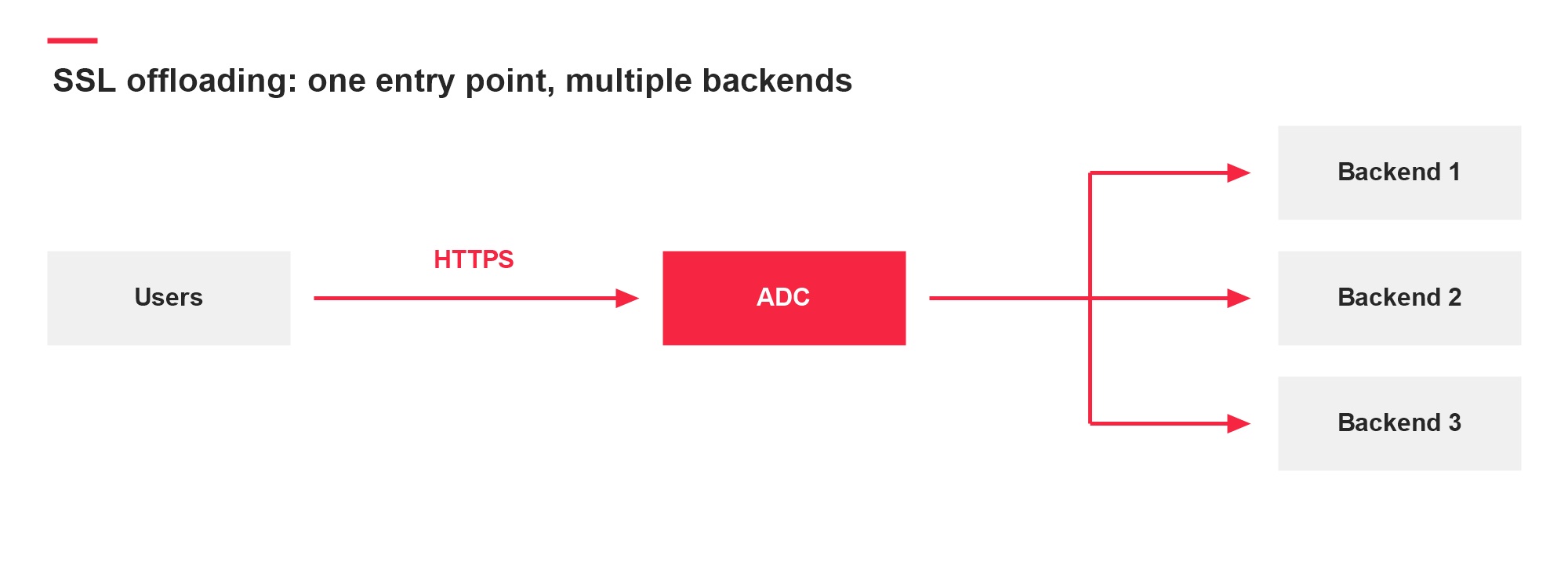
Plenty of applications already support TLS. Supporting encryption is one thing, though, and running it consistently across a production environment is another. Certificates have to be deployed and renewed, TLS settings kept up to date, and application servers may run different software versions or need different procedures to change their security settings. Legacy infrastructure adds one more problem: an older application may have no native TLS support, or may depend on software that is hard to upgrade.

Terminating TLS at the load balancer gives you a single place to manage encrypted client connections. Clients connect to the certificate SKUDONET presents, and the backend keeps receiving the application protocol it already understands. How far that protection reaches depends on whether you use offload or bridge.

How TCP SSL Works

A TCP SSL farm accepts a TCP connection and performs the TLS handshake with the client. Once the encrypted session is up, SKUDONET decrypts the incoming traffic and forwards the application data to the backend. Responses travel the other way: SKUDONET receives the data from the backend and encrypts it before sending it back to the client.

SKUDONET treats the payload as a TCP byte stream. To forward it, TCP SSL doesn’t need to interpret HTTP requests, database queries, mail commands or directory operations. That is what sets it apart from an HTTPS farm: both can terminate TLS, but only the HTTPS farm understands HTTP and can apply features based on what it carries.

“TCP SSL” is just the familiar name for the farm type. Deployments should use supported TLS versions and avoid obsolete SSL protocols.

Offload or Bridge

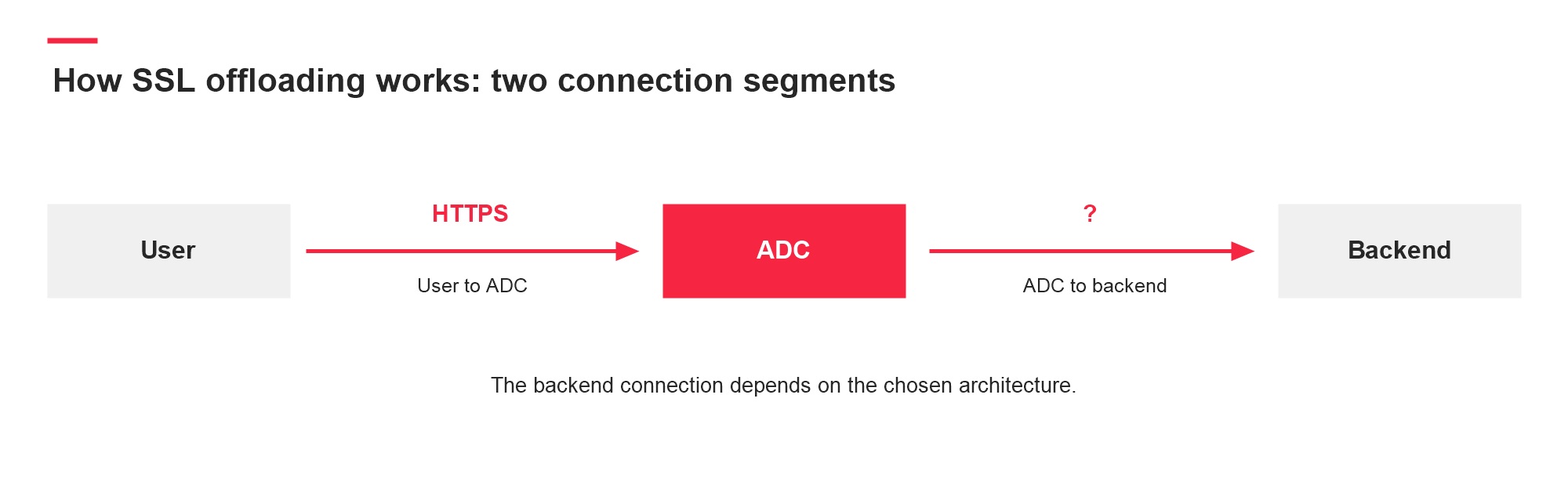
The connection between SKUDONET and the backend can be set up in two ways.

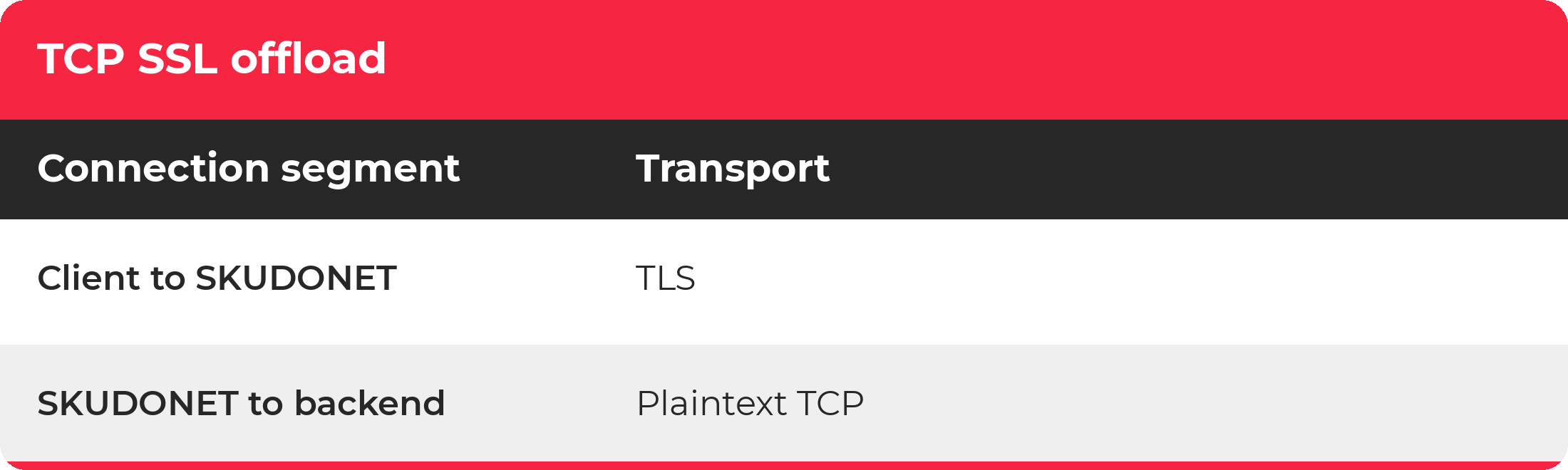
TLS offload

With TLS offload, SKUDONET presents the client-facing certificate, does the cryptographic work for that connection and talks to the backend over plaintext TCP. It suits backends that can’t handle TLS themselves: an application that exposes a plaintext TCP service can stay as it is while compatible clients connect through an encrypted endpoint on the load balancer.

skudonet-tcp-ssl-offload

Since the last segment is unencrypted, plaintext traffic there has to be acceptable in your architecture, and access to the backend should be limited to the intended network paths so clients can’t bypass the encrypted endpoint. In other words, offload protects the connection up to SKUDONET, not the one behind it. It also moves the TLS processing for client connections onto the load balancer, although any performance gain depends on the application, the traffic pattern and the resources available.

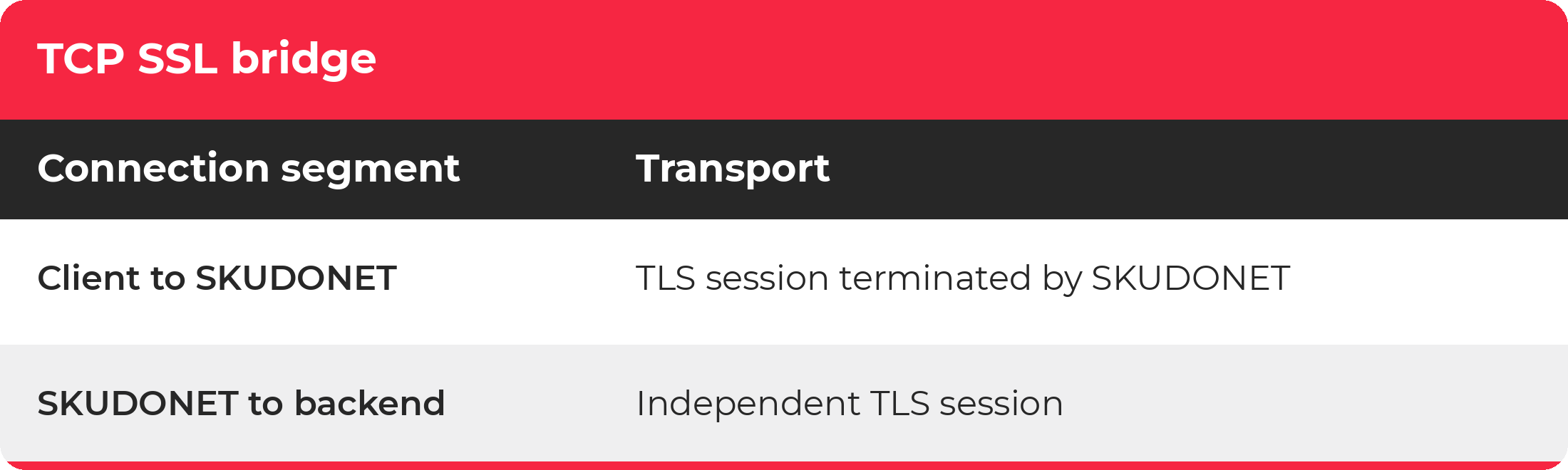
TLS bridge

In bridge mode, SKUDONET terminates the incoming TLS session and opens a separate TLS session with the selected backend. The client validates the certificate SKUDONET presents, while on the backend side SKUDONET acts as a TLS client. Traffic is decrypted inside the load balancer and encrypted again, and the two connections have their own handshakes, certificates and negotiated parameters.

skudonet-tcp-ssl-bridge

So encryption covers both segments, with SKUDONET acting as a trusted termination point between them. It is not one uninterrupted session between client and application. The backend has to support a compatible TLS connection and still does TLS processing for its link to SKUDONET, which means bridge doesn’t fit a legacy service that only works in plaintext. Where the configuration allows it, the backend connection should also authenticate the intended server through certificate and hostname verification.

Bridge Is Not Passthrough

When L4xNAT carries TLS traffic, SKUDONET forwards the encrypted traffic without terminating the session: the backend presents its certificate directly to the client and handles the encryption and decryption itself. In bridge mode, the client establishes TLS with SKUDONET, and SKUDONET opens a second connection to the backend. The difference decides where certificates are managed, where the cryptographic processing happens and which components can see the decrypted application data.

Which Services Fit

TCP SSL suits services that start TLS as soon as the TCP connection opens, known as implicit or direct TLS. Examples include LDAP clients using LDAPS, mail clients using implicit TLS for IMAP, POP3 or message submission, and custom applications whose clients support direct TLS.

Protocols that start in plaintext and negotiate encryption later, such as SMTP with STARTTLS, need extra care: because TCP SSL doesn’t parse the protocol, it can’t carry out that negotiation. Databases need a case-by-case check too. PostgreSQL, for example, traditionally sends a request before the TLS handshake, although newer implementations can support direct TLS negotiation, so you should confirm the client, the connection mode and the backend’s behavior first.

TCP SSL can also serve HTTP services that need TLS termination and TCP load balancing but no HTTP inspection. If your decisions depend on HTTP content, the HTTPS farm is still the right profile.

TCP SSL vs HTTPS vs L4xNAT

skudonet-tcp-ssl-vs-https-vs-l4xnat-

A Practical Step for Legacy Infrastructure

Replacing an application and improving the security of its transport don’t have to happen at the same time.

A business-critical service can be hard to modify because of vendor dependencies, operating system constraints or integration requirements. If its client connection model is compatible, TCP SSL offload lets administrators add encrypted access while keeping the existing backend application.

That protects against interception and modification of traffic on the client-facing connection. Application authentication and authorization, patching and backend network controls remainnecessary parts of the design necessary parts of the design.

15 October, 2026 02:53PM by Isabel Perez

October 14, 2026

hackergotchi for GreenboneOS

GreenboneOS

CVE-2026-21589: Multiple Atlassian Data Center Products Actively Exploited

CVE-2026-21589 (CVSS 9.3, EPSS ≥ 78th pctl) is a critical-severity arbitrary file access vulnerability [CWE-552] affecting Atlassian Jira Service Management Data Center, Jira Software Data Center, Confluence Data Center, Bitbucket Data Center, Bamboo Data Center, Crowd Data Center, Crucible, and Fisheye. All unpatched versions of the affected products are vulnerable. The file access vulnerability can […]

14 October, 2026 01:04PM by Joseph Lee

hackergotchi for Deepin

Deepin

October 13, 2026

hackergotchi for ARMBIAN

ARMBIAN

Github Highlights

Github Highlights

This week&aposs development centers on expanded board support and vendor kernel work, mainline kernel progression to 7.3 with CI resilience improvements, and a substantial refresh of the Armbian Imager.

New hardware enablement spans multiple SoC families, including the Boardcon SBC3568 (RK3568), ELTAY RM66 (RK3566) with vendor HDMI and power-domain workarounds, the Anbernic RG Rotate on the new Unisoc UMS512 family, and the NanoPi M6 V2. The NanoPi R6S, R6C, M6/M6V2, and NanoPC T6/T6-LTS have been unified under a single image with shared aliases, reducing duplication across the FriendlyELEC RK3588 lineup. On the vendor side, an initial rk35xx-vendor-next branch based on 6.12-rkr1 consolidates Rockchip vendor families, while fixes land for Orange Pi CM5 boot, Orange Pi 3B U-Boot unification, and RS485 support in the 8250 serial driver.

Mainline moves to 7.3-rc7 across rockchip64, meson64, and uefi targets, with SpacemiT K1 edge migrating from 7.2.y to 7.3.y and an RK3568 PCIe Root Port reset loop fix. Build infrastructure gains a GitHub mirror fallback for mainline kernel fetches, longer git proxy timeouts, overflow of arm64 image jobs to X64 runners, and ccache refactored into a swappable extension. The Armbian Imager received broad investment: full-page Settings with board-scoped first-boot profiles, a critical fix preventing the ext4 writer from corrupting the rootfs, hardened disk target validation before flashing, cache correctness fixes on Windows, and expanded CI coverage including Rust linting on Windows and functional test builds for fork PRs.

#Armbian #EmbeddedLinux #Rockchip #MainlineKernel #SBC

Changes

13 October, 2026 01:35AM by Michael Robinson

hackergotchi for Tails

Tails

Tails 7.15

Changes and updates

  • Update Tor Browser to 15.0.25.

  • Update the Tor client to 0.4.9.14.

  • Update some firmware packages. This improves support for newer hardware: graphics, Wi-Fi, and so on.

Get Tails 7.15

To upgrade your Tails USB stick and keep your Persistent Storage

  • Automatic upgrades are available from Tails 7.0 or later to 7.15.

  • If you cannot do an automatic upgrade or if Tails fails to start after an automatic upgrade, please try to do a manual upgrade.

To install Tails 7.15 on a new USB stick

Follow our installation instructions.

The Persistent Storage on the USB stick will be lost if you install instead of upgrading.

To download only

If you don't need installation or upgrade instructions, you can download Tails 7.15 directly:

13 October, 2026 12:00AM

hackergotchi for Qubes

Qubes

XSAs released on 2026-10-13

The Xen Project has released one or more Xen security advisories (XSAs). The security of Qubes OS is not affected.

XSAs that DO affect the security of Qubes OS

The following XSAs do affect the security of Qubes OS:

  • (none)

XSAs that DO NOT affect the security of Qubes OS

The following XSAs do not affect the security of Qubes OS, and no user action is necessary:

  • XSA-514: Affects only Xen 4.22 or higher; Qubes OS 4.3 uses Xen 4.19. Affects only Xenstore live update, which is not used in Qubes OS.
  • XSA-515: Up-to-date systems are not affected. Only systems running outdated AMD microcode from before 2023 are affected.
  • XSA-516: Only systems with 5 TiB of RAM or higher are affected, which is not the target hardware class for Qubes OS.
  • XSA-517: Grant tables v2 are disabled at build time in Qubes OS.
  • XSA-518: Denial of service only. In-VM only.
  • XSA-519: ARM only. Qubes OS does not support ARM.
  • XSA-520: Denial of service only.
  • XSA-521: Tapdisk is not used in Qubes OS.

About this announcement

Qubes OS uses the Xen hypervisor as part of its architecture. When the Xen Project publicly discloses a vulnerability in the Xen hypervisor, they issue a notice called a Xen security advisory (XSA). Vulnerabilities in the Xen hypervisor sometimes have security implications for Qubes OS. When they do, we issue a notice called a Qubes security bulletin (QSB). (QSBs are also issued for non-Xen vulnerabilities.) However, QSBs can provide only positive confirmation that certain XSAs do affect the security of Qubes OS. QSBs cannot provide negative confirmation that other XSAs do not affect the security of Qubes OS. Therefore, we also maintain an XSA tracker, which is a comprehensive list of all XSAs publicly disclosed to date, including whether each one affects the security of Qubes OS. When new XSAs are published, we add them to the XSA tracker and publish a notice like this one in order to inform Qubes users that a new batch of XSAs has been released and whether each one affects the security of Qubes OS.

13 October, 2026 12:00AM

October 12, 2026

hackergotchi for GreenboneOS

GreenboneOS

CVE-2026-104286: FortiMail Webmail Interface Actively Exploited

CVE-2026-104286 (CVSS 9.8, EPSS ≥ 82nd pctl) is a critical path traversal [CWE-22] and NULL-byte handling flaw [CWE-158] affecting Fortinet FortiMail. Exploitation can be achieved via HTTP/HTTPS request to the FortiMail web interface. The CVE was both published and added to CISA’s KEV list on October 1st, 2026. Successful exploitation allows writing arbitrary files with […]

12 October, 2026 01:11PM by Joseph Lee

hackergotchi for Deepin

Deepin

Urgent Security Update | Fix sudo time-window authorization bypass

Dear deepin users and community partners: Recently, we detected a time-window authorization bypass vulnerability in sudo. Under certain conditions, an attacker can cause expired or not-yet-effective sudo authorization rules to be incorrectly judged as valid, thereby obtaining root privileges outside the intended time period. At present, the technical details for exploiting this vulnerability have been made public. Given its severity and broad impact, to ensure the security of your system, we recommend that all users upgrade as soon as possible. Vulnerability Information Vulnerability ID:  CVE-2026-96512 Vulnerability Description: This vulnerability originates from a flaw (CWE-863) in sudo’s authorization validation of time-based ...Read more

12 October, 2026 05:54AM by xiaofei

October 11, 2026

hackergotchi for ArcheOS

ArcheOS

3DHOP x-ray tool 2.0

Hi everyone,

Last May I released the x-ray tool, a small extension for 3DHOP I had developed during the 3D documentation project of the Similaun mummy (Ötzi). It loads two aligned meshes of the same subject, an outer surface and an inner structure, and lets you make the outer one semi-transparent, so that what is inside becomes visible without moving the camera. In the first version the effect was a simple on/off toggle.

I have just published version 2.0, which turns that toggle into a real-time control. A new x-ray intensity slider, at the bottom centre of the viewer, regulates the transparency of the outer shell continuously, from an almost invisible shell to a dense "ghost"; the value used on the Ötzi project, 0.9, is still the default, and the toolbar button remains as an on/off shortcut. Version 2.0 also adds the standard 3DHOP measure tool, calibrated in millimetres.

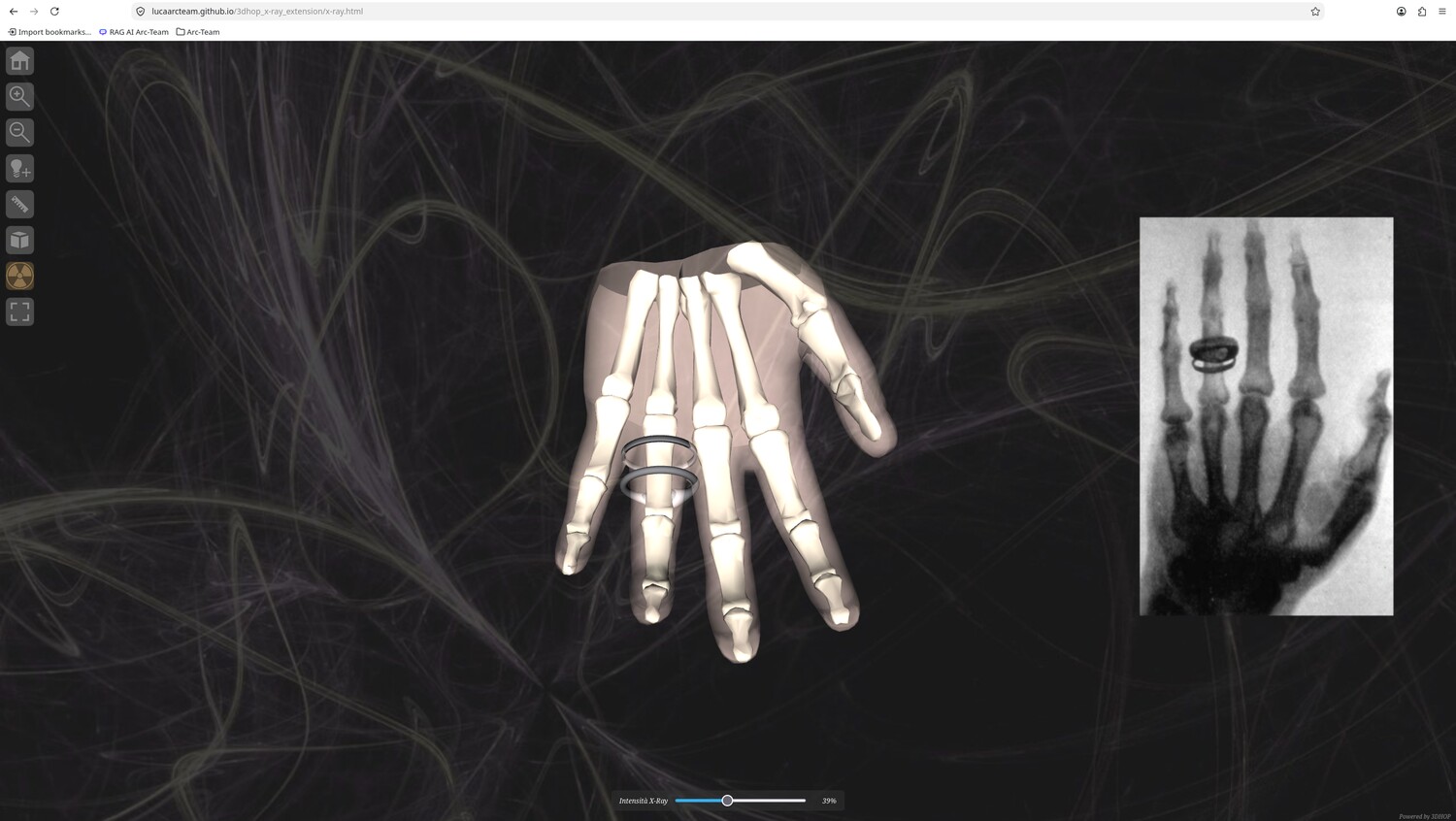
To make the tool easier to try, the repository now includes a live demo on GitHub Pages: lucaarcteam.github.io/3dhop_x-ray_extension/x-ray.html. The demo subject is a left hand with two rings, a homage to Wilhelm Röntgen's first radiograph (Hand mit Ringen, 1895): you can orbit the model, switch the x-ray on and drag the slider to see the bones appear through the skin in real time.

Below, you can see the live demo of the x-ray tool 2.0.

The x-ray tool 2.0 live demo: the Röntgen hand, with the x-ray slider and the skeleton visible through the skin.

Everything runs in the browser with static files, with no server-side code. As in the first version, the 3DHOP core is left untouched: all the extension logic lives in the x-ray.html page and uses the native transparency API, so the tool keeps working with upstream 3DHOP. The code is released under GPL-3.0-or-later, while the demo models come from the open Z-Anatomy atlas (CC BY-SA 4.0).

You can find the source code, the live demo and the release notes on GitHub. The tool was born within the study published in Heritage 2026.

I hope you find this useful. Have a nice day!


11 October, 2026 05:25PM by Luca Bezzi (noreply@blogger.com)

October 10, 2026

DendrOS, an open-source dendrochronology software

Hi everyone,

Together with Mauro Bernabei (CNR-IBE, the Institute of BioEconomy of the Italian National Research Council), I have been developing a new piece of open-source software for our field: DendrOS.

DendrOS is a cross-platform application for dendrochronological analysis and cross-dating of tree-ring width series. It is written in Python with a PyQt6 interface and released under the GNU General Public License v3, so it runs on Linux and Windows and can be read, modified and redistributed like the rest of our Arc-Team tools.

The project started from a practical need. Many dendrochronologists still rely on PAST4 or PAST5. They are solid reference software, but closed-source and Windows-only, and they no longer fit the open workflow we built around our other projects. DendrOS aims to bring the same working method into the open-source world.

DendrOS can import the most common formats used in dendrochronology (.rwl, .txt and .fh, i.e. the CATRAS/Holmes format) and display them in an interactive time-series plot with pan, zoom and a movable year cursor. Series are managed in a tree with View/Edit/Ref/Info columns, and two separate vertical and horizontal zoom tools, inspired by PAST4, let you stretch the plot on a single axis.

The core of the application is cross-dating: DendrOS slides one or more samples against a reference series (or against a master chronology built on the fly) and ranks every possible position with the Baillie-Pilcher t-value (tBP), together with its p-value, the Pearson correlation coefficient and the Gleichläufigkeit percentage. The best offset can then be applied to the series with a click. Beyond cross-dating, DendrOS can build a master chronology by averaging the overlapping series, highlight concordance bands and pointer years (Weiserjahre), and detrend/index the series through the dplPy library (spline, modified negative exponential, Hugershoff, linear, horizontal). The whole session is saved in a readable .dendro project file.

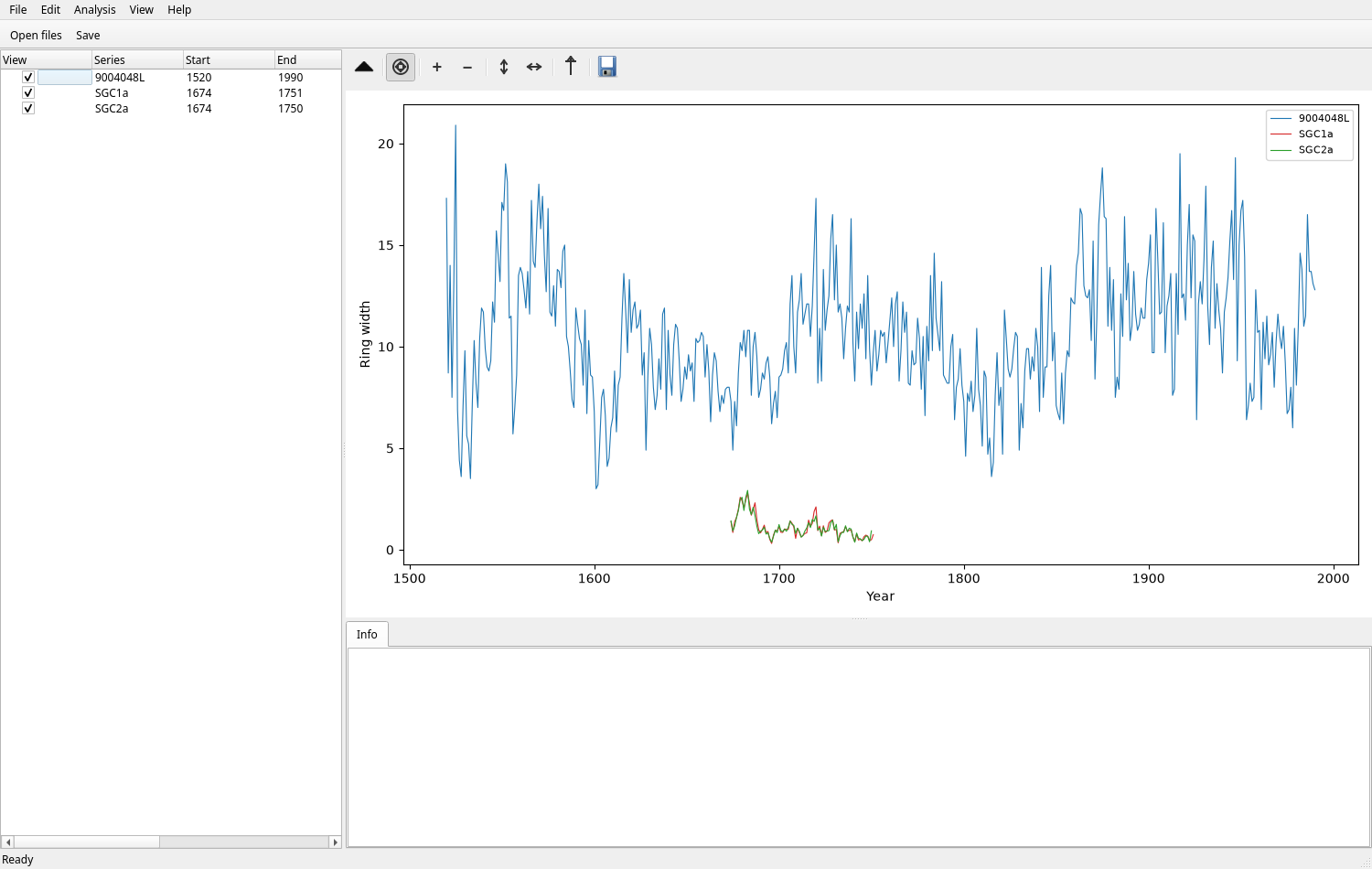
Below, you can see the main window of DendrOS.

The main window of DendrOS, with the series tree on the left and the time-series plot on the right.

DendrOS is already part of the ArcheOS software list, the GitHub project that marks the first step of the ArcheOS revival, in the dendrochronology section. You can find the source code and the user guide on GitHub, while a pre-built Windows executable is generated automatically from the latest commit and published under Releases, so no Python installation is required to try it.

The project is still under active development, so any feedback from colleagues working with dendrochronology is more than welcome.

I hope you find this useful. Have a nice day!


10 October, 2026 01:27PM by Luca Bezzi (noreply@blogger.com)

Ghostwriter, a Markdown editor to interact with AI

Hi everyone,

A few days ago I added a new entry to the ArcheOS software list, the GitHub project that marks the first step of the ArcheOS revival: Ghostwriter.

Ghostwriter is a free and open-source, distraction-free and themeable Markdown editor for Linux and Windows, recently moved into the KDE project. It provides a live HTML preview and can export to PDF, HTML, ODT and many other formats.

At first glance, a Markdown editor can look like an odd addition to a list of archaeological software. Actually, nowadays a growing part of our notes, reports and prompts are written in Markdown and produced together with AI agents: Ghostwriter is the application I use to read and edit those .md files, checking them with the live preview before committing them to a repository or sharing them with the team. In other words, it is the missing piece between the AI and our archaeological documents.

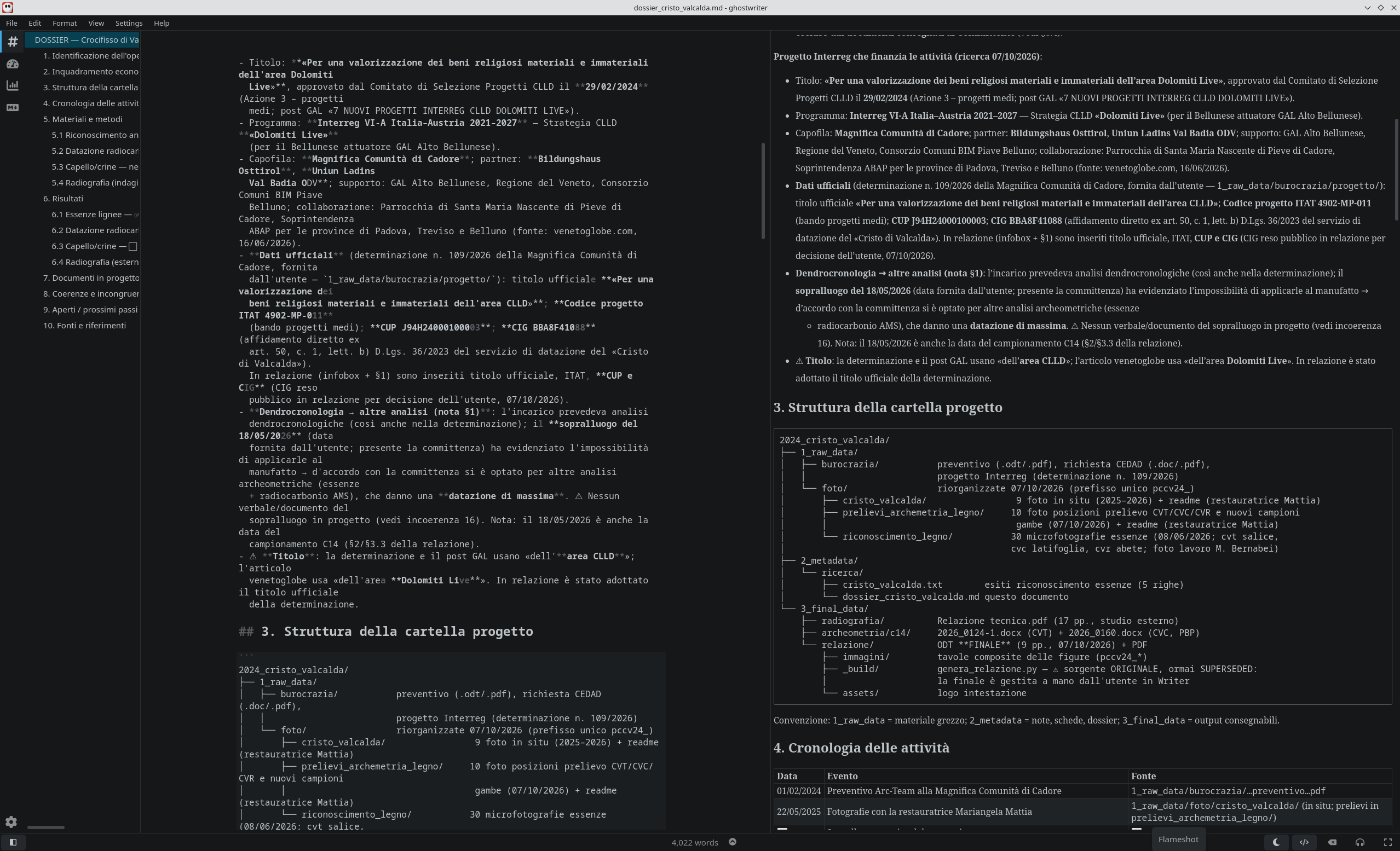
Below, you can see Ghostwriter during the archeometric study of the Cristo di Valcalda.

Use of Ghostwriter during the archeometric study of the Cristo di Valcalda.

For this reason, I have officially added Ghostwriter to the ArcheOS software list, both in the AI agents section and in the Utilities one. One more good reason: Ghostwriter is available in the Debian repositories, which is good news for the next steps of the ArcheOS roadmap.

I hope you find this useful. Have a nice day!


10 October, 2026 01:05PM by Luca Bezzi (noreply@blogger.com)

DendrOS, an open-source dendrochronology software


Hi everyone,

Together with Mauro Bernabei (CNR-IBE, the Institute of BioEconomy of the Italian National Research Council), I have been developing a new piece of open-source software for our field: DendrOS.

DendrOS is a cross-platform application for dendrochronological analysis and cross-dating of tree-ring width series. It is written in Python with a PyQt6 interface and released under the GNU General Public License v3, so it runs on Linux and Windows and can be read, modified and redistributed like the rest of our Arc-Team tools.

The project started from a practical need. Many dendrochronologists still rely on PAST4 or PAST5. They are solid reference software, but closed-source and Windows-only, and they no longer fit the open workflow we built around our other projects. DendrOS aims to bring the same working method into the open-source world.

DendrOS can import the most common formats used in dendrochronology (.rwl, .txt and .fh, i.e. the CATRAS/Holmes format) and display them in an interactive time-series plot with pan, zoom and a movable year cursor. Series are managed in a tree with View/Edit/Ref/Info columns, and two separate vertical and horizontal zoom tools, inspired by PAST4, let you stretch the plot on a single axis.

The core of the application is cross-dating: DendrOS slides one or more samples against a reference series (or against a master chronology built on the fly) and ranks every possible position with the Baillie-Pilcher t-value (tBP), together with its p-value, the Pearson correlation coefficient and the Gleichläufigkeit percentage. The best offset can then be applied to the series with a click. Beyond cross-dating, DendrOS can build a master chronology by averaging the overlapping series, highlight concordance bands and pointer years (Weiserjahre), and detrend/index the series through the dplPy library (spline, modified negative exponential, Hugershoff, linear, horizontal). The whole session is saved in a readable .dendro project file.

Below, you can see the main window of DendrOS.

The main window of DendrOS, with the series tree on the left and the time-series plot on the right.

DendrOS is already part of the ArcheOS software list, the GitHub project that marks the first step of the ArcheOS revival, in the dendrochronology section. You can find the source code and the user guide on GitHub, while a pre-built Windows executable is generated automatically from the latest commit and published under Releases, so no Python installation is required to try it.

The project is still under active development, so any feedback from colleagues working with dendrochronology is more than welcome.

I hope you find this useful. Have a nice day!


10 October, 2026 01:04PM by Luca Bezzi (noreply@blogger.com)

hackergotchi for Deepin

Deepin

September Community Monthly Report | deepin 25.2.2 Liquid Glass Effects & XiaoU Multi-Agent Collaboration

September Community Data Overview Learn more about deepin on DistroWatch: https://distrowatch.com/table.php?distribution=deepin Community Products deepin 25.2.2 Update: Window Split-Screen · Liquid Glass Effect On September 8, the deepin 25.2.2 official release was launched. The two most noticeable new features in this update come from the Treeland desktop environment; Window split-screen supports quickly tiling windows to the left or right side of the screen, making multitasking more efficient; The liquid glass effect replaces simple blurring with physical refraction, enriching the desktop's visual hierarchy. The Treeland underlying layer has been synchronized with upstream, removing the qwlroots dependency and upgrading to wiroots 0.20, adding support for pointer-constraints and relative-pointer protocols, and improving mouse interaction in games and 3D applications. At the system level, this update fixes multiple issues in system updates, the Panshi system and file management, input methods, document viewers, screenshot and screen recording, and other commonly used applications; improves connectivity for some MTK wireless network cards; enhances compatibility and recognition capabilities for some domestic graphics card platforms, graphics audio devices, and LPDDR5X memory; and fixes multiple security vulnerabilities in foundational components such as GLib, GStreamer, Ghostscript, curl, X.Org, and XWayland. The Linglong application update on September 24 focused on fixing issues such as missing desktop and taskbar icons after some Linglong applications were upgraded, failure to start normally, and abnormal host resource mounting, while also optimizing the DBus service security mechanism. Xiao U: Unified Scheduling and Multi-Agent Collaboration · Scenario-Based Recommendations Xiao U released version 3.3.0, upgrading around "ondemand loading and faster response": Xiao U automatically selects the required tools or dedicated sub-agents based on the task, loading only the capabilities needed for the current task; built-in tools, MCP, Skills, and subagents are unified into a single capability catalog, and conversations no ...Read more

10 October, 2026 09:11AM by xiaofei

October 09, 2026

hackergotchi for Univention Corporate Server

Univention Corporate Server

hackergotchi for ZEVENET

ZEVENET

What Is Application Security? Protecting Applications from Code to Production

An application can pass every code review, every scan and a full penetration test, and still be exposed a month after release. A dependency gets a new CVE. A configuration drifts. Someone finds a request pattern nobody thought to test. Meanwhile the application is live, handling real traffic and real customer data.

That gap between “tested” and “safe” is what application security is about. This guide covers what the discipline includes, the threats that come up most often, how testing and runtime controls split the work, and where infrastructure like a web application firewall (WAF) or an application delivery controller (ADC) fits in.

What is application security?

Application security (AppSec) is the set of practices and tools used to keep software free of exploitable weaknesses and to protect it from attack throughout its life: design, development, testing, deployment and daily operation. Its goal is to protect the confidentiality, integrity and availability of the application and the data it handles.

In practice that means four jobs: building software that avoids known flaws, testing it to find the ones that slip through, controlling who can do what inside it, and monitoring and defending it once it is live. Different teams usually own different jobs, so gaps tend to appear at the handoffs between them.

Web application security is the same discipline applied to anything exposed over HTTP: websites, web apps and APIs. Most of the threats below belong to that group.

The threats that come up again and again

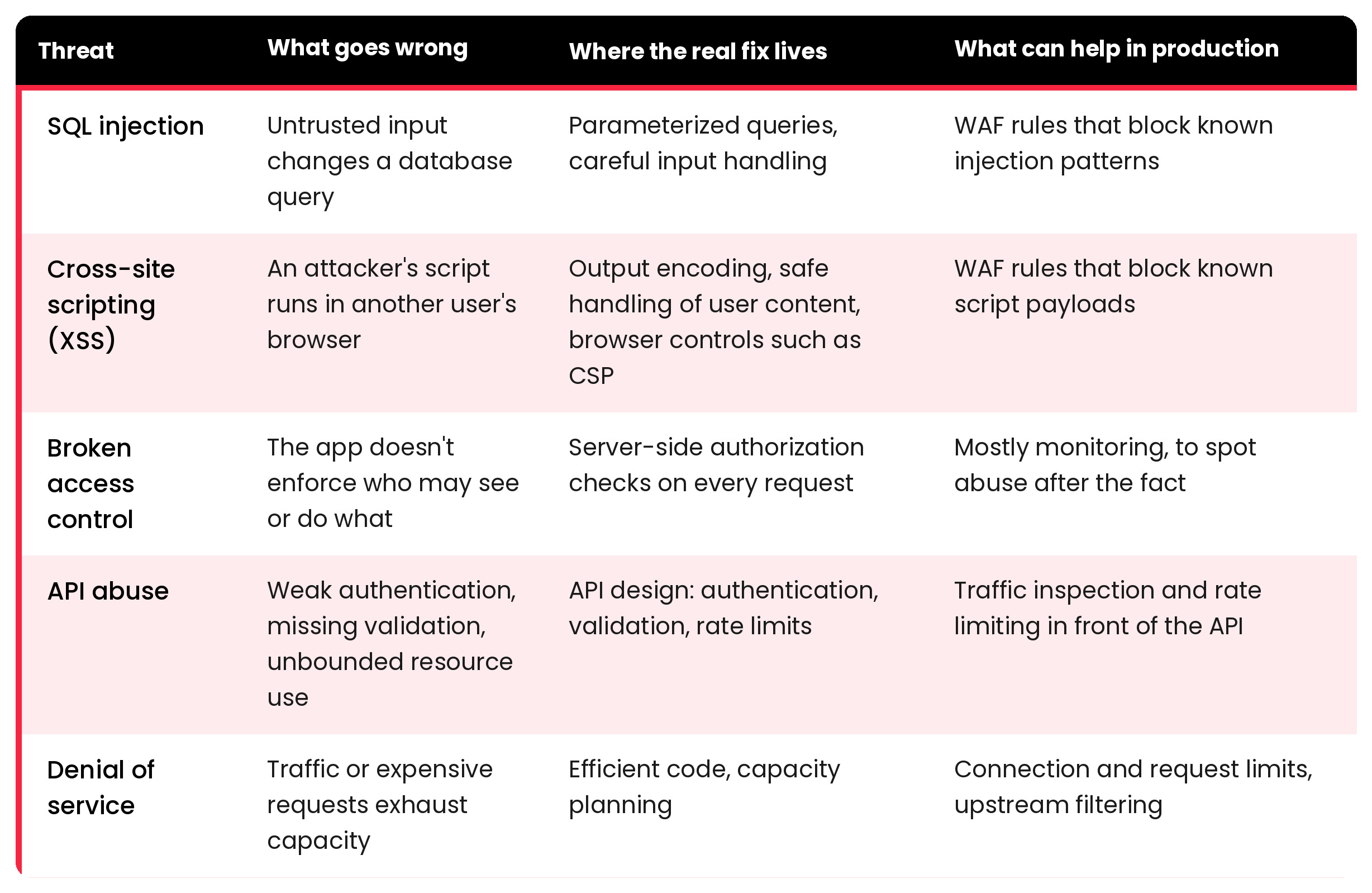
The OWASP Top 10 is the usual starting point for what to worry about. Instead of walking through all ten, it’s more useful to take five recurring threats and ask two practical questions: where does the real fix live, and what can help while that fix is still in progress?

application-security-threats-table

Broken access control deserves a note of its own. It has sat at or near the top of the OWASP Top 10 for years, and it’s the threat a perimeter device can do the least about. A request that reads another customer’s record usually looks perfectly normal. Only the application knows whether that user should see that record.

For APIs, rate limiting and schema validation, which rejects requests that don’t match the expected structure, are the controls most often placed in front of the application; see API Protection.

Denial of service is the odd one out because it isn’t about stealing anything. A SYN flood tries to exhaust the resources used to open TCP connections. An HTTP flood sends large volumes of requests that look legitimate, wearing down the application itself. Both attack availability, which is as much a part of security as confidentiality.

Securing the application before it ships

Most vulnerabilities are cheaper to fix before release, so testing comes first. Four techniques cover most of the ground:

  • SAST analyzes source code without running it.
  • DAST probes the running application from the outside.
  • SCA inventories third-party components and flags known vulnerabilities in them.
  • Penetration testing has people look for attack paths that automated tools miss.

Each one sees something the others don’t. SAST reads code but can’t observe runtime behavior. DAST observes runtime behavior, but only on what it can reach. SCA catches known problems in other people’s code, not logic flaws in yours. Threat modeling during design helps decide where to look in the first place.

They all share one limit: they describe the application on the day it was tested.

Why protection has to continue in production

After release, three things change. New vulnerabilities are disclosed in components you already shipped. Configuration and infrastructure change underneath the application. And the application meets traffic nobody planned for, hostile or not.

Fixing the code takes time. A patch has to be written, reviewed, tested and deployed, and the flaw stays exposed until then. That window is where runtime controls earn their place. They don’t remove the vulnerability. They reduce exposure while the fix moves through the pipeline.

Filtering malicious requests with a WAF

A web application firewall (WAF) inspects HTTP requests against a set of rules and blocks the ones that look like attacks. Placed in front of the application, typically at the reverse proxy or ADC, it can stop a recognizable SQL injection or XSS payload before it reaches the backend, with no change to application code. Security teams often call this virtual patching.

SKUDONET’s WAF is built on ModSecurity and the OWASP Core Rule Set, and its rules can be viewed, overridden and tuned. A textbook payload like admin’ OR ‘1’=’1′–, or a <script> tag that redirects the browser, matches the corresponding rules and is blocked at the delivery layer. Requests that don’t match pass through to the backend.

Two caveats apply to any WAF. It scores requests against known attack patterns, so a novel or obfuscated payload can get through, and a strict rule set can block legitimate users. The OWASP Core Rule Set, for example, has paranoia levels that trade stricter detection for more false positives, which is why new rules are usually tested in detection mode and tuned before they start blocking.

Signatures aren’t the only lever. You can also shrink the audience: restrict access by source IP, geography or HTTP headers, and filter known-bad sources with reputation lists (see Web Security). And because blocked requests are evidence, log them: WAF logs typically show the rule that fired, the matched variable and a transaction ID, which turns a block into something the team can investigate.

We cover the delivery-layer side of this in more depth in Security in Application Delivery, and the WAF page describes the capability itself.

Limiting floods

For denial of service, the first line of defense is simple: don’t let any single client consume more than its share. SYN and UDP floods can often be dropped at layer 4, before they reach application logic, and HTTP floods are usually handled at layer 7 with rate limiting, anomaly detection and bot filtering. SKUDONET’s DoS layer, for example, can cap connections per source IP and protect against RST floods.

The limits of this approach are worth stating plainly. Per-IP caps work well against floods from a small number of sources. A large distributed attack spreads across thousands of addresses, and any attack bigger than your available bandwidth saturates the link before the traffic ever reaches your ADC. Those cases need filtering upstream, from your ISP or a scrubbing service, with on-premises controls handling what’s left. See DDoS Protection.

Keeping the application available

To users, an attack and an outage look the same: the application is slow or gone. An ADC distributes requests across several backend servers, uses health checks to stop sending traffic to servers that fail, and can run as an active-passive pair in which a standby node takes over if the primary fails. SKUDONET supports all three. 

In SKUDONET’s active-passive clusters, WAF and IPDS configurations are automatically replicated to the standby node, along with active connections and sessions. This allows the secondary node to take over while maintaining the same security policies and preserving connection and session state.

High availability reduces the risk of service disruption, although failover behavior and overall availability still depend on the broader infrastructure and application architecture.

Seeing encrypted traffic

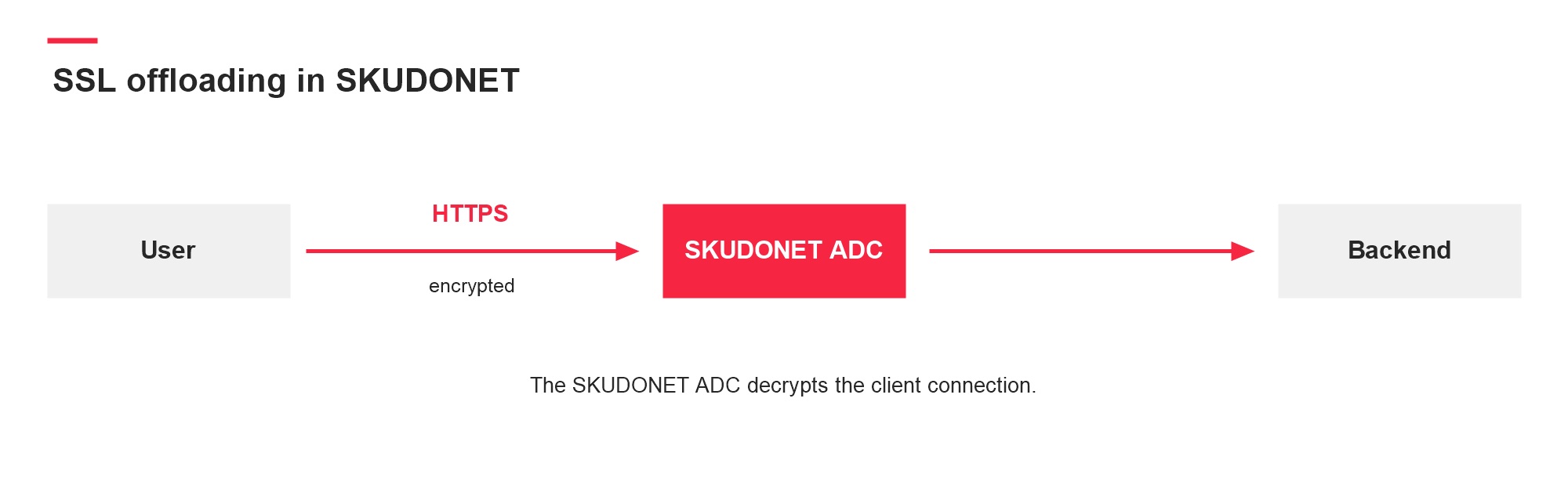
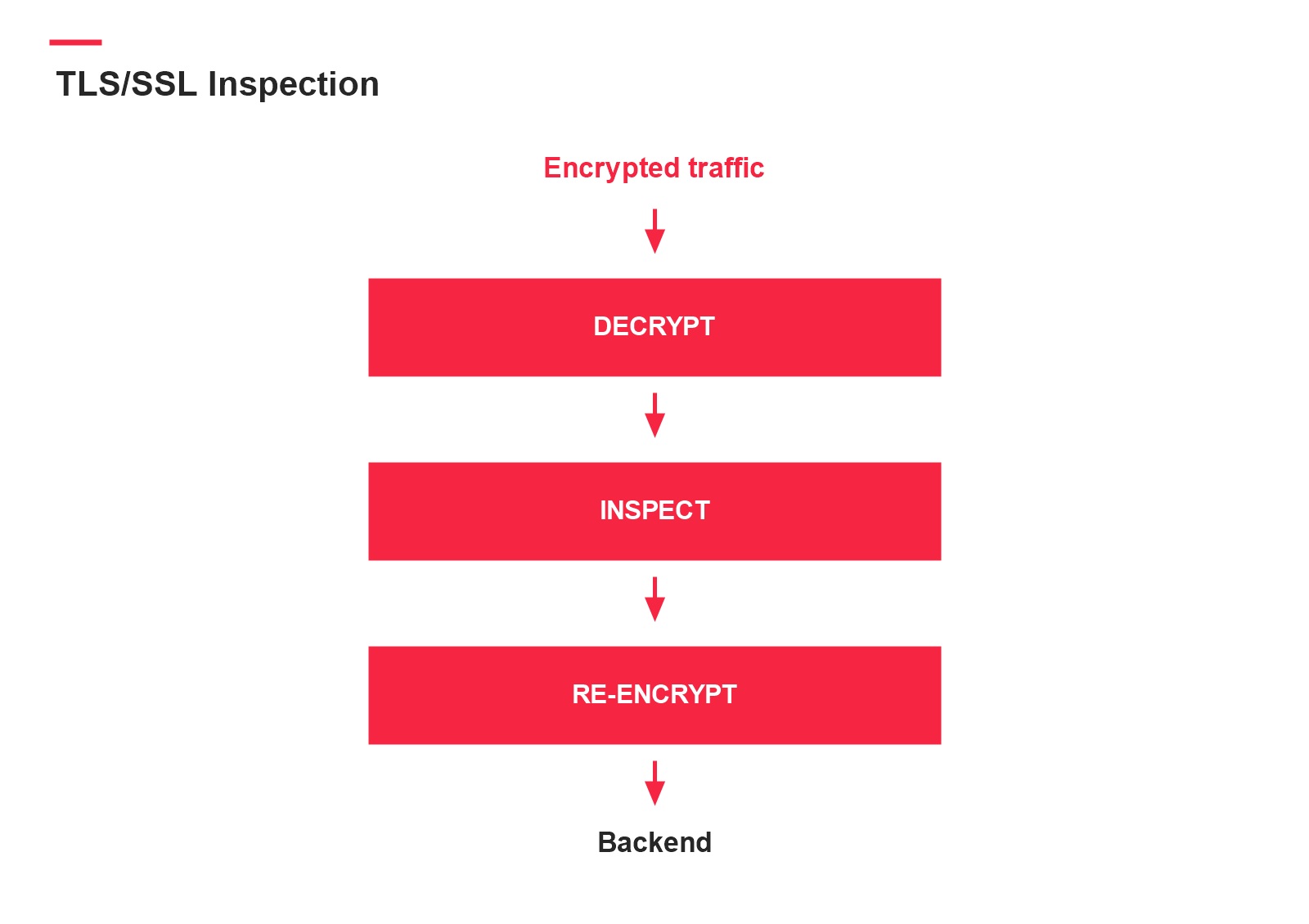
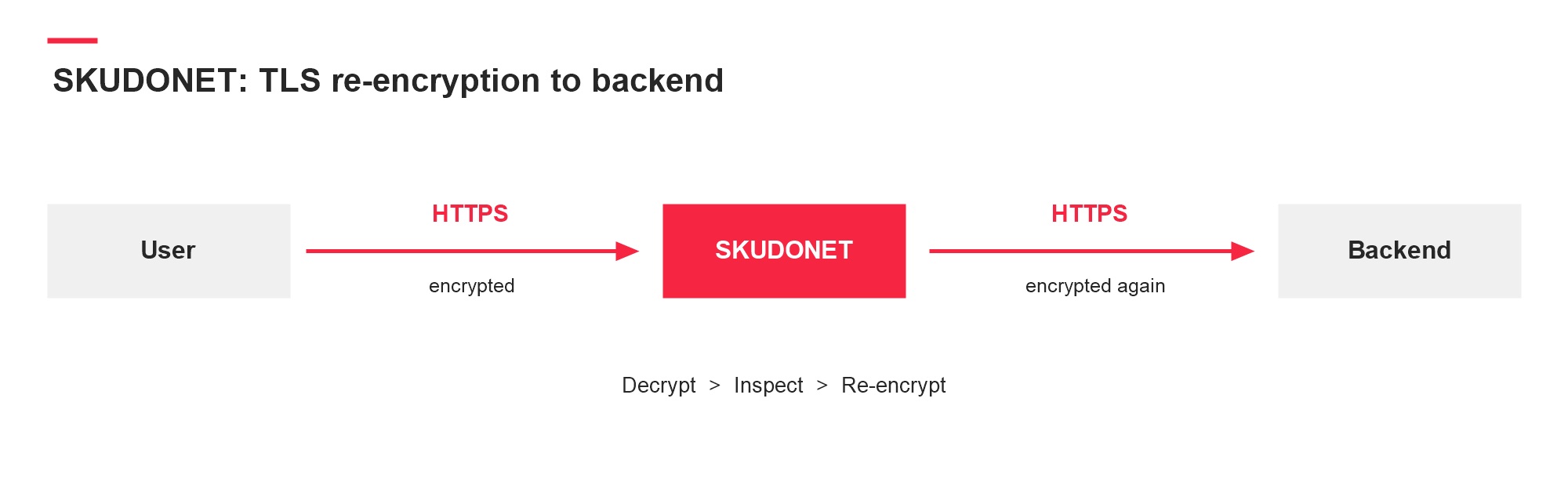
A WAF can only inspect what it can read. If TLS is terminated at the ADC or reverse proxy, the WAF sees the decrypted request, and the ADC can re-encrypt the traffic before forwarding it to the backend. If encrypted traffic passes straight through, nothing gets inspected. Terminating TLS there also brings certificate management and the question of how the hop to the backend is protected. TLS/SSL Inspection covers how SKUDONET handles it.

Application security vs. network security

Network security controls who and what can reach your systems: firewalls, segmentation, VPNs, intrusion prevention. Application security deals with what the application does with the requests it accepts.

A network firewall will happily allow port 443 traffic to a vulnerable web app. Judging the content of the request is up to the application, or a WAF in front of it. You need both, and neither substitutes for the other.

Application security best practices to start with

These apply to most organizations. The order depends on your risks and on what you already have in place:

  • Enforce authorization on the server for every request, and test it explicitly.
  • Know what you run. Keep an inventory of dependencies and track their disclosed vulnerabilities.
  • Put testing in the pipeline at a cadence that fits each technique and the risk.
  • Protect internet-facing apps with a WAF. Start in detection mode, tune, then block.
  • Keep TLS configuration and certificates current.
  • Log what matters (blocked requests, authentication failures) and make sure someone reads it.
  • Plan for availability: rate limits, health checks, redundancy and an upstream option for large DDoS attacks.

One question to keep asking

Application security doesn’t end at release, but it doesn’t move entirely to a firewall either. Code decides most of what’s exploitable. Runtime controls decide how long a mistake stays exploitable.

For any application you run, the useful test is this: if a flaw were disclosed tomorrow, how fast could you fix it, and what would stand in front of it until you did? If you’re looking at WAF or DDoS controls at the delivery layer, the WAF and DDoS Protection pages show how SKUDONET approaches them.

Frequently asked questions

What is the difference between application security and web application security? Application security covers software of any kind. Web application security focuses on applications and APIs exposed over HTTP, where threats like SQL injection and XSS are most common.

Can a WAF stop all application attacks? No. A WAF blocks requests that match known attack patterns. It can’t fix a vulnerability, enforce correct authorization, or reliably catch every new or obfuscated payload. It reduces exposure while the code is fixed.

What does an ADC add to application security? An ADC sits in front of the application and controls how traffic reaches it. It can distribute load, detect failed servers, support failover and host controls such as a WAF or connection limits. It complements secure code and testing and doesn’t replace them.

09 October, 2026 06:20AM by Isabel Perez

hackergotchi for Qubes

Qubes

XSAs released on 2026-10-09

The Xen Project has released one or more Xen security advisories (XSAs). The security of Qubes OS is not affected.

XSAs that DO affect the security of Qubes OS

The following XSAs do affect the security of Qubes OS:

  • (none)

XSAs that DO NOT affect the security of Qubes OS

The following XSAs do not affect the security of Qubes OS, and no user action is necessary:

About this announcement

Qubes OS uses the Xen hypervisor as part of its architecture. When the Xen Project publicly discloses a vulnerability in the Xen hypervisor, they issue a notice called a Xen security advisory (XSA). Vulnerabilities in the Xen hypervisor sometimes have security implications for Qubes OS. When they do, we issue a notice called a Qubes security bulletin (QSB). (QSBs are also issued for non-Xen vulnerabilities.) However, QSBs can provide only positive confirmation that certain XSAs do affect the security of Qubes OS. QSBs cannot provide negative confirmation that other XSAs do not affect the security of Qubes OS. Therefore, we also maintain an XSA tracker, which is a comprehensive list of all XSAs publicly disclosed to date, including whether each one affects the security of Qubes OS. When new XSAs are published, we add them to the XSA tracker and publish a notice like this one in order to inform Qubes users that a new batch of XSAs has been released and whether each one affects the security of Qubes OS.

09 October, 2026 12:00AM

October 08, 2026

hackergotchi for Deepin

Deepin

hackergotchi for Qubes

Qubes

QSB-120: Two CTAP proxy vulnerabilities

We have published Qubes Security Bulletin (QSB) 120: Two CTAP proxy vulnerabilities. The text of this QSB and its accompanying cryptographic signatures are reproduced below, followed by a general explanation of this announcement and authentication instructions.

Qubes Security Bulletin 120


             ---===[ Qubes Security Bulletin 120 ]===---

                              2026-10-08

                   Two CTAP proxy vulnerabilities

User action
------------

Continue to update normally [1] in order to receive the security updates
described in the "Patching" section below. No other user action is
required in response to this QSB.

Background
-----------

The Client to Authenticator Protocol (CTAP) is a standard governing the
interoperation of authentication devices, such as hardware security
keys, with client platforms, such as laptops. Qubes OS has a feature
known as the Qubes CTAP proxy [3] that enables a USB authentication
device to be used in a given qube without exposing that qube to the full
USB stack, similar to the way the USB keyboard and mouse proxies [4]
work in Qubes. There are multiple versions of CTAP, different ways it
can be used, and various related components that can work with it, so
there's a variety of other terms that you might see associated with
CTAP, such as U2F, CTAP1, CTAP2, FIDO2, WebAuthn, and passkeys.

Qubes users can write RPC policies [5] to control the way CTAP requests
forwarded through the CTAP proxy are handled. There are various request
types that are handled by different qrexec services: ctap.ClientPin,
ctap.GetInfo, u2f.Authenticate, and u2f.Register. In addition, users can
limit the u2f.Authenticate service to specific credentials by allowing
only specific qrexec service arguments.

Summary
--------

This QSB describes two CTAP proxy vulnerabilities:

Vulnerability 1: CTAP requests are supposed to match their requested
service types, but the CTAP proxy fails to enforce this.

Vulnerability 2: When RPC policies limit a qube to sending requests with
specific service arguments, the u2f.Authenticate service incorrectly
allows that qube to request multiple assertions (used for
authentication) as long as any of them match the allowed service
argument.

Impact
-------

Vulnerability 1: A qube that is allowed access to any of the
CTAP-related qrexec services can send any request type. For example,
even if the policy allows a qube access only to ctap.GetInfo, that qube
can also send an authentication request. In realistic configurations,
this means that argument-based filtering of access to specific
credentials is ineffective, since a qube can send authentication
requests through one of its other allowed services. This vulnerability
affects all CTAP versions.

Vulnerability 2: A qube that is allowed to have access only to specific
credentials on a forwarded authentication device can use any credentials
for CTAP2 (but not CTAP1) assertion requests, thereby enabling it to use
those credentials for authentication even though it should not be
allowed to do so.

Affected systems
-----------------

Since these vulnerabilities affect only the CTAP proxy, only users who
use the CTAP proxy on a supported Qubes release are affected. Users who
do not use the CTAP proxy are not affected.

In practice, the only systems that are affected are those in which the
RPC policies have been configured to restrict a qube's access to a
subset of the credentials available on an authentication device, since
otherwise the qube already (intentionally) has access to all
credentials on the authentication device.

These vulnerabilities were introduced in qubes-ctap package version
2.0.0. Older versions of the package (previously known as qubes-u2f) are
not affected.

Discussion
-----------

The software (usually a web browser) accessing a hardware authentication
device (either a real one, or in this case an emulated one that forwards
requests through qrexec) must limit the requests it sends to the device.
For example, if you visit <https://example.org>, the browser must ensure
that that site can request authentication only for
<https://example.org>. Therefore, in the absence of an additional,
exploitable vulnerability in the browser, a malicious website cannot
exploit either of the vulnerabilities described in this QSB. However,
the intention of the CTAP proxy is (in addition to making CTAP
authentication devices usable in the first place) to restrict the access
that qubes have to authentication devices, such that even if a qube is
compromised, it cannot access credentials on the authentication device
that it has not been given permission to access. The vulnerabilities
described in this QSB affect this latter form of protection.

Note that the RPC policies themselves are correctly enforced, so these
are not vulnerabilities in qrexec. Rather, the problem lies in the CTAP
proxy's implementation of the qrexec services, which breaks the intended
semantics of the (correctly-enforced) RPC policies.

Patching
---------

The following package contains the security update that addresses the
vulnerabilities described in this bulletin:

  For Qubes 4.3, in template for USB qube(s):
  - qubes-ctap package, version 2.0.8

This package will migrate from the security-testing repository to the
current (stable) repository over the next two weeks after being tested
by the community. [2] Once available, the package should be installed
via the Qubes Update tool or its command-line equivalents. [1]

In order for the update to take effect, all USB qubes must be restarted
after their respective templates have been updated and shut down.

Credits
--------

Vulnerability 2 was discovered by Giulio Berra of the Freedom of the
Press Foundation.

Vulnerability 1 was discovered internally by Piotr Bartman-Szwarc during
review of the previous report.

References
-----------

[1] https://doc.qubes-os.org/en/latest/user/how-to-guides/how-to-update.html
[2] https://doc.qubes-os.org/en/latest/user/downloading-installing-upgrading/testing.html
[3] https://doc.qubes-os.org/en/r4.3/user/security-in-qubes/ctap-proxy.html
[4] https://doc.qubes-os.org/en/r4.3/user/advanced-topics/usb-qubes.html
[5] https://doc.qubes-os.org/en/r4.3/user/advanced-topics/rpc-policy.html

--
The Qubes Security Team
https://www.qubes-os.org/security/

Source: qsb-120-2026.txt

Marek Marczykowski-Górecki’s PGP signature

-----BEGIN PGP SIGNATURE-----

iQIzBAABCAAdFiEELRdx/k12ftx2sIn61lWk8hgw4GoFAmrG7KMACgkQ1lWk8hgw
4GrgRA/+O/ej38/P71thC9CJj1vEvaKePbLFvdQhcsEsah26xUDxO9liCIdGZxnJ
yIyqPqFPoYdI6catrkgirn7/wI+oQyOYiwfK0JRezd4dLmBKf7IB0Je+3klJGFkz
j8RwzEcUzclD19L93CzT3LtBwR6MqfeNbbFdlh5zCvjVt4fbPwWWi2eYZc/NmS8L
heJhfojQzeEDaRxYBWJUAuDHt/hXDS+R4Ii5U/o3g7v8fN2CAAaUJL2Hax/c6SOX
2nosRjWaMqHjNeNZkKelCGjYhDA/MEZvwmB/jtMoFWEvQTKvon7hfvntMCEYBQRj
FfkWjNAvplfT4a2p65GgXwtNP8Arn5E1qDBUvVzswrGun3eWBRn51lhzBxCbwnlx
QeWz/vNn17brl6ctJhue21DMZ6cjdN3SP5d1MBsNQnPUeoe0TDRDPwoOpS5L4CvG
TddgeaFuleQO8bn1YE+CWu6+oC4lrymXdyRtHAoA7nqhq9WP9OZTK8SKn30g48J2
0Gvd6vk8DTsMkvycGfTpT/I5DciVPsjAa7FlRsjWkPDYHQjXbI6xlFmn+WozijpU
5hiLNT/y/Su7WHkgaFF3GxSeFnQMunaf4l11BNaJl+OmFqAJmU3Kmlm/fVDMJh0X
tUOYx1npDDkwGNXQ6CC/w0ZepLYg/GgYnlfIoBgHlSZX9o2PKwM=
=NHKR
-----END PGP SIGNATURE-----

Source: qsb-120-2026.txt.sig.marmarek

Simon Gaiser (aka HW42)’s PGP signature

-----BEGIN PGP SIGNATURE-----

iQIzBAABCgAdFiEE6hjn8EDEHdrv6aoPSsGN4REuFJAFAmrG150ACgkQSsGN4REu
FJC79hAAkhqOJVm1BKgw/zE+uKgMYL6ZvOPOae7wO14uL7yimqWCWZEURmsdI69d
aqj7H2F34vjcFbVo6ZvBvjzGZ4RBt26URAvoqPeVNvQc7e/8/bd98hPHSoxpvtke
5nV1vhKwl9hm6xaBW3noEbxcV7vBkf3SKCJ2qHB/anLGB72ykMS03aZ+lwsHEhl+
ErCf6komlqXakhPCNYBqhWE1Thi2ggGvaREOiIgvt2nrKi3NlJ/QC39D5/NAorZb
jvsDcpEFHXtKre13zdG/wnTp3zM0Cx+XWatlNhgddLLgUk1dwtJ+gMuOiVqAIluh
pPc0fiYIcs1ZTuSGRg5yC0j604nAwbKeAbQYcY/i/Ya5OTjmjcOMisxpciVdflo2
QwHD/c7ydxIdFGziz4BwQKPTuBPkKD6QxaSlsrkOoIZqT6PLCf+maX24YcY7Wt7a
KOYlCrr59ePSlyFaaI2vuG2wf2PRYFi0ra5NeQwiB8Wb+xDu224hYZMW4RhnHvzL
azbpiF7A2E0RgeUiAshXhIsPACXxOXD+1K59DxnswYaf7RaHWrdLhZDA27R6H6fv
qHV9TRciInBuiV6nvdW4LGo8iPgr7eNBOq7MK5j8Wz2XhjjSfq4LbJPlmTbwbDVg
5EEM18GT6L08RxK0xvAUuaVaANc1Eay89WLBMjepB28uDpLuA5Y=
=Ufwb
-----END PGP SIGNATURE-----

Source: qsb-120-2026.txt.sig.simon

What is the purpose of this announcement?

The purpose of this announcement is to inform the Qubes community that a new Qubes security bulletin (QSB) has been published.

What is a Qubes security bulletin (QSB)?

A Qubes security bulletin (QSB) is a security announcement issued by the Qubes security team. A QSB typically provides a summary and impact analysis of one or more recently-discovered software vulnerabilities, including details about patching to address them.

Why should I care about QSBs?

QSBs tell you what actions you must take in order to protect yourself from recently-discovered security vulnerabilities. In most cases, security vulnerabilities are addressed by updating normally. However, in some cases, special user action is required. In all cases, the required actions are detailed in QSBs.

What are the PGP signatures that accompany QSBs?

A PGP signature is a cryptographic digital signature made in accordance with the OpenPGP standard. PGP signatures can be cryptographically verified with programs like GNU Privacy Guard (GPG). The Qubes security team cryptographically signs all QSBs so that Qubes users have a reliable way to check whether QSBs are genuine. The only way to be certain that a QSB is authentic is by verifying its PGP signatures.

Why should I care whether a QSB is authentic?

A forged QSB could deceive you into taking actions that adversely affect the security of your Qubes OS system, such as installing malware or making configuration changes that render your system vulnerable to attack. Falsified QSBs could sow fear, uncertainty, and doubt about the security of Qubes OS or the status of the Qubes OS Project.

How do I verify the PGP signatures on a QSB?

The following command-line instructions assume a Linux system with git and gpg installed. (For Windows and Mac options, see OpenPGP software.)

  1. Obtain the Qubes Master Signing Key (QMSK), e.g.:

    $ gpg --fetch-keys https://keys.qubes-os.org/keys/qubes-master-signing-key.asc
    gpg: directory '/home/user/.gnupg' created
    gpg: keybox '/home/user/.gnupg/pubring.kbx' created
    gpg: requesting key from 'https://keys.qubes-os.org/keys/qubes-master-signing-key.asc'
    gpg: /home/user/.gnupg/trustdb.gpg: trustdb created
    gpg: key DDFA1A3E36879494: public key "Qubes Master Signing Key" imported
    gpg: Total number processed: 1
    gpg:               imported: 1
    

    (For more ways to obtain the QMSK, see How to import and authenticate the Qubes Master Signing Key.)

  2. View the fingerprint of the PGP key you just imported. (Note: gpg> indicates a prompt inside of the GnuPG program. Type what appears after it when prompted.)

    $ gpg --edit-key 0x427F11FD0FAA4B080123F01CDDFA1A3E36879494
    gpg (GnuPG) 2.2.27; Copyright (C) 2021 Free Software Foundation, Inc.
    This is free software: you are free to change and redistribute it.
    There is NO WARRANTY, to the extent permitted by law.
       
       
    pub  rsa4096/DDFA1A3E36879494
         created: 2010-04-01  expires: never       usage: SC
         trust: unknown       validity: unknown
    [ unknown] (1). Qubes Master Signing Key
       
    gpg> fpr
    pub   rsa4096/DDFA1A3E36879494 2010-04-01 Qubes Master Signing Key
     Primary key fingerprint: 427F 11FD 0FAA 4B08 0123  F01C DDFA 1A3E 3687 9494
    
  3. Important: At this point, you still don’t know whether the key you just imported is the genuine QMSK or a forgery. In order for this entire procedure to provide meaningful security benefits, you must authenticate the QMSK out-of-band. Do not skip this step! The standard method is to obtain the QMSK fingerprint from multiple independent sources in several different ways and check to see whether they match the key you just imported. For more information, see How to import and authenticate the Qubes Master Signing Key.

    Tip: After you have authenticated the QMSK out-of-band to your satisfaction, record the QMSK fingerprint in a safe place (or several) so that you don’t have to repeat this step in the future.

  4. Once you are satisfied that you have the genuine QMSK, set its trust level to 5 (“ultimate”), then quit GnuPG with q.

    gpg> trust
    pub  rsa4096/DDFA1A3E36879494
         created: 2010-04-01  expires: never       usage: SC
         trust: unknown       validity: unknown
    [ unknown] (1). Qubes Master Signing Key
       
    Please decide how far you trust this user to correctly verify other users' keys
    (by looking at passports, checking fingerprints from different sources, etc.)
       
      1 = I don't know or won't say
      2 = I do NOT trust
      3 = I trust marginally
      4 = I trust fully
      5 = I trust ultimately
      m = back to the main menu
       
    Your decision? 5
    Do you really want to set this key to ultimate trust? (y/N) y
       
    pub  rsa4096/DDFA1A3E36879494
         created: 2010-04-01  expires: never       usage: SC
         trust: ultimate      validity: unknown
    [ unknown] (1). Qubes Master Signing Key
    Please note that the shown key validity is not necessarily correct
    unless you restart the program.
       
    gpg> q
    
  5. Use Git to clone the qubes-secpack repo.

    $ git clone https://github.com/QubesOS/qubes-secpack.git
    Cloning into 'qubes-secpack'...
    remote: Enumerating objects: 4065, done.
    remote: Counting objects: 100% (1474/1474), done.
    remote: Compressing objects: 100% (742/742), done.
    remote: Total 4065 (delta 743), reused 1413 (delta 731), pack-reused 2591
    Receiving objects: 100% (4065/4065), 1.64 MiB | 2.53 MiB/s, done.
    Resolving deltas: 100% (1910/1910), done.
    
  6. Import the included PGP keys. (See our PGP key policies for important information about these keys.)

    $ gpg --import qubes-secpack/keys/*/*
    gpg: key 063938BA42CFA724: public key "Marek Marczykowski-Górecki (Qubes OS signing key)" imported
    gpg: qubes-secpack/keys/core-devs/retired: read error: Is a directory
    gpg: no valid OpenPGP data found.
    gpg: key 8C05216CE09C093C: 1 signature not checked due to a missing key
    gpg: key 8C05216CE09C093C: public key "HW42 (Qubes Signing Key)" imported
    gpg: key DA0434BC706E1FCF: public key "Simon Gaiser (Qubes OS signing key)" imported
    gpg: key 8CE137352A019A17: 2 signatures not checked due to missing keys
    gpg: key 8CE137352A019A17: public key "Andrew David Wong (Qubes Documentation Signing Key)" imported
    gpg: key AAA743B42FBC07A9: public key "Brennan Novak (Qubes Website & Documentation Signing)" imported
    gpg: key B6A0BB95CA74A5C3: public key "Joanna Rutkowska (Qubes Documentation Signing Key)" imported
    gpg: key F32894BE9684938A: public key "Marek Marczykowski-Górecki (Qubes Documentation Signing Key)" imported
    gpg: key 6E7A27B909DAFB92: public key "Hakisho Nukama (Qubes Documentation Signing Key)" imported
    gpg: key 485C7504F27D0A72: 1 signature not checked due to a missing key
    gpg: key 485C7504F27D0A72: public key "Sven Semmler (Qubes Documentation Signing Key)" imported
    gpg: key BB52274595B71262: public key "unman (Qubes Documentation Signing Key)" imported
    gpg: key DC2F3678D272F2A8: 1 signature not checked due to a missing key
    gpg: key DC2F3678D272F2A8: public key "Wojtek Porczyk (Qubes OS documentation signing key)" imported
    gpg: key FD64F4F9E9720C4D: 1 signature not checked due to a missing key
    gpg: key FD64F4F9E9720C4D: public key "Zrubi (Qubes Documentation Signing Key)" imported
    gpg: key DDFA1A3E36879494: "Qubes Master Signing Key" not changed
    gpg: key 1848792F9E2795E9: public key "Qubes OS Release 4 Signing Key" imported
    gpg: qubes-secpack/keys/release-keys/retired: read error: Is a directory
    gpg: no valid OpenPGP data found.
    gpg: key D655A4F21830E06A: public key "Marek Marczykowski-Górecki (Qubes security pack)" imported
    gpg: key ACC2602F3F48CB21: public key "Qubes OS Security Team" imported
    gpg: qubes-secpack/keys/security-team/retired: read error: Is a directory
    gpg: no valid OpenPGP data found.
    gpg: key 4AC18DE1112E1490: public key "Simon Gaiser (Qubes Security Pack signing key)" imported
    gpg: Total number processed: 17
    gpg:               imported: 16
    gpg:              unchanged: 1
    gpg: marginals needed: 3  completes needed: 1  trust model: pgp
    gpg: depth: 0  valid:   1  signed:   6  trust: 0-, 0q, 0n, 0m, 0f, 1u
    gpg: depth: 1  valid:   6  signed:   0  trust: 6-, 0q, 0n, 0m, 0f, 0u
    
  7. Verify signed Git tags.

    $ cd qubes-secpack/
    $ git tag -v `git describe`
    object 266e14a6fae57c9a91362c9ac784d3a891f4d351
    type commit
    tag marmarek_sec_266e14a6
    tagger Marek Marczykowski-Górecki 1677757924 +0100
       
    Tag for commit 266e14a6fae57c9a91362c9ac784d3a891f4d351
    gpg: Signature made Thu 02 Mar 2023 03:52:04 AM PST
    gpg:                using RSA key 2D1771FE4D767EDC76B089FAD655A4F21830E06A
    gpg: Good signature from "Marek Marczykowski-Górecki (Qubes security pack)" [full]
    

    The exact output will differ, but the final line should always start with gpg: Good signature from... followed by an appropriate key. The [full] indicates full trust, which this key inherits in virtue of being validly signed by the QMSK.

  8. Verify PGP signatures, e.g.:

    $ cd QSBs/
    $ gpg --verify qsb-087-2022.txt.sig.marmarek qsb-087-2022.txt
    gpg: Signature made Wed 23 Nov 2022 04:05:51 AM PST
    gpg:                using RSA key 2D1771FE4D767EDC76B089FAD655A4F21830E06A
    gpg: Good signature from "Marek Marczykowski-Górecki (Qubes security pack)" [full]
    $ gpg --verify qsb-087-2022.txt.sig.simon qsb-087-2022.txt
    gpg: Signature made Wed 23 Nov 2022 03:50:42 AM PST
    gpg:                using RSA key EA18E7F040C41DDAEFE9AA0F4AC18DE1112E1490
    gpg: Good signature from "Simon Gaiser (Qubes Security Pack signing key)" [full]
    $ cd ../canaries/
    $ gpg --verify canary-034-2023.txt.sig.marmarek canary-034-2023.txt
    gpg: Signature made Thu 02 Mar 2023 03:51:48 AM PST
    gpg:                using RSA key 2D1771FE4D767EDC76B089FAD655A4F21830E06A
    gpg: Good signature from "Marek Marczykowski-Górecki (Qubes security pack)" [full]
    $ gpg --verify canary-034-2023.txt.sig.simon canary-034-2023.txt
    gpg: Signature made Thu 02 Mar 2023 01:47:52 AM PST
    gpg:                using RSA key EA18E7F040C41DDAEFE9AA0F4AC18DE1112E1490
    gpg: Good signature from "Simon Gaiser (Qubes Security Pack signing key)" [full]
    

    Again, the exact output will differ, but the final line of output from each gpg --verify command should always start with gpg: Good signature from... followed by an appropriate key.

For this announcement (QSB-120), the commands are:

$ gpg --verify qsb-120-2026.txt.sig.marmarek qsb-120-2026.txt
$ gpg --verify qsb-120-2026.txt.sig.simon qsb-120-2026.txt

You can also verify the signatures directly from this announcement in addition to or instead of verifying the files from the qubes-secpack. Simply copy and paste the QSB-120 text into a plain text file and do the same for both signature files. Then, perform the same authentication steps as listed above, substituting the filenames above with the names of the files you just created.

08 October, 2026 12:00AM

October 06, 2026

hackergotchi for ARMBIAN

ARMBIAN

Github Highlights

Github Highlights

This week&aposs work centers on expanded board and SoC support, build and repository infrastructure modernization, and refinements to user-facing tooling and documentation.

On the hardware side, mainline support arrived for the Radxa Rock 2A/2F and the Toradex Verdin iMX8M Mini, while the KickPi K2B V2.2 DDR3 gained a full board definition including a new Maxio MAE0621 PHY driver. The Allwinner sun60iw2 platform saw substantial advancement on the Orange Pi 4 Pro with GPU, desktop, and hardware video decode enablement, alongside kernel configuration refinements. The Amlogic C400-plus received U-Boot repacking and Mali-T820 stabilization, the Rockchip armhf edge kernel was bumped to 7.3, and smaller fixes landed for the BPI-M4-Zero, Allwinner D1 RISC-V, MangoPi MQ, and Anbernic handhelds.

The build framework received a significant repository management overhaul, adopting the production singlemode repo.sh into main and publishing with Acquire-By-Hash for integrity. OCI storage became configurable with a read-only OCI_PROXY, propagated through CI chunk workflows and runner cleanup. NXP and Trusted Firmware sources were migrated to Armbian-hosted GitHub mirrors, user patches can now override same-named core patches, and USERPATCHES_PATH was restored to working order.

For end users, armbianmonitor received a full refactor, armbian-firstlogin gained unattended-preset safety and broader username validation, and the APT lock handling was hardened against stale cache locks. The configng project introduced a read-only registry-cache for ghcr.io, fixed static IP cancellation handling, and corrected tuning-profile swappiness regressions. Documentation expanded to cover OCI storage, unattended first login, and application installation workflows.

#Armbian #EmbeddedLinux #SBC #Rockchip #Allwinner #UBoot

Changes

06 October, 2026 12:59PM by Michael Robinson

hackergotchi for VyOS

VyOS

EVPN-VXLAN with Internet DCI on VyOS

Modern data centers increasingly rely on IP fabrics that use BGP EVPN as the control plane and VXLAN as the data plane. This standards-based architecture extends Layer 2 and Layer 3 services across an IP underlay while keeping a clear separation between the physical network and tenant or service networks.

This post summarizes the routing models, interconnect options, and resiliency considerations behind an Internet-based Data Center Interconnect (DCI) built on VyOS. For the complete configuration and validation steps, see the EVPN-VXLAN DCI Deployment Guide.

06 October, 2026 11:44AM by Fernando Maidana (f.maidana@vyos.io)

October 05, 2026

hackergotchi for GreenboneOS

GreenboneOS

September 2026 Threat Report: Unchecked Accumulation of Security Debt in Enterprise IT

Widespread, unchecked accumulation of security debt in enterprise IT is emerging at an accelerated pace. While the numbers are staggering, defenders need to realize that regular scanning, orderly prioritization, and timely patching are still the most fundamental way to prevent attackers from exploiting software flaws for impact. For prudent defenders applying well-orchestrated security programs, vulnerability […]

05 October, 2026 12:25PM by Joseph Lee

October 02, 2026

hackergotchi for Qubes

Qubes

Qubes OS 4.3.2 has been released!

We’re pleased to announce the stable release of Qubes OS 4.3.2! This patch release aims to consolidate all the security updates and bug fixes that have occurred since the previous stable release. Our goal is to provide a secure and convenient way for users to install (or reinstall) the latest stable Qubes release with an up-to-date ISO. The ISO and associated verification files are available on the downloads page.

Announcements

What’s new in Qubes 4.3.2?

For an overview of what’s new in Qubes 4.3, see the Qubes 4.3 release notes.

How to get Qubes 4.3.2

In all cases, we strongly recommend making a full backup beforehand.

Known issues in Qubes 4.3.2

It’s possible that templates restored in 4.3.2 from a pre-4.3 backup may continue to target their original Qubes OS release repos (#8701). After restoring such templates in 4.3.2, enter the following additional commands in a dom0 terminal:

sudo qubes-dom0-update -y qubes-dist-upgrade
sudo qubes-dist-upgrade --releasever=4.3 --template-standalone-upgrade -y

This will automatically choose the templates that need to be upgraded. The templates will be shut down during this process.

Fresh templates on a clean 4.3.2 installation are not affected. Users who perform an in-place upgrade from 4.2 to 4.3 (instead of restoring templates from a backup) are also not affected, since the in-place upgrade process already includes the above fix in stage 4. For more information, see issue #8701.

View the full list of known bugs affecting Qubes 4.3 in our issue tracker.

What’s a patch release?

The Qubes OS Project uses the semantic versioning standard. Version numbers are written as [major].[minor].[patch]. Hence, we refer to releases that increment the third number as “patch releases.” A patch release does not designate a separate, new major or minor release of Qubes OS. Rather, it designates its respective major or minor release (in this case, 4.3) inclusive of all updates up to a certain point. See our supported releases for a comprehensive list of major and minor releases and our version scheme documentation for more information about how Qubes OS releases are versioned.

02 October, 2026 12:00AM

October 01, 2026

hackergotchi for SparkyLinux

SparkyLinux

Sparky news 2026/09

The 9th monthly Sparky project and donate report of the 2026: – Linux kernel updated up to 7.2.8, 6.18.54-LTS, 6.12.111-LTS (amd64 + i686-pae) – repos of Sparky 6 potolo (oldoldstable) based on Debian 11 bullseye has been removed – EOL – Sparky 2026.09 of the testing (semi-rolling) line released, including a new image of Labwc on Wayland Many thanks to all of you for supporting our open…

Source

01 October, 2026 02:48PM by pavroo

hackergotchi for ZEVENET

ZEVENET

SSL Offloading: What It Is, How It Works, and When to Use It

When a user connects to a website or application over HTTPS, the traffic between them is encrypted. That protects the data in transit, but it also creates work: somewhere in the infrastructure, the traffic has to be decrypted before the application can actually process the request.

In a simple setup, each application server handles that work itself. As an application scales across multiple servers, there’s another option: move that responsibility to the load balancer or Application Delivery Controller (ADC) sitting in front of them, so one system handles encryption instead of every backend doing it independently. That’s the basic idea behind SSL offloading — the ADC handles the secure connection with the user, decrypts the incoming traffic, and forwards the request to the right application server.

But there’s a question that actually determines the architecture: after the ADC decrypts the traffic, what happens between the ADC and the backend? It can stay decrypted, get encrypted again, or never be decrypted at the load balancer at all. Those three possibilities are what this article covers.

Why Do We Talk About Both SSL and TLS?

Before going further, it’s worth clarifying one point. SSL is the older protocol; modern HTTPS connections actually run on its successor, TLS. Even so, the term SSL offloading remains widely used across the industry, so you’ll also come across TLS offloading and SSL/TLS offloading describing the same concept.

This article uses SSL offloading as the general term, and TLS specifically when referring to the modern encryption protocol behind HTTPS.

What Is SSL Offloading?

SSL offloading means moving the work of handling secure HTTPS connections away from application servers and onto another system — typically a load balancer or ADC. Instead of every server managing encryption and decryption for its own client connections, the ADC becomes the single point that terminates HTTPS and decides which backend receives each request.

Take an application running on five servers. Without offloading, each server manages secure connections from users on top of running the application itself. With SSL offloading, the ADC becomes the entry point instead:

That’s the shift: instead of five separate servers each managing their own encrypted connections, the ADC becomes the single point where those connections are handled.

This is why SSL offloading is closely tied to load balancing: the same component that distributes traffic across a server pool can also take on the encrypted connection before it routes each request.

How Does SSL Offloading Work?

It helps to think of the connection as two separate parts:

The first part is straightforward: the user’s browser establishes a secure HTTPS connection with the ADC. The second part is where infrastructure teams have a choice. From that point, there are three possible flows: the ADC can decrypt and forward plain HTTP, decrypt and re-encrypt before forwarding, or leave the connection encrypted and pass it straight through to the backend.

Here’s what each of those three flows looks like in practice.

Three Ways an ADC Can Handle Encrypted Traffic

1. Decrypt at the ADC and send HTTP to the backend

The ADC handles the secure connection with the user. After decrypting the request, it sends plain HTTP traffic to the selected backend. This is the clearest form of SSL offloading: the backend no longer handles encryption or decryption for the client connection, and certificate management for that public-facing connection can be centralized at the ADC.

The trade-off matters just as much: the connection between the ADC and backend isn’t encrypted. That can be acceptable in a controlled network environment, but not in every architecture.

2. Decrypt at the ADC and encrypt again (SSL bridging)

The ADC still decrypts the incoming request — but why decrypt it if it’s going to be encrypted again? Because there’s useful work to do in between. Once decrypted, the ADC can read the HTTP request, apply application-aware routing, or let a Web Application Firewall inspect it. Only after that processing does the ADC open a new encrypted connection to the backend.

This is commonly called SSL bridging or TLS re-encryption: the ADC decrypts traffic at the edge and re-encrypts it before sending it on to the web server. It’s a useful middle ground: the ADC gets visibility into application traffic while the connection to the backend stays encrypted.

3. Do not decrypt at the load balancer (SSL/TLS passthrough)

Here the load balancer never decrypts the application traffic — it forwards the encrypted connection to a backend server, which handles decryption itself. This is known as SSL or TLS passthrough.

Passthrough is useful when the secure connection needs to terminate directly on the application server. The trade-off is visibility: because the load balancer can’t see inside the encrypted connection, it can’t perform the same application-level inspection or content-based routing that decryption enables.

Why Use SSL Offloading?

SSL offloading brings several benefits beyond the architecture itself:

Centralized management

Managing public-facing certificates and encryption settings independently on every backend server creates operational overhead. Moving the client-facing HTTPS connection to the ADC creates a single control point for those connections.

Application-aware traffic management

Once traffic is decrypted, the ADC can read the actual HTTP request instead of just seeing an encrypted stream — which makes it possible to route based on hostname, URL, or HTTP headers.

Security inspection

The same visibility matters for application security. A WAF needs access to the HTTP request to analyze URLs, parameters, headers, or request bodies for malicious activity — which is why decryption and application security are closely linked.

Reduced backend workload

Moving client-facing encryption off the application servers frees up resources for the application itself. How significant that is depends on traffic volume and infrastructure — in modern environments, operational simplicity and traffic visibility can matter just as much as the raw CPU savings.

SSL Offloading vs SSL Termination vs SSL Bridging vs SSL Passthrough

One common source of confusion is SSL termination vs SSL offloading. Vendors often use them interchangeably, but they emphasize different things: termination tells you where an encrypted connection ends and gets decrypted; offloading emphasizes that the encryption work has moved away from another component — usually the backend.

This overlap shows up across the industry: many vendors describe SSL termination and SSL offloading as effectively interchangeable. We use similar language ourselves — our HTTPS listener performs SSL offloading, and our TLS/SSL Inspection flow refers to that decryption stage as TLS termination.

In practice, the vendor label matters less than the actual traffic flow. Rather than choosing an architecture based on whether something is called “offloading” or “termination,” ask where the traffic is decrypted and whether it’s encrypted again before reaching the application server.

Which Approach Should You Use?

The decision comes down to two questions: does the ADC need to inspect HTTP traffic, and does that traffic also need to stay encrypted on the way to the backend.

  • Need HTTP/WAF visibility, and a plaintext backend connection is acceptable under your security policy → classic SSL offloading.
  • Need HTTP/WAF visibility, but the backend connection also has to stay encrypted — for compliance, or because the network segment isn’t fully trusted → SSL bridging / re-encryption.
  • The original secure connection needs to terminate only at the backend → passthrough.

There’s no universal “best” mode. The choice depends on the application’s security requirements, network boundaries, the ADC functionality you need, and your operational model.

Is SSL Offloading Secure?

SSL offloading doesn’t automatically make an architecture more or less secure — the important question is what happens after decryption.

With classic offloading, traffic between the ADC and backend can travel as plain HTTP, which means that network segment no longer carries encrypted data. Whether that’s appropriate isn’t just a question of whether the network is “internal” — it depends on your security policy, the trust boundaries of that network segment, and any compliance requirements that apply. If plaintext traffic isn’t acceptable, the ADC can decrypt the request for processing and then open a new encrypted connection toward the backend.

This also means the ADC itself becomes a security-critical component: it can access decrypted application traffic and manages the certificates used for those connections. Administrative access, updates, monitoring, and certificate management all matter as a result.

How SSL Offloading Works in SKUDONET

An HTTPS farm is a Layer 7 reverse-proxy service that handles secure HTTP traffic. When you use the HTTPS listener, the farm performs SSL offloading — moving the handling of client SSL/TLS connections away from the real application servers.

Decrypt, inspect, and control

TLS/SSL Inspection breaks this down into three stages:

The first stage is TLS termination — native TLS offloading. Once traffic is decrypted, Layer 7 security and traffic-management functions can operate on the request, which can then be re-encrypted before being forwarded to a backend when that architecture is required. This is also what makes WAF inspection possible on HTTPS traffic: our WAF checks requests only after the encrypted connection has been terminated, because it can’t inspect a payload that’s still encrypted.

Does the backend connection have to stay unencrypted?

No. Within an HTTP/S service, the HTTPS Backends option lets you encrypt traffic again before it reaches the backend servers:

This is documented as TLS Re-encryption to Backend — the same architecture described elsewhere as SSL bridging.

Centralized certificate management

Because we act as the HTTPS endpoint in this model, the HTTPS farm also manages the certificates and encryption settings tied to those client connections — SSL/TLS versions, cipher configuration, wildcard and SNI support, and Let’s Encrypt integration for automated renewal. Encryption management, load balancing, and application security inspection all happen at the same application delivery layer.

Conclusion

SSL offloading moves the handling of encrypted client connections from backend servers to the load balancer or ADC. What happens next — plaintext to the backend, re-encryption, or passthrough — is the part of the architecture that actually needs a decision, and it depends on where your organization needs traffic to stay encrypted, whether the ADC needs to see inside HTTP requests, and how you want to split that responsibility between the delivery layer and the backend.

On our platform, HTTPS farms provide SSL offloading at the application delivery layer, and TLS/SSL Inspection builds on the same model — decrypt, inspect, and re-encrypt — for teams that need both visibility and an encrypted path to the backend.

Want to see how SKUDONET can fit into your application delivery architecture? Explore SKUDONET Enterprise Edition.

FAQ

What is SSL offloading?

SSL offloading is the process of moving the handling of secure HTTPS connections from application servers to another system, typically a load balancer or Application Delivery Controller. The ADC decrypts the incoming connection and forwards the application request to a backend.

How does SSL offloading work on a load balancer?

The user establishes an HTTPS connection with the load balancer rather than directly with an application server. The load balancer decrypts the traffic, can process or inspect the HTTP request, and then forwards it to the selected backend.

What is the difference between SSL and TLS offloading?

SSL is the older protocol name that remains widely used in industry terminology such as “SSL offloading.” Modern HTTPS uses TLS. In today’s infrastructure, SSL offloading and TLS offloading generally refer to the same architectural concept.

What is the difference between SSL termination and SSL offloading?

SSL termination tells you where an encrypted connection is decrypted. SSL offloading emphasizes moving that processing away from the backend servers. Vendors often use the terms with some overlap, so checking the actual client-to-ADC and ADC-to-backend traffic flow is more reliable than relying on the label alone.

What is the difference between SSL offloading and SSL bridging?

In the classic SSL offloading model, the ADC decrypts HTTPS and can forward plaintext traffic to the backend. With SSL bridging or re-encryption, the ADC decrypts the request but creates a new encrypted connection before sending it to the backend.

What is SSL passthrough?

With SSL passthrough, the load balancer does not decrypt the HTTPS traffic. It forwards the encrypted connection to a backend server, where it is finally decrypted. This preserves backend control of the secure connection but limits the load balancer’s ability to inspect HTTP traffic.

Does SSL offloading improve server performance?

SSL offloading can reduce the encryption and decryption work performed by application servers. The actual performance impact depends on traffic volume, connection behavior, and infrastructure. Centralized certificate management and application visibility are also important reasons to use offloading.

Is SSL offloading secure?

It can be used securely, but the architecture must account for what happens after the ADC decrypts the request. If traffic to the backend isn’t encrypted, that network segment carries plaintext data. When that’s not appropriate, the traffic can be re-encrypted before being forwarded to the backend.

01 October, 2026 12:16PM by Isabel Perez

September 30, 2026

hackergotchi for VyOS

VyOS

VyOS Project September 2026 Update

Hello, Community!

Over the last month, two well-known subsystems changed the way they work. OpenVPN acquired a kernel data path that carries traffic. The REST API acquired authentication methods beyond a shared key. Much of everything else came from outside the core team, including the OpenVPN work, which was contributed by an upstream OpenVPN developer.

30 September, 2026 11:30PM by Taras Pudiak (taras@vyos.io)

hackergotchi for ARMBIAN

ARMBIAN

Armbian Newsletter September 2026

30 September, 2026 06:40PM by Michael Robinson

Booting every board, every night

Booting every board, every night

Armbian builds for hundreds of boards. A kernel bump that is clean on one SoC can leave another unbootable and no build log will tell you. So there is a rack, and the rack boots them.

Compiling is not evidence. A kernel that builds, packages that install, an image that flashes — none of it proves a board comes back after reboot. Armbian supports a very large number of boards across a dozen vendors and twenty SoC families, maintained largely by volunteers who each own one or two of them. The failure mode that hurts is not a broken build. It is a change that builds perfectly and quietly bricks the boot path on hardware nobody happened to have on their desk that week.

The automated test facility exists to close that gap. It is a rack of real boards, wired for remote power, that installs what Armbian published and then tries to use it: upgrade, switch kernel branches, reboot repeatedly, measure, report. What follows is what it does today, the hardware it takes to run, where AI fits into maintaining the stack around it, and the change we want to make next: moving hardware validation from nightly builds to pull requests.

What is in the rack

Fleet composition, as recorded in inventory

65 Boards under test 62 Distinct models 22 Vendors 20 SoC families

The boards are the point, and the spread is deliberate. Rockchip, Amlogic, Allwinner, NXP, Marvell, Broadcom, TI, Samsung, Qualcomm, SpacemiT and x86 are all represented, because that is where the differences live; a change to a shared kernel config lands differently on rockchip64 than on meson64, and only one of them will tell you so.

Vendors currently on the bench include Radxa, FriendlyELEC, Khadas, Orange Pi, Banana Pi, Odroid, Raspberry Pi, Pine64, SolidRun, Mekotronics, Kobol, Cubietech, Udoo, Inovato and Arduino. Of the 65, 56 are active and 9 are in a failed state at the moment article was done boards that need a hand in the rack. That number is itself a signal: a board that has stopped answering is a board that stopped being able to report, which is usually more interesting than a test that merely failed.

Every board is registered in NetBox, which is the source of truth for the whole system. Not just an asset list the orchestrator reads it to decide what a board can be tested with. Power is derived from cabling topology rather than a field someone typed: a board&aposs power port is cabled to an outlet on a controller device, and the controller carries the driver. If the cable is not in the model, the board is treated as having no managed power, and the tests that need a hard power cut are skipped rather than faked.

The hardware it takes

Per bench, and the shared infrastructure behind it

The cost of adding a board is not the board. It is the wiring around it. Each bench needs some subset of the following, and which subset a board has determines which tests it is eligible for.

Remote power Required

A way to cut and restore power without a human. Three backends are in use: PoE switch ports for anything powered over Ethernet, a switched rack PDU for mains devices, and a 24-channel relay board driven over GPIO for DC-barrel and USB-powered boards. Without this there is no cold-boot test, only a soft reboot which is exactly the case that tends to pass while the real one fails.

Network Required

Wired Ethernet on a managed switch. This is the control channel (the harness drives boards over SSH), the measurement channel for throughput tests, and on PoE benches, the power channel too. A board that only has Wi-Fi is testable but much harder to recover.

Power metering Strongly recommended

PoE ports meter per-port draw, so the harness samples watts throughout a run. This is how you tell a board that genuinely rebooted from one whose SoC never stopped executing the power trace is flat across what was supposed to be a power cycle.

Serial console Recommended

USB-to-TTL adapters on a powered hub, exposed over the network as named consoles. Without one, a board that fails to boot tells you nothing at all: you get silence and have to guess. Several boards in the rack currently lack one, and every hang on those is an investigation that stalls at "it does not come back".

Clean-flash path Not yet wired

An SD-card switcher that presents the card to a flasher host or to the board, or USB access for vendor recovery modes. This is what makes a board recoverable from software that does not boot. The framework supports it; no bench in the rack is currently wired for it, which is the single biggest constraint on what comes next.

Behind the benches sits the shared infrastructure, the part people underestimate when they picture "a few boards on a shelf":

  • Switching. Three core switches and four access switches, several of them PoE, which do double duty as the fleet&aposs power controllers. Between them they carry the control network, the test traffic and the power for a large fraction of the boards. This is no longer just a 1 GbE network: newer boards increasingly come with 2.5 GbE, while the uplinks and core need 10 GbE to aggregate traffic from many boards running tests in parallel. Without that headroom, the lab network itself becomes the bottleneck and network-performance results stop measuring the board under test.
  • Power delivery. A switched rack PDU, multi-channel DC supplies, multiple 16-way USB supply, switched power strips, and a UPS in front of all of it because a lab that loses power mid-write is a lab that corrupts SD cards.
  • Console and out-of-band. Dedicated console hosts, including a KVM device for the machines that need screen-level access.
  • Compute. Six servers in the same site, including two Ampere-class ARM machines, running the CI runners that execute the build and test jobs and the services the fleet depends on.

All of it is scripted. Each class of hardware has a small command-line tool with the same shape — status, on, off, powercycle so the harness does not care whether a board is switched by a PoE port, a PDU outlet or a relay channel. It resolves the path from the inventory model and calls whichever tool matches.

What a nightly run does

The cycle, end to end

The fleet does not stay powered. A full cycle brings it up, tests it, and puts it back to sleep. The last step runs even when everything before it failed.

  1. Power on The fleet is brought up from the PDU and the boards are given several minutes to boot.
  2. Scan and reconcile Every board is probed and the inventory updated: what version it is running, what kernel, when it was last seen. Drift between the model and reality is recorded rather than assumed away.
  3. Sync maintainer keys Board maintainers&apos SSH keys are pushed to the boards they own, so the person responsible for a board can log into the actual unit that failed.
  4. Run the board pipeline A matrix job per board, in parallel across the runners. This is the part below.
  5. Scan again Post-test state is captured; what the run left behind, not just what it reported.
  6. Power off Always, including after a failure. A rack left powered on a failed run is a rack that cooks.

Inside step four, each board runs the same pipeline. It upgrades to the nightly repository, reboots, and then walks every kernel branch that board is configured to test:

StepWhat it does
upgradePoint at the nightly repository and install what is currently published.
rebootVerify that the board comes back with what it already had installed.
For each branchRepeat the steps below for each kernel branch (current, edge, …).
↳ kernel-switchInstall that branch&aposs kernel and verify that it is fully configured.
↳ rebootPerform warm reboots, followed by a cold power cycle where switched power is available.
↳ hw-performanceTest CPU, memory, disk and temperature.
↳ dvfsVerify that the governor actually reaches the frequencies it claims.
↳ network-iperfMeasure throughput on each cabled network interface.
↳ store-versionsRecord exactly what is installed and running.
restore-stablePut the board back the way it was found.

Two details in there carry more weight than they look. The reboot module does warm reboots followed by a cold power cycle, because those fail differently: a board can survive reboot indefinitely and still not come back from a real power cut. Testing both is the only way to catch both failure modes. And kernel-switch verifies that the package is genuinely configured rather than trusting an exit code, because the interesting failures can leave a kernel half-installed while every command reports success.

What the results look like

Booting every board, every night

Current results are published publicly at docs.armbian.com/status/board-tests, refreshed as runs complete.

What it actually catches

Here are few examples from recent runs.

Reboots that hang on both kernels

One board fails every reboot attempt on both of its kernel branches. The power trace shows the draw holding steady through what should have been a restart — the SoC never stopped executing.

That points at firmware rather than the kernel, but the issue remains unresolved. It is also a good example of the console gap: that bench has no serial console, so the investigation is relying on power measurements and inference instead of a boot log.

A test that was wrong about x86

The frequency-scaling check assumed that a governor under load should reach at least 95% of the maximum advertised frequency. That works for ARM cpufreq, but not for Intel and AMD, where the driver manages turbo behaviour itself and the advertised maximum is not a promise.

Every x86 board was therefore failing a test that was itself wrong. The test was fixed by detecting the driver and applying the check only where it makes sense.

Telling a broken board from a broken runner

Self-hosted runners occasionally drop mid-job: the test finishes green, then the job dies later and the run is marked failed. Retrying everything would be wrong. A board pipeline power-cycles hardware and takes about half an hour, so retrying a genuine failure wastes rack time and keeps cycling a board that may already be unwell.

The retry logic therefore re-runs only jobs whose test step did not fail. A real hardware or test failure stays red rather than being hidden by an automatic retry.

Where AI fits

And where it explicitly does not

A large share of the tooling described here — the test modules, hardware control scripts, inventory reconciliation and documentation — is now written and maintained with AI assistance. That is worth being plain about, including the parts that go wrong.

What AI is genuinely good at is shortening the distance from symptom to candidate explanation. A board fails; there is a transcript, a package state, a power trace, a kernel version and forty thousand lines of shell across several repositories. Correlating those quickly, proposing a mechanism and drafting a patch is work that used to take an evening and can now take a few minutes.

What it is bad at is knowing when it is wrong. In the course of this work, an analysis confidently concluded that a particular board had never appeared in the test results. The conclusion came from a sample that covered about three-quarters of the archive and happened to miss both of that board&aposs records. The reasoning was sound; the evidence was partial; nothing in the output said so.

The point

AI shortens the distance from symptom to patch. It does not shorten the distance from patch to proof. Those are different problems, and only one of them has been made easier.

That is precisely why the rack matters more now, not less. If proposing changes gets cheaper while validating them does not, the amount of unverified change grows faster than our ability to verify it. And the most dangerous bugs here are exactly the ones that compile cleanly, install without error, and fail only when a specific board is asked to come back from a power cut.

A machine that is confidently wrong is a fine collaborator as long as something downstream can check it. Sixty-five boards that will actually try to boot are that something.

So the working rule is simple: AI is free to propose anything, but nothing reaches a board on its say-so. Hardware evidence is the gate, and every conclusion that matters is expected to point at a run, a trace or a package state rather than an argument.

What is next: validation at pull-request time

The change we want to make

Today the facility validates nightly builds. Whatever was published overnight gets installed on real hardware and exercised. That is genuinely useful, and it is how the bugs above were found, but it is validation after the fact. By the time a board fails, the change is already in the nightly repository and, depending on timing, already on users&apos machines.

The goal is to move that gate earlier: a pull request that touches a board family gets that family&aposs boards booted before it merges. Not the whole rack for every PR, just the boards the change can actually reach.

Several things have to be true first, and they are worth stating honestly rather than as a roadmap of solved problems.

Selection

A diff has to map to boards. A change to a board configuration file implicates that board; a change to a kernel family implicates every board in it; a change to the packaging code implicates everything. Select too broadly and every PR occupies the entire rack for half an hour. Select too narrowly and the one board that would have caught the regression never gets tested.

Artifacts

A PR build currently proves a compile. Hardware testing needs installable packages the rack can pull and install exactly as a user would, which means PR builds must publish to an isolated repository the fleet can reach. Our current build machinery is already stretched by existing CI and release workloads. Making hardware testing part of routine PR validation will require additional build capacity, storage and package-publishing infrastructure.

Time budget

A full board pipeline takes around thirty minutes. That is acceptable overnight and much too slow as a merge gate, particularly when a nightly cycle already has the rack. This needs a short profile for PRs: install, switch kernel, reboot warm and cold, and confirm it is running what was installed. Performance and throughput work can stay in the nightly run. It also needs real contention handling, so a PR does not simply queue behind a fleet cycle.

Recovery

This is the hard one, and it is a hardware problem rather than a software one. Testing unmerged code means occasionally installing a kernel that does not boot. Right now every bench in the rack is tested in place; there is no remote path to reflash a board whose boot is broken. A board that a bad PR bricks is a board that stays bricked until somebody walks to the rack.

So PR-stage testing starts on benches that can be recovered remotely: SD-card switchers for boards that boot from removable media, and vendor recovery modes over USB for those that support it. Wiring that up across the fleet is the prerequisite that gates everything else, and it is where the next round of hardware effort goes. Boards that cannot be recovered remotely stay on nightly testing, where a failure is an inconvenience instead of a dead unit.

Signal quality

A merge gate that fails for reasons unrelated to the change is worse than no gate: it trains people to ignore it. The distinction between a board failure and a broken bench, already important for nightly runs, becomes critical the moment a red result blocks a merge.

Helping

Infrastructure, capacity, partnerships

There are three practical ways to move this forward.

Bench infrastructure. Remote recovery is the immediate blocker for PR-stage testing, particularly SD-card switchers and the wiring around them. The network also needs to grow with the hardware being tested: managed PoE switches with 2.5 GbE access ports and 10 GbE uplinks, plus PoE splitters for boards that cannot be powered directly over Ethernet. These are not just infrastructure upgrades; they expand what can be tested, measured and recovered without somebody standing in front of the rack.

Build capacity. PR-stage hardware testing needs PR builds, and build queue time is already a constraint on how quickly a fix reaches hardware. More build capacity, storage and package-publishing infrastructure are needed to move validation from nightly runs into the pull-request workflow. If you can host a build server, the requirements are documented, and the current fleet is listed on the build machinery page.

Hardware partnerships. For vendors, the facility provides a way to keep hardware under continuous validation rather than testing it once around release. Devices covered by support and maintenance agreements can become part of the permanent test fleet, where kernel updates, upgrades, reboots, networking and other regressions are exercised on real hardware as Armbian evolves. The value is not the board itself; it is keeping that board working over its supported lifetime.

30 September, 2026 06:29PM by Igor Pecovnik

hackergotchi for Purism PureOS

Purism PureOS

PureOS Development Report: August 2026

We're already working on building PureOS Dawn Alpha images, and we're eager to get Dawn into your hands to test! As always, stability and reliability are paramount, so this month brings even more improvements on both fronts.

The post PureOS Development Report: August 2026 appeared first on Purism.

30 September, 2026 06:00PM by Purism

Over a Decade of Warrant Canaries

October 1st, 2026 will be ten years and 3 quarters worth of warrant canaries published by Purism.

The post Over a Decade of Warrant Canaries appeared first on Purism.

30 September, 2026 05:13PM by Purism

hackergotchi for ARMBIAN

ARMBIAN

JetHome boosts Armbian CI

JetHome boosts Armbian CI

JetHome (Shenzhen JetHome Technology Co.) donated a build server for Armbian. The server compiles Armbian images, kernels and U-Boot packages. Thank you, JetHome.

HW Specifications

CPU
2 × Intel Xeon Gold 6148, 80 threads
Memory
384 GB
Storage
3.84 TB SSD, plus 20 TB of disk
Network
2 × 1 Gbit/s, bonded
Build runners
40

That is about a tenth of the fleet&aposs capacity, running up to 3 kernel or 40 full image builds at once.

The server also remembers work it has already done:

  • Compiled code is reused. A rebuild takes under a minute instead of three.
  • Software packages are downloaded once and shared by all 40 build jobs.
  • Source code and ready-made parts, such as kernels, are fetched once and kept on the server.

The fleet today

18 build servers · 774 CPU threads · 322 build runners

With 2371 GB of memory across x86-64 and ARM servers. Part of the fleet sleeps and powers up only when builds are waiting.

Current build servers are sponsored by JetHome, the OSU Open Source Lab and netcup. Armbian members sponsor all other servers.

See the live list on the build machinery page.

We need more build servers!

More servers mean more than more boards. We want faster CI, and more building and testing of every pull request, so community developers get feedback sooner and fixes reach users faster. Today the build queue is longer than it should be.

Minimum
Ideal
CPU
16 cores
32 cores
Memory
64 GB
128 GB
Storage (NVMe)
512 GB
1 TB
Upload
50 Mbit/s
1 Gbit/s

Both x86-64 and arm64 help. The server runs only Armbian builds, and we credit your hosting on the build machinery page.

Spare CPU cores and a fast uplink? Put them to work compiling Armbian for hundreds of boards.

Donate build capacity

30 September, 2026 03:26PM by Igor Pecovnik

Mali GPU with LiteRT-LM

Running Gemma 4 E2B on a Mali GPU with LiteRT-LM
Mali GPU with LiteRT-LM

This guide should work on any armbian minimal/console (trixie) system with a working Mali-g610 GPU.

DO NOT USE DESKTOP

Verified on: Orange Pi 5 Max (Rockchip RK3588, Arm Mali-G610 MC4), Armbian/Debian 13 (trixie), aarch64, 8 GB RAM.

Status summary: Both CPU (XNNPACK) and GPU (WebGPU/Dawn → Vulkan → panvk → panthor) work on the mainline panthor kernel — numbers below. The GPU path needed one line of local patching in
Mesa&aposs panvk driver (raise maxImageDimension3D 512 → 2048 to meet the WebGPU minimums that LiteRT&aposs Dawn library enforces; recipe in §5, rationale in §7.1). The model is multimodal (Text + Vision + Audio): the vision encoder runs on the same patched panvk via--vision-backend gpu (§5 "VL path" results). The vendor Rockchip libmali route and OpenCL remain unavailable on mainline panthor (§7.2, §7.3).

Stack (as shipped):

Gemma 4 E2B (.litertlm, int4)  →  LiteRT-LM CLI  →  LiteRT GPU accelerator (WebGPU/ML Drift)

Dawn (WebGPU impl) → Vulkan → panvk → panthor (kernel) → Mali-G610

1. Prerequisites

  • ARM (aarch64) Linux with a Mali GPU and at least 8 GB RAM.
  • Armbian/Debian 13 (trixie)
  • The panthor (or panfrost for older Mali) kernel driver active:
ls /dev/dri/renderD128          # render node must exist
lsmod | grep panthor            # or panfrost / lima

Full ARMv8.2-A dotprod support is required — LiteRT&aposs ARM64 binaries are built with it and will SIGILL otherwise:lscpu | grep -w asimddp (both A55 and A76 cores list it here).

2. Install Mesa + Vulkan for Mali (needs root)

sudo apt update
# Prefer the newest Mesa (backports on Debian) for the best panvk coverage of Valhall CSF GPUs:
sudo apt install -y -t trixie-backports mesa-vulkan-drivers libvulkan1 vulkan-tools
# Optional (see §7 — currently yields NO usable OpenCL device on panthor):
sudo apt install -y -t trixie-backports mesa-opencl-icd clinfo

Verify the GPU is visible to Vulkan:

vulkaninfo --summary | grep -iE "deviceName|driverName"
# Expect: deviceName = Mali-G610 MC4   driverName = panvk

3. Install the LiteRT-LM CLI (user space, no root)

curl -LsSf https://astral.sh/uv/install.sh | sh
export PATH="$HOME/.local/bin:$PATH"
uv tool install litert-lm        # current: v0.17.x; incl. CPU (XNNPACK/YNNPACK) + GPU (WebGPU/Vulkan) backends

4. Get the model (Gemma 4 E2B, int4 .litertlm, 2.58 GB)

mkdir -p ~/litert-lm-bench && cd ~/litert-lm-bench
curl -L -o gemma-4-E2B-it.litertlm \
  https://huggingface.co/litert-community/gemma-4-E2B-it-litert-lm/resolve/main/gemma-4-E2B-it.litertlm
# or have the CLI fetch it for you:
#   litert-lm benchmark --from-huggingface-repo litert-community/gemma-4-E2B-it-litert-lm gemma-4-E2B-it.litertlm

Other ready models: google/gemma-3n-E2B-it-litert-lm (gemma-3n-E2B-it-int4.litertlm),litert-community/gemma-4-E4B-it-litert-lm, ... (see litert-lm list / HF).

5. Benchmark

Lock the CPU governor to performance first (fair, repeatable numbers):

sudo sh -c &aposfor c in /sys/devices/system/cpu/cpu[0-7]/cpufreq/scaling_governor; do echo performance > $c; done&apos

CPU baseline (XNNPACK, 8 threads):

litert-lm benchmark ~/litert-lm-bench/gemma-4-E2B-it.litertlm \
  -p 1024 -d 256 --backend cpu --cpu-thread-count 8 --cache disk --runs 2

GPU (patched panvk, §7.1). One-time local Mesa build — stays entirely in userland, the system Mesa is untouched:

# 1) Mesa source + one-line patch (26.1.2)
cd ~/litert-lm-bench
curl -L -o mesa.tar.xz https://archive.mesa3d.org/mesa-26.1.2.tar.xz
tar -xf mesa.tar.xz && cd mesa-26.1.2
python3 - <<&aposPY&apos
p = &apossrc/panfrost/vulkan/panvk_vX_physical_device.c&apos
s = open(p).read()
s = s.replace(&apos.maxImageDimension3D = PAN_ARCH <= 10 ? (1 << 9) : (1 << 14),&apos,
              &apos.maxImageDimension3D = (1 << 11), /* 2048 — meets WebGPU min */&apos)
open(p, &aposw&apos).write(s)
PY

# 2) build deps (the LLVM/CLC chain is required — panvk bakes CLC-compiled SPIR-V for libpan)
sudo apt install -y --no-install-recommends meson ninja-build pkg-config gcc g++ python3-mako \
  python3-yaml python3-ply libdrm-dev llvm-19-dev libllvmspirvlib-19-dev spirv-tools \
  libclang-19-dev libclang-cpp19-dev

# 3) panvk-only build (~10–25 min on the 5 Max)
meson setup build-panvk -Dvulkan-drivers=panfrost -Dgallium-drivers= -Dbuildtype=release \
  -Dllvm=enabled -Dmesa-clc=auto -Dplatforms= -Degl=disabled -Dgbm=disabled -Dglx=disabled \
  -Dopengl=false -Dglvnd=disabled -Dtools= -Dbuild-tests=false
ninja -C build-panvk -j6

# 4) benchmark with the patched driver, process-scoped. First put the WebGPU prebuilts
#    (libLiteRtTopKWebGpuSampler.so + libwebgpu_dawn.so etc., litert-lm repo tag v0.17.1,
#    prebuilt/linux_arm64) in ~/litert-lm-bench/prebuilt_v0171/ — see Troubleshooting.
export BUILD=~/litert-lm-bench/mesa-26.1.2/build-panvk
export VK_ICD_FILENAMES="$BUILD/src/panfrost/vulkan/panfrost_devenv_icd.aarch64.json"
export LD_LIBRARY_PATH="$BUILD/src/panfrost/vulkan:$HOME/litert-lm-bench/prebuilt_v0171"
export PATH="$HOME/.local/bin:$PATH"            # uv-installed CLI
litert-lm benchmark ~/litert-lm-bench/gemma-4-E2B-it.litertlm \
  -p 1024 -d 256 --backend gpu --cache disk --runs 2

First GPU run compiles the WebGPU/Vulkan shaders (one-time) and uploads GPU-rearranged weights (~0.8 GB weight cache); --cache disk persists both next to the model, so later loads start fast — the compile cost is NOT repaid on every run.

Results on this Orange Pi 5 Max (Mali-G610 MC4)

Backend Prefill (tk/s) Decode (tk/s) TTFT (s)
CPU (XNNPACK, 8 threads) 123.6 12.3 8.4
GPU (WebGPU/Dawn→Vulkan, patched panvk §5/§7.1) 374.0 8.7 2.9

Google&aposs on-device-class references for Gemma 4 E2B: S26 Ultra GPU 3808/52 tk/s, Raspberry Pi 5 CPU 133/7.6 tk/s. On this board the GPU wins the prefill race by ~3.0× (374 vs 124 tk/s) and TTFT by ~2.9× (2.9 vs 8.4 s), while decode stays on the CPU&aposs side (8.7 vs 12.3 tk/s) — as expected, decode is the bottleneck on Mali-class hardware; the Mali GPU is a prefill/TTFT accelerator here, not a decode accelerator.

GPU clock note (measured, no guesswork): the Mali-G610 is an integrated GPU sharing the board&aposs DDR. The devfreq governor (simple_ondemand, stock) boosts it to 1 GHz under load and parks it at 200 MHz idle — confirmed by sampling cur_freq at 400 ms during the run (233/263 samples at 1000 MHz, temps 41→56 °C, no thermal trip). Leave the governor alone: forcingperformance/min/max via sysfs was counterproductive (idle readbacks that look like the clock collapsed, and it destabilized perfectly good runs). The numbers above are at the stock governor&aposs real 1 GHz boost.

Results: Gemma 4 E4B (4B) — text GPU via the web flavor, vision GPU straight from stock

E4B (the 4B sibling) ships as three files in the HF repo: the stock gemma-4-E4B-it.litertlm (text+vision+audio, 3.66 GB) plus an -gpu and a -web (text-only, 2.97 GB) variant. On this 8 GB board the stock file cannot run on the GPU — two structural walls, both measured:

panthor job watchdog: a fixed one-shot pipeline dispatch (dmesg: job timeout ... seqno=144, same job on every E4B attempt) exceeds the driver&aposs compiled-in 1 s job timeout even at the real 1 GHz boost (E2B&aposs equivalent is seqno=77 and fits). The GPU is reset, Dawn reports VK_ERROR_DEVICE_LOST, generation aborts.

8 GB RAM ceiling: GPU buffers (pinned, unrescalable shmem) peak near 4–5 GB on top of the 3.66 GB model; every run ended in a global OOM-kill (EXIT=137) during iteration 2 even with a 2048-token KV cap + ringbuffers + disk cache.

The -web flavor dodges both — its finer op layout splits the killer dispatch under the 1 s bar and shrinks the GPU working set (peak 4.3 GB observed, holds 1 GHz the whole run):

Gemma 4 E4B lane Flavor Prefill (tk/s) Decode (tk/s) TTFT (s)
CPU (XNNPACK, 8 threads) stock 52.6 5.58 19.6
GPU (patched panvk) web (text-only) 75.1 4.54 13.9

(reproducible to the decimal across --runs 2; init 6.2 s; note --cache disk does not persist for the web flavor — expect a recompile each run. --speculative-decoding true gave no gain:4.37 vs 4.54 tok/s decode (this build ships no draft model).) Reference: Raspberry Pi 5 (16 GB, CPU) 51/3.2/20.5 — this board matches or beats it on every column. Same shape as E2B: GPU wins prefill +1.4× and TTFT 19.6→13.9 s, but decode stays CPU-favored (4.5 vs 5.6 tk/s).

E4B vision (VL) on GPU works — cpu text + gpu vision

The stock E4B&aposs vision encoder is a separate 1477-op subgraph that fits under the panthor watchdog and inside 8 GB even though the full stock model&aposs text lane does not. Drive it via the Engine API (this repo&aposs vl_bench.py --model ...), LLM lane = CPU, vision encoder = GPU (patched panvk): the test image (resized to 912×672 → 2394 patches, near E4B&aposs max_num_patches 2520) is encoded on the Mali.

E4B VL (LLM lane = cpu) vision cpu vision gpu (patched panvk)
TTFT (s) 12.3–12.5 9.6
Decode (tok/s) 7.33–7.37 7.28–7.39
Reply (same image) "coyote walking on a dirt path" identical

Text-only CPU control: TTFT ≈ 2.0 s (7-token prompt, decode ~7.8 tok/s). Isolated vision-encode cost: ~10.4 s CPU vs ~7.6 s GPU — the Mali cuts E4B vision latency by ~2.9 s/image (~27%). No watchdog hits, no OOM (peaks well below ceiling; vision weights are a fraction of a GB). Same conclusion as E2B: for vision work keep the LLM on CPU and let the GPU run the encoder.

# 1. SET ENVIRONMENT FOR GPU VISION DELEGATE
  export LITERT_VISION_DELEGATE=gpu

  # 2. RUN VL HARNESS FOR STOCK GEMMA-4-E4B
~/.local/share/uv/tools/litert-lm/bin/python vl_bench.py \
    --text cpu \
    --vision gpu \
    --image \
    --iters 3 \
    --model gemma-4-E4B-it.litertlm
# Ensure directory exists and download model
mkdir -p ~/litert-lm-bench
curl -L -o ~/litert-lm-bench/gemma-4-E4B-it-web.litertlm \
  https://huggingface.co/litert-community/gemma-4-E4B-it-litert-lm/resolve/main/gemma-4-E4B-it-web.litertlm

# Execute benchmark with standard LiteRT-LM flags
litert-lm benchmark ~/litert-lm-bench/gemma-4-E4B-it-web.litertlm \
  --backend=gpu \
  -p 1024 \
  -d 256 \
  --runs 2

Results: VL (vision) path

The benchmark sub-command only benches the text path. To time the vision encoder, drive the same engine via the Python API (vl_bench.py in this directory) — it loads the model, streams a real image (test_multi.jpg, httpbin.org/image/jpeg) + text through vision_backend=cpu|gpu and prints TTFT (vision encode + prefill + first token), per-chunk decode rate, and the reply. One sentence prompt, 13-token answer, ~290-token total prefill (280 vision + text), generations deterministic (temperature=0). Medians over 3+ runs after compile:

Combo (text / vision) VL TTFT (s) Decode (tok/s) Reply matches CPU?
cpu / cpu 8.93–9.40 17.4 baseline
cpu / gpu (patched panvk) 6.16–6.62 17.2 yes, identical
gpu / gpu (patched panvk) 5.62–6.16 9.8 yes, identical

Text-only controls (7-token prompt): CPU TTFT ≈ 0.8 s, GPU TTFT ≈ 0.57 s.

Isolating the vision cost (VL TTFT − text-only TTFT for the same text backend): ~8.1 s on a CPU vision encoder vs ~5.4 s GPU — the Mali GPU cuts vision-encoder latency by ~2.7–3 s per image (~30%), and the full-GPU combo is ~37% faster end-to-end (5.6 vs 8.9 s). The patched panvk covers the model&aposs separate VISION_ENCODER subgraph too (no extra Dawn limits tripped).

Caveat: for short generations (< ~20 tokens) GPU decode is slower than CPU (9.8 vs 17.4 tok/s) — per-iteration GPU sync overhead — so for chatty/VL replies the CPU text lane with GPU vision is often the best mix (6.2 s TTFT, CPU-fast decode).

Benchmarking the VL path yourself

# 1. FETCH SAMPLE TEST IMAGE
  curl -sL -o ~/litert-lm-bench/test_multi.jpg https://httpbin.org/image/jpeg

  # 2. SET PYTHON INTERPRETER PATH
  VL_PY=~/.local/share/uv/tools/litert-lm/bin/python

  # 3. BASELINE: TEXT (CPU) + VISION (CPU)
  $VL_PY ~/litert-lm-bench/vl_bench.py --text cpu --vision cpu --image --iters 3

  # 4. HYBRID: TEXT (CPU) + VISION (GPU) — EXPORT PANVK MESA ENVS FIRST
  export BUILD=~/litert-lm-bench/mesa-26.1.2/build-panvk
  export VK_ICD_FILENAMES="$BUILD/src/panfrost/vulkan/panfrost_devenv_icd.aarch64.json"
  export LD_LIBRARY_PATH="$BUILD/src/panfrost/vulkan:$HOME/litert-lm-bench/prebuilt_v0171"

  $VL_PY ~/litert-lm-bench/vl_bench.py --text cpu --vision gpu --image --iters 3

  # 5. FULL ACCELERATION: TEXT (GPU) + VISION (GPU)
  $VL_PY ~/litert-lm-bench/vl_bench.py --text gpu --vision gpu --image --iters 3

  # 6. TEXT-ONLY CONTROLS (ISOLATE VISION-ENCODER COST)
  $VL_PY ~/litert-lm-bench/vl_bench.py --text cpu --iters 3
  $VL_PY ~/litert-lm-bench/vl_bench.py --text gpu --iters 3

Prints per-iteration TTFT / decode tok/s / reply. Run cases sequentially — parallel GPU runs contend for the Mali GPU and inflate the numbers (observed 2× TTFT when two ran at once).

6. Inference

# 1. DIRECT CLI EVALUATION 
  litert-lm run ~/litert-lm-bench/gemma-4-E2B-it.litertlm \
    --cache disk --prompt "What is the capital of France?"

  # 2. INTERACTIVE REPL MODE
  litert-lm run ~/litert-lm-bench/gemma-4-E2B-it.litertlm

  # 3. OPENAI-COMPATIBLE API SERVER
  litert-lm serve ~/litert-lm-bench/gemma-4-E2B-it.litertlm

Vision (and audio) input uses run with attachments — one per --attachment, placed before the first user text (images and audio can be mixed):

litert-lm run ~/litert-lm-bench/gemma-4-E2B-it.litertlm \
  --attachment ~/litert-lm-bench/test_multi.jpg \
  --prompt "What is in this image? Answer in one sentence." \
  --vision-backend cpu          
  # or gpu (patched panvk, §5) — ~2.7–3 s faster vision encode

--vision-backend/--audio-backend pick the encoder lane independently of --backend (which chooses the LLM lane). Like --backend gpu, --vision-backend gpu needs the §5 env (VK_ICD_FILENAMES + LD_LIBRARY_PATH) exported for that run.

Notes:

--cache disk persists compiled artifacts next to the model — the first GPU load compiles shaders, later loads start instantly. The load time is NOT paid on every run. Observed caches: <model>_*_mldrift_program_cache.bin (compiled kernels) and<model>_*_mldrift_weight_cache.bin (GPU-rearranged weights, ~0.8 GB). The vision encoder&aposs kernels live in the same cache files — first GPU --vision-backend gpu run compiles, later
runs reuse.

GPU (patched panvk) is ~2.8× faster at prefill and ~2.7× on TTFT, but ~30% slower at decode — pick the lane by workload (§7.4).

Vision: --vision-backend gpu cuts vision-encode latency by ~2.7–3 s per image; CPU text + GPU vision is the best blend for short/chatty replies (§5 VL results).

Speculative decoding (--speculative-decoding true) can lift decode on CPU+GPU for rewrite/summarize/coding style prompts (Gemma 4 E2B supports it).

7. GPU deep dive: the blocker and how it was unblocked here

Everything below was reproduced with LiteRT-LM v0.17.1 (CLI + litert-lm-api), Mesa 26.1.2 (trixie-backports), kernel 7.2.4-edge-rockchip64 (mainline panthor).

7.1 The panvk limit blocker — RESOLVED with a one-line local patch

LiteRT&aposs WebGPU accelerator uses Dawn, which enforces the WebGPU spec minimums against the Vulkan driver and refuses to proceed when they are unmet. Stock panvk reports:

maxImageDimension3D = 512      # WebGPU spec requires ≥ 2048

Dawn logs exactly this (PhysicalDeviceVk.cpp:794: "Insufficient Vulkan limits for maxTextureDimension3D ... must be at least 2048"), and stock panvk then dies with a null-pointer dispatch (SIGSEGV, pc=0x0) inside the WebGPU path on the first real GPU execution. The root cause is the driver limit, not packaging: the crash is identical even with the WebGPU prebuilts (libLiteRtTopKWebGpuSampler.so + friends) fetched from the litert-lm repo prebuilt/linux_arm64 @ v0.17.1 on LD_LIBRARY_PATH.

The fix (validated on this board): panvk caps 3D textures at 512 for Valhall
(PAN_ARCH <= 10), but the Mali-G610 hardware handles 2048³ — raising the advertised limit to 2048 makes Dawn accept the adapter:

-.maxImageDimension3D = PAN_ARCH <= 10 ? (1 << 9) : (1 << 14),
+.maxImageDimension3D = (1 << 11),       /* 2048 — meets WebGPU min (was 512 on arch <= 10) */

Why it&aposs safe: Dawn only validates the advertised limit against its spec minimum, and the value also caps future image allocations — so if a kernel ever genuinely requested a 2048³ 3D texture, panvk would fail cleanly at allocation instead of corrupting anything. LiteRT/ML-Drift&aposs LLM and vision-encoder kernels allocate buffers and 2D textures only, so real GPU behaviour is unchanged; Dawn simply stops rejecting the adapter, the SIGSEGV disappears, and the full benchmark runs (§5). Confirmed via vulkaninfo on the patched build: maxImageDimension3D = 2048. All other WebGPU minimums (per-stage descriptors, workgroup sizes, buffer ranges) were already comfortably met.

The build is process-scoped (VK_ICD_FILENAMES + LD_LIBRARY_PATH per run), the system Mesa is never touched, and reverting is unsetting two variables. Unless/until Mesa raises this limit upstream for Valhall, keep this build around for LiteRT-LM GPU runs.

7.2 The vendor route (Rockchip libmali) — needs a different kernel

Rockchip&aposs proprietary blob would satisfy Dawn (it exposes Vulkan 1.3 with full limits), but the blob&aposs userspace talks to Rockchip&aposs proprietary kbase kernel driver (/dev/mali) and cannot attach to the mainline panthor driver:

"libmali-valhall-g610-g13p0-gbm"      → loads, exports NO Vulkan ICD (0 vk_* symbols)
"libmali-valhall-g610-g24p0-gbm"
  libMaliVulkan.so.1 (api 1.3.276)    → loads, "No mali devices found" then SIGSEGV (no /dev/mali)

Installable packages exist (tsukumijima/libmali-rockchip releases, e.g.
v1.9-1-20260312-bd33ee2), but they all presume the vendor kernel.

Unblock: flash a vendor-kernel image (kernel with kbase/mali.ko, e.g. Armbian images with the Rockchip BSP kernel), then install
libmali-valhall-g610-g13p0-gbm (or g24p0) and point Dawn/Vulkan at it
(VK_DRIVER_FILES/LD_LIBRARY_PATH). That same blob also provides OpenCL 3.0 (libMaliOpenCL.so + /etc/OpenCL/vendors/mali.icd), which would additionally satisfy the "would OpenCL be faster?" curiosity — for running LLMs, both WebGPU/Vulkan and OpenCL on the same GPU land in the same class of throughput; the win is the mature compiler&aposs fast startup, not raw speed.

7.3 OpenCL on the current kernel — not available

Mesa&aposs rusticl on panthor currently exposes zero devices (clinfo -l shows only the rusticl platform, no device). So there is no OpenCL device at all on the mainline stack, and LiteRT-LM has no Linux OpenCL accelerator anyway.

7.4 Practical advice for this board today

  • Chat / streaming (decode-bound): CPU is the better lane — 12.3 vs 8.7 tk/s decode.
  • Long prompts / RAG / document Q&A (prefill-bound): GPU pays off — 345 vs 124 tk/s prefill,
    3.1 vs 8.4 s TTFT.

Images / VL: --vision-backend gpu cuts vision-encode latency by ~2.7–3 s (~30%). Shortest VL TTFT is text+vision both on GPU (5.6 vs 8.9 s all-CPU), but keep the LLM on CPU when replies are short and chatty (6.2 s TTFT plus CPU-fast decode).

  • --speculative-decoding true can lift decode further on both lanes (Gemma 4 E2B supports it).

Serving an OpenAI-compatible endpoint (litert-lm serve)

litert-lm serve exposes an OpenAI API on 0.0.0.0:9379, so LAN clients (LiteCode, opencode, aider, Continue, scripts) use the board like any OpenAI endpoint. Import a model once (litert-lm import ./gemma-4-E2B-it.litertlm, registry at ~/.litert-lm/models/), then litert-lm serve. Per-model settings come from ~/.litert-lm/config.json (default + models.<id>), so clients stay plain-OpenAI:

{
  "default": { "backend": "cpu", "cpu_thread_count": 8, "cache": "disk" },
  "models": { "gemma-4-E2B-it.litertlm": { "speculative_decoding": true, "max_num_tokens": 4096 } }
}

Endpoints: GET /v1/models and POST /v1/chat/completions (streaming + non-streaming). OpenAI tools / tool_choice are bridged to the model&aposs function-calling template — verified to return valid tool_calls JSON (non-streaming and streamed) and to complete the full agent cycle (assistant tool_call → tool result → final answer). /v1/embeddings exists but is not tied to LLM models.

Even though litert-lm describe reports Supports Function Call: NO for Gemma 4, the serve layer still bridges tools into the model template (empirically verified); that flag only means the CLI&aposs interactive run has no native FC template.

RAM budget (E2B, CPU): max_num_tokens preallocates KV/ringbuffer arenas up front.Measured process RSS: 4096 → ~3.1 GB (4.9 GB free — recommended), 8192 → ~7 GB (1.1 GB free — works but leaves no headroom). Keep 4096 and let clients budget. Config keys (0.15+): backend, vision_backend, audio_backend, cpu_thread_count, cache,
max_num_tokens, speculative_decoding, thinking, thinking_budget,
gpu_decode_steps_per_sync, sampling. CLI flags override config. For a persistent border, run under systemd.

Verified client on this board

LiteCode (razvanneculai/litecode) — works end-to-end. Its Planner
({"synthesis","tasks"} strict JSON) and Executor (raw file content, no fences) prompts fit the 4096 budget; single-request task runs completed correctly and files linter-clean.
litecode.json:

{
  "provider": { "baseURL": "http://<yourIP>:9379/v1", "apiKey": "", "model": "gemma-4-E2B-it.litertlm" },
  "tokenLimit": 4096, "reservedOutputTokens": 1500, "systemPromptBudget": 1000, "maxParallelExecutors": 1
}

Troubleshooting

FATAL ERROR: This binary was compiled with dotprod enabled... → CPU lacks FEAT_DotProd, not supported by the ARM64 prebuilt wheels. RK3588 has it.

GPU benchmark errors but CPU works → with stock Mesa this is the §7.1 Dawn limit crash (maxImageDimension3D = 512); with the patched build, check vulkaninfo --summary again — panvk must list the Mali device and report maxImageDimension3D = 2048. ExportVK_ICD_FILENAMES+LD_LIBRARY_PATH for every run that should use the patched driver.

Could not load shared library libLiteRtTopKWebGpuSampler.so → the CLI wheel does not bundle the WebGPU samplers; fetch them from the litert-lm repo prebuilt/linux_arm64/ at the matching version tag (e.g. v0.17.1) and export their directory on LD_LIBRARY_PATH.

First GPU run is slow (one-time kernel compilation) — normal; use --cache disk so later loads skip it. Caches persist next to the model.

Bigger models (e.g. stock gemma-4-E4B-it.litertlm, 3.66 GB) fail on the GPU even with the patched driver: panthor ... job timeout in dmesg (fixed 1 s driver watchdog, not tunable; the model has a one-shot dispatch that exceeds it even at the real 1 GHz boost) theVK_ERROR_DEVICE_LOST, and/or a global OOM-kill (EXIT=137) when pinned GPU buffers + the model outgrow 8 GB. E2B fits, E4B-stock doesn&apost. Use the text-only -web flavor (gemma-4-E4B-it-web.litertlm, 2.97 GB) for E4B-on-GPU — its finer kernels stay under the watchdog and its GPU set peaks ~4.3 GB (§5 E4B section).

Join the conversation on the Armbian Forum and let us know how it runs on your hardware!

30 September, 2026 03:24PM by Michael Robinson

hackergotchi for GreenboneOS

GreenboneOS

CVE-2026-5430: Full Account Takeover in WSO2 API Management Products Now Actively Exploited

CVE-2026-5430 (CVSS 10), published August 6th, 2026, is a critical authentication bypass in WSO2 JSON Web Token (JWT) authentication affecting multiple WSO2 API management products. The flaw allows a token signed with an unsupported algorithm to bypass JWT authentication. Exploitation allows unauthorized access, compromise of administrative accounts, and full account takeover. Although the CVE was […]

30 September, 2026 10:07AM by Joseph Lee

hackergotchi for Tails

Tails

Tails 7.14

Changes and updates

  • Update Tor Browser to 15.0.24.

  • Update the Tor client to 0.4.9.13.

  • Update the Linux kernel to 6.12.111.

Fixed problems

  • Fix the default keyboard input method when starting a session in Korean. (#21779)

Get Tails 7.14

To upgrade your Tails USB stick and keep your Persistent Storage

  • Automatic upgrades are available from Tails 7.0 or later to 7.14.

  • If you cannot do an automatic upgrade or if Tails fails to start after an automatic upgrade, please try to do a manual upgrade.

To install Tails 7.14 on a new USB stick

Follow our installation instructions.

The Persistent Storage on the USB stick will be lost if you install instead of upgrading.

To download only

If you don't need installation or upgrade instructions, you can download Tails 7.14 directly:

30 September, 2026 12:00AM

September 29, 2026

hackergotchi for GreenboneOS

GreenboneOS

New Distributor Partnership: CoreWin Brings OPENVAS to Ukraine and the Region

Greenbone is pleased to announce CoreWin as a new distribution partner. As a Ukraine-based value-added software distributor, CoreWin is well-positioned to make OPENVAS available in Ukraine, Armenia, Azerbaijan, Georgia, Kazakhstan, Kyrgyzstan, Moldova, and Uzbekistan. Why Our CoreWin Partnership Matters Organizations across these regions, in both the public and private sectors, depend on reliable cyber security […]

29 September, 2026 09:50AM by Greenbone AG

hackergotchi for Pardus

Pardus

Pardus Depo Yansıları Üniversitelerin Katılımıyla Büyüyor

Pardus depo altyapısı artık daha dağıtık, daha erişilebilir ve daha güçlü. Kullanıcılar en uygun depo yansısına otomatik olarak yönlendiriliyor.

29 September, 2026 08:08AM by Mohammad Niaei

September 28, 2026

hackergotchi for ARMBIAN

ARMBIAN

Github Highlights

Github Highlights

This week&aposs work centers on Rockchip platform maturation, kernel and toolchain modernization, and board-level enablement across vendors.

Rockchip received the largest share of attention, with RK3528 gaining a thermal driver, cooling-map refinements, and cleanup of legacy PCIe and pmdomain workarounds. The Radxa E24C now stores its U-Boot environment in SPI flash and reads switch port MAC addresses from EEPROM, while device trees for the Mixtile Blade 3, Core3588E, and Edge 2 were corrected. New board support was added for the Boardcon SBC3568, and the Rock 5T now ships an edge kernel. On the configuration side, hyphenated LINUXFAMILY handling was fixed in both the kernel selector and firmware remap logic for the rk35xx family.

Kernel and build infrastructure saw significant modernization. Mainline advanced to 7.3-rc5, several C23 build errors were resolved for D1 ATF, OpenSBI, and libbpf, and the default FRAME_WARN was restored on 64-bit configs. Deprecated patch directories for imx6 and the RK BSP 5.10 legacy kernel were retired, parallel patch queueing was optimized, and kernel-debs postinst ordering was hardened for DKMS safety. CI switched to remote ccache only, and ATF builds now honor USE_CCACHE correctly.

Board-level enablement spanned multiple vendors. ODROID-HC4 gained PCIe suspend, Wake-on-LAN, and RTC alarm support, along with a usable SPI NOR and SD card power-down. ODROID-XU4 was bumped from 6.15 to 7.2 on edge, the Amlogic C400 Plus received SD-boot and Wi-Fi profile fixes, and the Raspberry Pi 4B added support for Waveshare and Raspberry touchscreen v2 panels. The MorseMicro DKMS project also matured substantially with split MM6108/MM8108 packages, Linux 7.1 API compatibility, and initial NetworkManager udev integration.

#Armbian #EmbeddedLinux #Rockchip #Kernel #SBC

Changes

28 September, 2026 02:26PM by Michael Robinson

hackergotchi for GreenboneOS

GreenboneOS

CVE-2026-7273: Zyxel GS1900 Switches Actively Exploited Globally

CVE-2026-7273 (CVSS 8.8, EPSS 1.286% (69th)), published in mid-June 2026, is a stack-based buffer overflow that allows unauthenticated remote code execution (RCE) on Zyxel GS1900 series switches. The flaw is in the device’s firmware CGI program and can be triggered via crafted HTTP request. As of September 21st, 2026, CVE-2026-7273 is considered actively exploited and […]

28 September, 2026 11:23AM by Joseph Lee

hackergotchi for Volumio

Volumio

DSD versus PCM for Better Digital Listening

A favorite album can arrive in several digital forms, and the labels can feel more consequential than they are. In the discussion of DSD versus PCM, there is no universally superior format waiting to transform every system. There are different technical approaches, different playback requirements, and, most importantly, different recordings and masterings behind the files.

The useful question is not simply, “Which has more numbers on the spec sheet?” It is: which version of this music was prepared with care, and can your player, DAC, and system reproduce it as intended? Once those pieces are in place, both PCM and DSD can deliver deeply involving listening.

DSD versus PCM: two ways to represent music

PCM, or Pulse Code Modulation, represents an audio waveform by measuring its level at regular intervals. Each measurement is assigned a numerical value. The two specifications most listeners encounter are sample rate and bit depth: CD-quality PCM is 16-bit/44.1 kHz, while high-resolution releases may be 24-bit/96 kHz, 24-bit/192 kHz, or higher.

This is the foundation of digital audio as most people know it. PCM is used for CD, downloads, streaming, studio recording, editing, and mixing. It is mature, widely compatible, and exceptionally capable. A well-mastered 16-bit/44.1 kHz file can sound superb, while higher sample rates and bit depths can offer practical advantages during recording and production.

DSD, short for Direct Stream Digital, takes a very different route. Rather than storing multi-bit samples at a comparatively lower rate, it uses a one-bit stream sampled at an extremely high frequency. Standard DSD, often called DSD64, runs at 2.8224 MHz. DSD128 doubles that rate, and DSD256 doubles it again.

Because a one-bit signal has limited instantaneous resolution, DSD uses noise shaping. It moves much of its quantization noise out of the audible band and into ultrasonic frequencies. A DSD-capable DAC then uses filtering to remove that ultrasonic noise before the signal reaches your amplifier.

Neither approach is a simple shorthand for sound quality. PCM and DSD use different engineering compromises to preserve the musical signal. Their specifications cannot be compared line for line, so DSD64 is not directly equivalent to a particular PCM sample rate just because both are described as high resolution.

Why the format alone does not decide the sound

The mastering is usually the decisive factor. If a DSD download was made from an excellent analog tape transfer and a PCM version came from a compressed, heavily limited remaster, the DSD release may sound more open, relaxed, or natural. But that does not prove DSD is inherently better. It may simply be the better master.

The reverse happens often enough to matter. Many DSD releases originate from a PCM recording, mixing, or mastering chain. That is not automatically a problem. Modern PCM production can be transparent and highly precise. Still, converting a PCM master to DSD at the final stage does not restore information that was not present in the original recording.

For this reason, compare editions rather than formats in the abstract. Look for the release date, mastering engineer, recording provenance, and source notes when they are available. A carefully transferred DSD64 album can be more satisfying than a poorly handled DSD256 release. A thoughtful 24-bit/96 kHz PCM master can be every bit as compelling as an outstanding DSD file.

Your DAC also has a voice in the result. Some DACs process DSD natively, while others convert it internally to PCM. Some offer a direct DSD path that minimizes processing, and some use filter choices that subtly change the presentation. PCM playback has its own variables, including reconstruction filters, oversampling, and clocking. These design choices can be more audible than the format label on the file.

The practical case for PCM

PCM is the format of convenience without being a compromise in musical potential. It is supported by nearly every playback device, music service, recording application, and DAC. If your library combines CD rips, downloads, live recordings, and streaming favorites, PCM provides the broadest path to playing everything without friction.

It is also the natural format for music production. Editing, equalization, level adjustment, room correction, and digital volume control are generally performed in PCM. That flexibility matters if you use DSP in your system, whether for headphone equalization, subwoofer integration, or room correction.

PCM files can also be more storage-efficient than equivalent DSD releases. A 24-bit/96 kHz FLAC file preserves PCM audio without loss while taking less space than many DSD files. For a large personal library, that difference can become meaningful, especially when backups are part of the plan.

None of this means PCM has to sound clinical or merely practical. The best PCM playback is spacious, tonally complete, and remarkably faithful to the character of a recording. Its ubiquity comes from reliability and versatility, not from a lack of refinement.

When DSD makes sense

DSD is especially appealing when you have access to recordings created or transferred thoughtfully in DSD and a DAC designed to handle it well. Classical, jazz, acoustic, and archival recordings are common places to encounter carefully produced DSD releases, partly because subtle ambience, instrumental tone, and dynamic gradation are priorities for listeners and labels alike.

Some listeners describe excellent DSD playback as fluid, continuous, or unusually relaxed. Those impressions are valid personal responses, but they should not be treated as universal properties. Another listener may prefer the focus, immediacy, or tonal balance of a different PCM master through the same system.

DSD also asks a little more from the playback chain. Native DSD support varies by operating system, network player, USB driver, and DAC. Some systems send DSD as DoP, or DSD over PCM, which packages the DSD data for transport without converting the audio itself to PCM. Other systems can send native DSD. Both can work very well when properly implemented, but compatibility should be confirmed rather than assumed.

Higher-rate DSD files demand more from storage and network bandwidth, too. That is rarely an obstacle on a well-configured home network, yet it is worth considering if you maintain a large library or stream files to multiple rooms.

Choose the playback path before chasing formats

A capable music player should make format handling feel secondary to the listening experience. It should organize your library, identify the file type, send the signal appropriately to a compatible DAC, and keep your focus on the album rather than the file extension.

With a platform such as Volumio, the important setup question is whether your connected DAC supports DSD and which transport method it expects. In settings, avoid converting formats unnecessarily unless your DAC requires it or you are intentionally using DSP. If native DSD playback is available, test it with a familiar recording. If PCM conversion is required, do not assume you are losing the essence of the music before you listen.

There are a few practical checks worth making before buying a DSD-heavy library. Confirm the maximum DSD rate your DAC accepts. Check whether it supports native DSD, DoP, or both. Make sure your chosen output connection supports the rate you intend to play, since USB, network playback, and some digital connections have different capabilities. Finally, consider whether you use DSP, because it may mean DSD is converted to PCM for processing.

That last point is not a failure of the system. DSP can produce far larger audible improvements than changing file formats, particularly in a room with bass problems or poorly integrated speakers. A well-executed room correction profile and a great PCM master may bring you closer to the performance you want than a format change ever could.

A better way to build a high-resolution library

Treat DSD as a valuable option, not a collecting contest. Buy or keep DSD releases when they offer a preferred master, a recording you love, or a direct transfer with convincing provenance. Choose PCM when it is the best available edition, when you need broad compatibility, or when your system uses digital processing.

For an honest comparison, level-match as closely as possible and listen to complete passages, not just a few dramatic seconds. Use music whose phrasing, room ambience, vocals, and instrumental textures you know well. If two versions are from different masters, recognize that you are comparing production decisions as much as formats.

The file that earns a place in your library is the one that makes you stay for the next track. Let your ears, your system, and the quality of the mastering lead the decision.

The post DSD versus PCM for Better Digital Listening appeared first on Volumio.

28 September, 2026 02:33AM

September 27, 2026

hackergotchi for Qubes

Qubes

Qubes OS Summit 2026: Freedom of the Press Foundation and NovaCustom sponsorships; conference schedule available!

We’re proud to announce two new Qubes OS Summit 2026 sponsorships: Freedom of the Press Foundation (FPF) as a Gold-tier sponsor and NovaCustom as a Silver-tier sponsor!

Freedom of the Press Foundation logo

The FPF is a long-standing Qubes Partner. As a nonprofit organization, it is dedicated to supporting and defending public interest journalism. It leads the development of SecureDrop, an open-source whistleblower submission platform used by more than 50 media organizations around the world to securely accept documents from anonymous sources. FPF uses Qubes OS in the development of an integrated SecureDrop Workstation.

NovaCustom logo

NovaCustom builds custom laptops, mini PCs, and smartphones with a focus on privacy, security, and customization. They offer the freedom of Dasharo coreboot firmware, true repairability, and a plethora of customization options. Several NovaCustom models are officially certified for Qubes OS.

Conference schedule

We’re also pleased to share the official conference schedule, including a list of sessions and speakers, which you can find here:

https://pretalx.com/qubes-os-summit-2026/schedule/

(Please note that we’re still waiting on a few speakers to confirm their attendance, so this schedule is subject to change.)

On-site tickets are nearly halfway sold out, so if you’d like to join us in person, we recommend getting your tickets soon! See below for details.

When and where

Friday, October 30 @ 9:30 AM — Sunday, November 1 @ 3:00 PM (GMT+1)

Refugio Berlin
Lenaustraße 3-4
12047 Berlin
View on OpenStreetMap

Attend in person or online

There are three ways to attend the Summit:

  1. In person at Refugio Berlin
    • Requires a paid on-site ticket
    • Grants access to the hackathon (including interactive workshops) and any design sessions (depending on conference schedule)
    • Provides the opportunity to socialize, network, and mingle with like-minded individuals who are passionate about secure computing
    • Grants exclusive access to any non-livestreamed, non-recorded presentations (see below)
    • Grants access to attend presentations and participate as a live audience member
  2. Actively participate online
    • Requires a free virtual ticket
    • For those who are presenting remotely
    • For those who are attending presentations remotely and wish to ask questions or engage in active discussion in a live chat during the presentations
    • Does not grant access to the hackathon or any design sessions
    • Does not provide the opportunity to socialize, network, or mingle with like-minded individuals who are passionate about secure computing
    • Does not grant access to any non-livestreamed, non-recorded presentations (see below)
    • Does not grant access to attend presentations as a live audience member
  3. Passively view online
    • No ticket or registration required
    • For those who simply wish to watch the presentations via the public livestream and recorded videos
    • Does not provide the ability to ask questions or engage in active discussion during the presentations
    • Does not grant access to the hackathon or any design sessions
    • Does not provide the opportunity to socialize, network, or mingle with like-minded individuals who are passionate about secure computing
    • Does not grant access to any non-livestreamed, non-recorded presentations (see below)
    • Does not grant access to attend presentations as a live audience member

Note: As mentioned above, presenters have the option to request that their presentations not be recorded. If a presenter opts out of recording, there will be a “no recording” icon next to that presentation in the conference schedule. Only on-site attendees will be able to view that presentation. It will not be livestreamed or recorded for later viewing.

Become a sponsor

If you or your organization are interested in sponsoring Qubes OS Summit 2026 or becoming a Qubes Partner, please contact us at funding@qubes-os.org.

Code of conduct

This event is covered by the Qubes OS Project’s code of conduct.

27 September, 2026 12:00AM

September 26, 2026

hackergotchi for Volumio

Volumio

Hi Fi Streamer Buying Guide for Better Sound

A great hi fi streamer buying guide should begin with a simple truth: the right streamer does more than put a streaming app on your stereo. It becomes the place where your favorite albums, saved discoveries, radio stations, and carefully ripped files meet the system you already love. Choose well, and playing music becomes more immediate, more organized, and far less dependent on a phone’s tiny speaker-first interface.

The challenge is that streamers can look similar on a spec sheet while serving very different systems. Some are digital transports designed to feed an existing DAC. Others combine streaming and digital-to-analog conversion in one component. Some prioritize a large color display; others disappear into a rack and put control entirely in an app. The best choice is not necessarily the one with the longest feature list. It is the one that fits your listening habits, connections, and plans for the system.

Start With Your Listening Life

Before comparing formats or outputs, consider where your music actually lives. If you move between Qobuz, TIDAL, Spotify, internet radio, and a personal library, look for a player that brings those sources together in one clear interface. Constantly switching apps breaks the connection between choosing music and enjoying it.

Your local collection deserves equal attention. A capable streamer should make it practical to browse a network-attached drive, USB storage, or a computer-based library by artist, album, composer, genre, and resolution. If you own a substantial collection of CD rips or high-resolution downloads, library handling may matter more than another headline specification.

Also think about who uses the system. A dedicated screen and physical controls can be valuable in a shared living room. For listeners who prefer the listening chair and a tablet, a well-designed control app may be the better experience. Neither approach is inherently more audiophile. The point is to make choosing music feel natural enough that you do it more often.

Hi Fi Streamer Buying Guide: Transport or Built-In DAC?

This is the decision that shapes the rest of your purchase. A network transport receives and organizes digital music, then sends a digital signal to an external DAC. A streamer with a built-in DAC performs both jobs and usually connects directly to an integrated amplifier, preamplifier, or powered speakers.

Choose a transport if you already own a DAC whose sound and inputs you enjoy. It lets you preserve a valued part of your system while improving the streaming experience. It also offers a clear upgrade path: change the DAC later without replacing the streaming section. This route is especially sensible when your DAC has an excellent coaxial, optical, AES/EBU, or USB input.

Choose a streamer with an integrated DAC when you want fewer boxes, fewer cables, and a more direct path to music. A thoughtfully matched streaming DAC can be an elegant answer for an integrated amplifier with analog inputs, a minimalist system, or a second listening room. The trade-off is flexibility. If you later want a different DAC presentation or new digital input options, you may be replacing more of the chain.

Do not assume an external DAC is automatically superior. Implementation matters: power supply design, output stage, clocking, isolation, software integration, and the quality of the analog section all affect the final result. More importantly, the component must work well with the equipment around it.

Check Connections Before You Fall for Features

Make a short inventory of the inputs on your amplifier, preamplifier, DAC, and active speakers. Then choose a streamer that connects cleanly without adapters or compromises.

For digital transport use, coaxial S/PDIF is common and often preferred for its secure connection and broad DAC compatibility. Optical can be useful where electrical isolation is a priority, although its supported resolution may vary by component. AES/EBU is a professional-style balanced digital connection found on some higher-end DACs. USB can support high-resolution playback and is widely used, but its performance and reliability depend on both devices and cable setup.

For an integrated DAC streamer, look for balanced XLR outputs if your amplifier supports them and your system benefits from a balanced connection. RCA outputs remain entirely appropriate for many systems. If the streamer will feed powered speakers, confirm that it offers proper volume control and that the output level can be configured safely.

Network connection deserves the same care. Ethernet is usually the most dependable choice for a fixed hi-fi system, particularly with high-resolution files or a busy home network. Wi-Fi offers welcome placement freedom and can work very well when signal strength is strong. If your listening room has inconsistent coverage, solve that issue before blaming the streamer.

Sound Quality Is More Than File Resolution

It is easy to get distracted by maximum sample rates and format badges. High-resolution support is useful, but it is only one part of satisfying digital playback. A streamer should deliver a stable signal, low noise, confident dynamics, and a sense that instruments occupy believable space. It should also make ordinary CD-quality albums compelling, because much of the music people love is recorded at that resolution or below.

Pay attention to power. A well-designed internal supply can be excellent, while an external linear power supply may be a meaningful upgrade for some components and systems. The right answer depends on the streamer’s design, your system’s resolving ability, and whether you value a simpler installation over another chassis and cable. Treat power upgrades as system tuning, not a mandatory first purchase.

The analog stage matters greatly when the streamer includes a DAC. Its output circuitry influences tonal balance, drive, texture, and how comfortably the component works with long cables or particular preamp inputs. Reading specifications can narrow the field, but listening in your own system remains the best test when possible.

Choose Software You Will Still Enjoy Next Year

A streamer is both an audio component and a software product. Hardware may sit unchanged for years, but music services evolve, libraries grow, and your habits shift. That makes the control experience a core part of sound ownership, not an afterthought.

Look for a platform with active development, dependable updates, and support for the services you use today. Check whether it can search across your library and streaming subscriptions, handle favorites and playlists clearly, and preserve useful metadata. Album artwork, credits, composer sorting, and radio recommendations may seem secondary until they are the reason you rediscover music you had forgotten.

Compatibility should be specific, not assumed. Verify the exact streaming services, playback protocols, voice-control options, and multiroom capabilities that matter in your home. If you use a separate music-management platform, confirm the intended integration rather than relying on a similarly named feature. A streamer that is perfect on paper but interrupts your preferred listening routine will not feel like an upgrade.

For builders, software can also determine whether a DIY project remains enjoyable after the first successful boot. Volumio offers a route from accessible Raspberry Pi and PC-based players to dedicated hi-fi components, with one familiar music environment across both approaches. That continuity can be valuable when a first system later becomes a second-room player or a more ambitious project.

Size Your Budget Around the Whole System

A streamer should be proportionate to the rest of the chain. In a modest system, ease of use, reliable service support, and a clean analog or digital connection may create a larger improvement than pursuing exotic specifications. In a revealing system, output stage quality, isolation, power design, and DAC pairing become more audible and worth closer consideration.

Remember the small costs as well. You may need a better-quality Ethernet cable of the correct length, an additional digital interconnect, storage for a local library, or a network upgrade. None of these needs to be extravagant, but planning them avoids an incomplete setup on day one.

Resist buying for a hypothetical system five years away. A flexible transport can make sense if an external DAC is clearly in your future. Otherwise, buy for the music, equipment, and room you have now. The most satisfying purchase is one that removes friction immediately and leaves room for thoughtful changes later.

A Sensible Way to Audition

When you can audition a streamer, use music you know deeply rather than demonstration tracks alone. Play a dense recording, a sparse vocal, an acoustic instrument with natural decay, and something rhythmically demanding. Notice whether you keep analyzing the equipment or simply want to hear the next song.

Compare at matched volume levels, use the same DAC where possible, and give the interface a real test. Search for an album, queue a playlist, move from a streaming favorite to a local file, and hand the controls to someone else in your household. The best streamer should make those ordinary moments feel considered rather than technical.

Your final choice should invite a better ritual: sit down, find the record you meant to revisit, and let the system disappear long enough for the music to take over.

The post Hi Fi Streamer Buying Guide for Better Sound appeared first on Volumio.

26 September, 2026 02:40AM

September 24, 2026

hackergotchi for GreenboneOS

GreenboneOS

CVE-2026-48842: Unauthenticated SQL Injection Flaw in Roundcube Webmail Now Targeted

Overview of CVE-2026-48842, the unauthenticated SQL injection flaw in Roundcube Webmail, shown with its CVSS severity band and EPSS exploitation-probability score CVE-2026-48842 CVSS 8.1 · High EPSS 0.8% (54th) CVE-2026-48842 (CVSS 8.1, EPSS ≥ 54th pctl), published in May 2026, is an unauthenticated SQL injection flaw in Roundcube Webmail. Vulnerable instances warrant prompt attention due […]

24 September, 2026 12:08PM by Joseph Lee

hackergotchi for Deepin

Deepin

AiPy 上架 deepin 应用商店:你说需求,TA 来执行

Sorry, this entry is only available in 中文.

24 September, 2026 11:16AM by xiaofei

(中文) 小U同学更新:操作更少,秒回更快

Sorry, this entry is only available in 中文.

24 September, 2026 11:04AM by xiaofei

From XDG Standards to Global Co-Building: Linyaps Welcomes Its First Overseas Open-Source Contribution

Following its recognition by XDG standards, Linyaps has achieved another breakthrough in its internationalization efforts: the flutter-linglong-store community edition project recently welcomed an important contribution from its first overseas developer.   Developer alvarosamudio from the Spanish-speaking community submitted complete Spanish localization support for the Linyaps Store community edition. The PR covers all interfaces including app navigation, package management workflows, download queues, environment detection, and accessibility assistance, involving as many as 495 translation keys. All translations were completed one by one against the Chinese template, achieving high-quality delivery with no omissions or gaps. This contribution is not just an expansion in language dimensions—it marks ...Read more

24 September, 2026 10:02AM by Chen, Rong